Have we ever wished our favorite movies, games, and playlists could actually shake the room instead of just sounding “good enough”?

What Is the WiiM Sub Pro and Who Is It For?
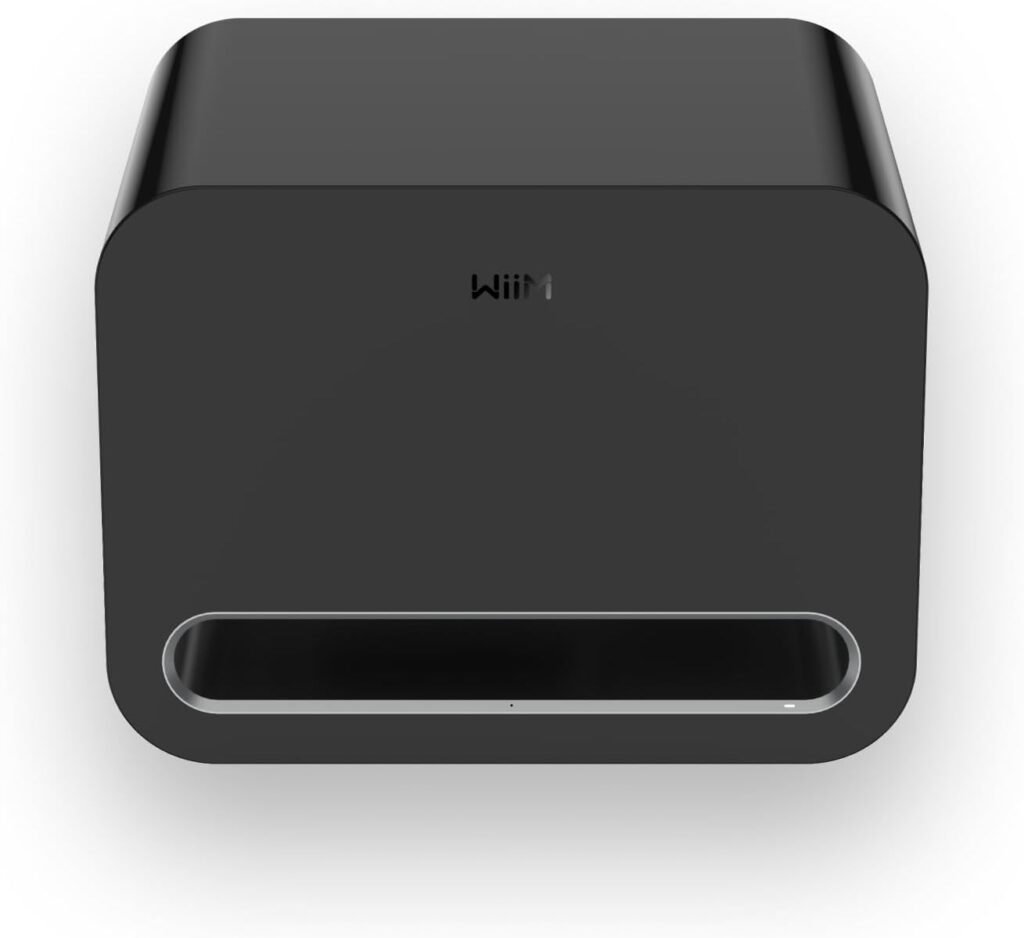
When we think about upgrading our sound, we usually focus on speakers, soundbars, or amps. But if we want the kind of impact that makes explosions rumble and basslines thump in our chest, the subwoofer is where the magic happens. The WiiM Sub Pro – 8″ 250 W Wireless Smart Subwoofer is designed to give us that deep, powerful, and controlled low end without turning our living room into a mess of cables and complex settings.
This sub is aimed at anyone who wants serious bass with modern convenience: home theater fans, gamers, music lovers, and especially those already using WiiM streamers, amps, or speakers. It brings wireless connectivity, app control, and automatic room calibration together in one compact package.
Key Features at a Glance
Before we go deeper into real-world use, it helps to look at the core specs in one place. These are the headline features that define what the WiiM Sub Pro brings to our setup.
| Feature | Description | Why It Matters |
|---|---|---|
| Woofer Size | 8″ high-excursion driver | Moves plenty of air for impactful bass without a huge box |
| Amplifier Power | 250 W Class-D | Delivers strong, controlled output with good efficiency |
| Frequency Response (Low End) | Down to 25 Hz | Reaches deep enough for cinematic rumbles and realistic bass in music |
| Connectivity | Wi-Fi 6, Bluetooth 5.3, RCA input | Flexible placement and compatibility with both modern and traditional systems |
| AI RoomFit™ Auto-Calibration | One-tap room tuning via app | Optimizes bass for our actual room without manual measuring |
| App Control | WiiM Home App with 10-band parametric EQ, crossover, phase, and latency settings | Lets us fine-tune sound to our taste and room |
| Multi-Room & WiiM Integration | Works wirelessly with WiiM streamers, amps, speakers & multi-room groups | Integrates cleanly with an existing WiiM ecosystem |
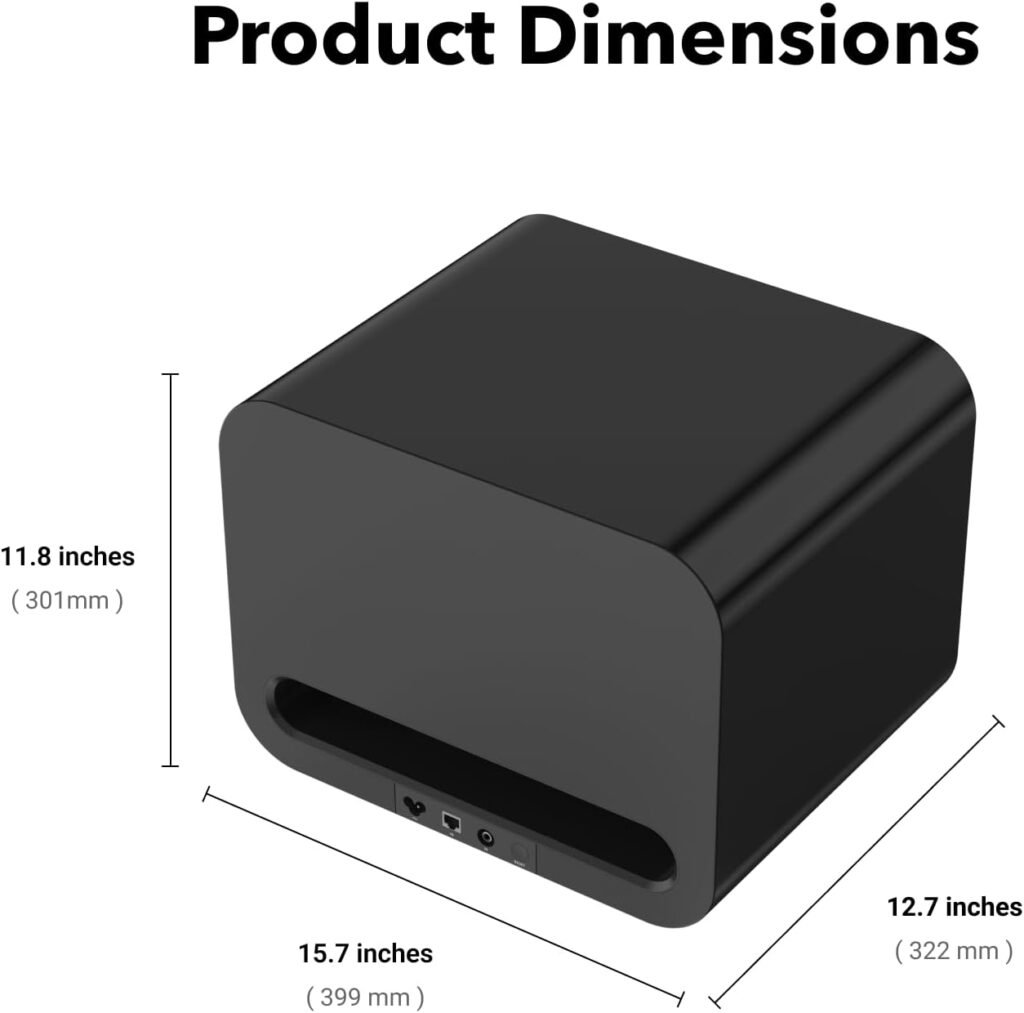
| Form Factor | Compact powered subwoofer, black finish | Easy to fit into most living spaces visually and physically |
| Firmware Updates | Delivered via app | Improves functionality and fixes issues over time |
| Known Limitation (Wireless Mode) | No bass output during Alexa Multi-Room Music, Roon Ready, LMS, Google Cast (temporary) | Important to know for certain streaming workflows; fix in progress |

Sound Performance: Deep, Controlled Bass to 25 Hz
We usually care about two things with a subwoofer: how deep it goes and how clean it sounds. The WiiM Sub Pro is rated to reach down to 25 Hz, which gets us well into the territory where we feel bass as much as we hear it. That range is where movie effects come alive and modern music gains real weight.
The 8″ high-excursion woofer and 250 W Class-D amplifier work together to give us bass that feels powerful but still controlled. That “high-excursion” term simply means the driver can move a lot of air without stressing or distorting, which matters when we push volumes for movie nights or parties.
In normal living rooms or media rooms, this sub can comfortably fill the space with low-end impact. It is not a massive 15″ monster meant for cavernous home theaters, but for typical living spaces, it delivers a satisfying, room-filling foundation. We get the rumble, we get the thump, but we do not get the bloated, muddy boom that cheaper subs often produce.
Bass for Movies, Music, and Gaming
Different types of content stress a subwoofer in different ways, and the WiiM Sub Pro does a good job across the board.
For movies, the sub adds punch to explosions, car chases, and sound effects that live in the LFE (low-frequency effects) channel. Those dramatic low sweeps in sci-fi films or the roar of engines feel deeper and more believable.
In music, a good sub should not just be loud; it should be tight and accurate. Here, the WiiM Sub Pro is tuned to give us clarity with kick drums, bass guitars, and synth bass. Rather than drowning the midrange, it anchors the soundstage and extends the low end so everything feels more complete.
For gaming, positional effects—like footsteps, rumbles, and environmental sounds—benefit from a solid low-frequency foundation. Combined with a good stereo or surround setup, this sub helps us feel environmental cues and in-game actions more physically, especially with modern console or PC titles that mix in strong LFE content.
AI RoomFit™ Auto-Calibration: Smarter Bass Tuning
Bass is notoriously tricky because our room shapes the sound as much as the subwoofer itself. Corners, walls, and furniture all create peaks and dips that can make bass sound boomy in one spot and thin in another. This is where the AI RoomFit auto-calibration feature really matters.
AI RoomFit lets us run an automatic tuning routine from the WiiM Home App with essentially one tap. The system analyzes how the sub interacts with our room and adjusts its output to smooth things out. Unlike many higher-end room correction solutions, we do not have to mess with separate microphones, long setup wizards, or confusing graphs.
What RoomFit Changes for Us
After running AI RoomFit, we generally notice:
- Less “one-note” bass, with more definition between different notes and effects
- Reduced boominess near walls or corners
- More even bass throughout the main seating area rather than a single “sweet spot”
For those of us who would rather spend time enjoying content than fiddling with calibration, this feature is a major plus. For enthusiasts who like more control, we can still tweak EQ, crossover, and phase after the automatic tuning to taste.
Connectivity: Wi-Fi 6, Bluetooth 5.3, and RCA Flexibility
We usually run into two problems with subwoofers: where to put them and how to connect them without ugly cables. The WiiM Sub Pro gives us several options so we can prioritize sound, aesthetics, or convenience depending on our situation.
Wi-Fi 6 support means we get a more robust wireless link with better bandwidth and stability, particularly helpful in busy homes with many devices. Bluetooth 5.3 gives us a direct pairing option for quick setups or temporary configurations. And the RCA input keeps this sub compatible with classic AV receivers, integrated amps, or soundbars that offer a dedicated sub-out.
Wireless vs. Wired: Choosing What Works for Us
There is no single “best” connection method; it depends on our system:
- If we already use WiiM streamers or amps, wireless integration is usually the cleanest, since it syncs nicely and keeps cable clutter low.
- If we use a receiver, TV, or third-party soundbar with a sub-out, the RCA input may be the simplest and most reliable.
- If we want to temporarily pair a phone, laptop, or portable source without integrating it into a full system, Bluetooth 5.3 offers that flexibility.
Because the sub only needs power when used wirelessly, we have far more freedom to place it where it sounds best instead of just where the cables reach. That freedom alone can noticeably improve bass performance.
WiiM Home App: Precision Control at Our Fingertips
The hardware might be the muscle, but the WiiM Home App is the brain. Through the app, we can manage nearly every aspect of the WiiM Sub Pro’s behavior, from basic volume control to detailed equalization.
The standout feature is the 10-band parametric EQ. Unlike basic bass/treble knobs or fixed presets, parametric EQ lets us adjust specific frequency ranges, their intensity, and how wide or narrow the adjustment is. That gives us real power to fine-tune the sub’s response to our actual room and preferences.
Advanced Settings for Enthusiasts
For those of us who care about optimizing our systems, the app also offers:
- Crossover adjustments: We can choose where the sub hands off to our main speakers, which helps blend the sound seamlessly.
- Phase control: Adjusting phase helps align the sub with our main speakers so bass does not cancel out at the listening position.
- Latency tweaks: Helpful in complex systems where audio from different devices needs time alignment.
Even if we do not want to tweak everything manually, it is comforting to know we can grow into these features. The app strikes a nice balance between making basic setup easy and offering deeper tools when we are ready.

Integration with WiiM Ecosystem and Multi-Room Audio
If we are already using WiiM products—like WiiM streamers, amplifiers, or speakers—the WiiM Sub Pro feels like a natural extension. It pairs wirelessly with WiiM gear and can join multi-room groups so we can distribute powerful bass throughout the house.
This synergy means we can build a modular system over time:
- Start with a WiiM streamer and our existing amp and speakers.
- Add the WiiM Sub Pro for serious bass.
- Later add more WiiM speakers in other rooms and group them for synchronized playback.
The sub essentially becomes part of a broader WiiM ecosystem, rather than a standalone piece that needs separate handling. That consistency simplifies our experience as we scale up.
Multi-Room Use Cases
In a multi-room setup, we might:
- Have a main system with TV and surround speakers in the living room.
- Use smaller WiiM speakers in the kitchen or bedroom.
- Group everything through the app so the same music plays everywhere, with the sub reinforcing bass in the main room.
While bass is most noticeable in the room where the sub is placed, having it tied into a shared system means our whole home listening feels more coherent and powerful.
Known Wireless Limitation: What We Need to Know
WiiM is transparent about a current limitation when we use the Sub Pro in wireless mode. Under certain conditions, there may be no bass output during playback of:
- Alexa Multi-Room Music
- Roon Ready
- LMS (Logitech Media Server)
- Google Cast
This does not mean the sub fails entirely; it is a specific issue tied to how these platforms handle multi-room wireless audio streams. WiiM states that their team is actively working on a resolution.
If we rely heavily on those platforms for multi-room wireless audio, especially Alexa MRM or Roon, we should factor this in:
- We can still use the sub via RCA in traditional setups, bypassing the limitation.
- We can monitor firmware updates in the WiiM app, since this is the most likely path to a future fix.
Being aware of this upfront helps us avoid frustration and choose connection methods that best fit our habits.

Design, Build, and Practical Placement
A subwoofer has to do more than sound good; it also has to live in our room without becoming an eyesore or a constant source of vibration problems. The WiiM Sub Pro takes a fairly understated approach in a black finish that blends easily with most TV stands, media consoles, and modern furniture.
The cabinet is designed to handle the stresses of low-frequency output without ringing or rattling, which is essential for clean bass. While we do not see all the internal bracing and engineering, we certainly notice when a sub is poorly built—buzzes, cabinet flex, and muddy output. Here, the emphasis on distortion-free bass suggests careful attention to these details.
Placement Tips for Better Bass
Where we place a subwoofer can easily make or break its performance. Even with AI RoomFit, we get better results if we start from a good position. A few general guidelines tend to work well:
- Avoid placing it directly in the exact center of the room if possible.
- Corners can boost bass, sometimes too much; try along a wall a bit away from corners as a starting point.
- If we can, test a few different locations—front wall, side wall, near the main speakers—and then run RoomFit in each to see what sounds best.
Thanks to wireless connectivity, we are not forced to keep the sub right next to our TV stand or receiver. Sometimes a slightly unconventional spot—like along a side wall closer to our seating area—can give smoother and more powerful results.
Setup Experience: From Unboxing to First Bass Hit
Most of us want setup to be as painless as possible. With the WiiM Sub Pro, the process tends to follow a straightforward path, especially if we are comfortable with apps and Wi-Fi devices.
We typically go through these steps:
- Plug in the subwoofer and power it on.
- Open the WiiM Home App and follow the prompts to add a new device.
- Connect it to our Wi-Fi network (for wireless use).
- Pair it with our WiiM streamer, amp, or speakers, or connect via RCA if we prefer wired.
- Run AI RoomFit auto-calibration.
- Adjust sub level so it complements our main speakers or system.
The app-guided setup makes the process approachable even for those of us who do not typically enjoy configuring AV gear. We have the option to keep things simple or gradually customize more over time.
Ongoing Updates and Support
One advantage of a connected subwoofer is that it can keep improving after we buy it. Through the WiiM app, firmware updates can:
- Fix compatibility issues (like the known multi-room limitation).
- Enhance performance or add new features.
- Improve integration with existing or future WiiM devices.
Instead of being frozen in time, the Sub Pro can evolve along with our system and our listening habits.
Everyday Use: Living with the WiiM Sub Pro
Once set up, the best compliment we can give a subwoofer is that it feels natural to live with. It should add excitement when needed, disappear when it should, and never draw attention for the wrong reasons.
In day-to-day use, we notice that:
- Dialogue in movies and shows remains clear because the sub does not intrude into midrange frequencies.
- Casual listening at low volumes still feels full, since the sub maintains presence without needing to be cranked up.
- Music with heavy bass feels energetic but not overbearing, especially once RoomFit and EQ are dialed in.
We also appreciate that control is centralized. Instead of walking over to the unit to adjust a knob, we handle volume and fine-tuning in the WiiM app—particularly handy when late-night listening requires a quick reduction in bass impact.
Pros and Cons Summary
It helps to gather the strengths and weaknesses in one place to see if this sub aligns with our needs.
Advantages
- Deep and clean bass to 25 Hz for cinematic impact and satisfying low end in music
- 250 W Class-D amplifier provides strong, efficient power without unnecessary heat or bulk
- AI RoomFit auto-calibration simplifies room tuning and improves sound without extra hardware
- Wi-Fi 6 and Bluetooth 5.3 give us flexible, modern wireless options
- RCA input ensures compatibility with traditional AV receivers, soundbars, and amps
- App-based 10-band parametric EQ, crossover, phase, and latency offer serious control for enthusiasts
- Seamless integration with WiiM ecosystem and multi-room groups for an expandable home audio setup
- Firmware updates via app mean the sub can improve over time
Trade-Offs and Limitations
- Wireless limitation with certain platforms (Alexa MRM, Roon Ready, LMS, Google Cast) is significant if we rely heavily on those
- 8″ driver size, while powerful and sufficient for most rooms, may not satisfy those chasing extreme, reference-level sub-bass in very large spaces
- App-centric control might feel unfamiliar or inconvenient for those who prefer physical knobs and sliders
By weighing these points, we can decide whether the strengths match the way we actually listen and the equipment we already own.
Comparing to Typical Subwoofers in Its Class
Instead of pure specs, it helps to think about how the WiiM Sub Pro differs from a typical powered sub in the same general category.
Most traditional subs in this range offer:
- A similar-sized driver (8″–10″)
- Comparable or slightly higher/lower power ratings
- Basic controls on the rear panel: gain, crossover, phase
- A simple RCA input, sometimes plus LFE
The WiiM Sub Pro stands out by adding:
- Smart connectivity: Wi-Fi 6, Bluetooth 5.3, multi-room integration
- App-based advanced control: parametric EQ, latency, detailed crossover tuning
- AI RoomFit auto-calibration for room compensation
- Tight integration with a broader streaming ecosystem (WiiM devices)
So if we just want a no-frills sub to plug into an old receiver and never touch again, a basic model might be enough. But if we value wireless placement options, room-aware calibration, and app control, the WiiM Sub Pro gives us a more complete package in the same footprint.
Ideal Use Cases and System Types
To decide if this sub fits our setup, it helps to picture a few common scenarios where it shines.
Small to Medium Home Theater
For a typical living room or dedicated media room with a TV, a soundbar or a pair of bookshelf speakers, and a streaming device, the WiiM Sub Pro brings a substantial upgrade in immersion. Connected wirelessly to a WiiM amp or streamer, it avoids cable clutter while bringing out the drama in movies and series.
Music-Focused Stereo System
If we love music and have a nice pair of passive or powered speakers but feel they lack bass authority, adding the Sub Pro fills in the bottom octave or two. With careful crossover and EQ settings through the app, we can integrate the sub so it sounds like a natural extension, not a separate, boomy add-on.
Gaming and Mixed-Use Entertainment Room
For mixed setups where we watch TV, stream, and play games in the same space, the WiiM Sub Pro offers consistent performance across all content types. We get the rumble for cinematic cutscenes, the weight for soundtracks, and the impact for in-game explosions, all in a compact, app-managed sub.
Who Might Want to Look Elsewhere
While the WiiM Sub Pro is versatile, it is not the perfect fit for every single system or listener.
We might want to consider alternatives if:
- We have a very large room and want reference-level, theater-grade sub-bass at very high volumes; in that case, multiple larger subs might be more appropriate.
- We never plan to use Wi-Fi, Bluetooth, or app control and want a purely analog, set-and-forget solution with physical controls only.
- Our entire system heavily depends on Alexa Multi-Room Music, Roon Ready, LMS, or Google Cast in wireless mode, and we do not want to work around the current limitation or wait for firmware fixes.
For most home users with typical living spaces and modern audio habits, though, the WiiM Sub Pro’s strengths will align well with daily needs.
Long-Term Value and Future-Proofing
One of the biggest advantages of a “smart” subwoofer like the WiiM Sub Pro is longevity. While the basic job of a sub—playing low frequencies—does not change, the ways we stream and manage audio definitely do.
With this sub, we gain:
- Ongoing firmware support, likely addressing issues like the current wireless limitation and potentially enhancing features.
- Compatibility with evolving WiiM hardware and services, so if we add or upgrade streamers, amps, or speakers, the sub can keep pace.
- Room calibration that can be rerun anytime we move furniture, change rooms, or alter speakers, keeping the system tuned to our space.
In that sense, we are not just buying a bass box; we are adding a flexible, updatable component to a broader ecosystem that can grow with our habits and gear.
Practical Tips to Get the Best Out of the WiiM Sub Pro
To wrap it up in a more actionable way, we can think about a few key steps and habits that help us get the most from this subwoofer.
- Take placement seriously: Try at least two or three spots before settling. Even a small move along a wall can change how even and powerful the bass feels.
- Run AI RoomFit after final placement: Let the auto-calibration do its job once we have chosen a location.
- Adjust crossover thoughtfully: If our main speakers are small bookshelves or satellites, a higher crossover (e.g., 80–100 Hz) may work best. For larger towers, lower crossovers (e.g., 60–80 Hz) might blend more naturally.
- Start with conservative levels: It is tempting to crank the sub, but the goal is balance. We can raise the level slowly until the bass feels full but not attention-grabbing.
- Revisit settings after a week: Once our ears adjust and we have lived with the sound, we might find a few tweaks to level or EQ make it even better.
By spending a little time upfront, we can lock in a configuration that we will enjoy for movies, music, and gaming without constant adjustment.
Final Thoughts: Is the WiiM Sub Pro Right for Us?
The WiiM Sub Pro – 8″ 250 W Wireless Smart Subwoofer aims to bring together strong, deep bass performance with modern connectivity and smart features. It offers:
- Enough power and extension to handle impactful home theater, engaging gaming, and rich music playback
- A compact 8″ form factor that fits into real living spaces
- AI RoomFit calibration and robust app tools that give us control without technical overwhelm
- Clean integration with WiiM amps, streamers, speakers, and multi-room setups
We do need to be aware of the current wireless limitation with specific multi-room and casting platforms, and we should consider our room size and listening habits when deciding if an 8″ sub is sufficient.
If we are building or upgrading a modern home audio system and want bass that feels both powerful and intelligently managed, the WiiM Sub Pro makes a strong case. It gives us not only the low-end impact we crave but also the flexibility and control to shape that bass to our room, our content, and our personal taste.
Disclosure: As an Amazon Associate, I earn from qualifying purchases.