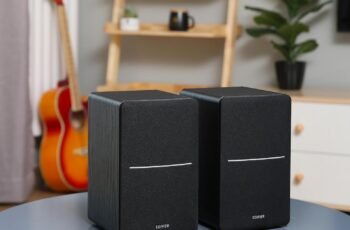
Have we ever wished our bookshelf speakers could sound great, look stylish, and connect to everything without us needing a degree in audio engineering?

What Is the Edifier R1700BT and Who Is It For?
The Edifier R1700BT Bluetooth Bookshelf Speaker set is a pair of active near‑field studio monitors designed for people who want better sound than basic computer speakers or TV speakers, without stepping into complicated hi-fi territory. They sit in a sweet spot between casual listening and serious audio enjoyment.
We are looking at powered speakers with Bluetooth, dual AUX inputs, a remote, and a classic wooden enclosure. They fit well on a desk, media console, or bookshelf and work nicely for movies, music, gaming, and even light home studio use.
Key Features at a Glance
Before we go deeper, it helps to have a quick summary of what these speakers bring to our setup. Here is an overview of the standout features and what they mean in everyday use.
| Feature | What It Is | Why It Matters to Us |
|---|---|---|
| Bluetooth Connection | Wireless pairing with phones, tablets, computers | No messy cables for casual listening |
| 2 x AUX Inputs | Two wired analog inputs (3.5mm or RCA) | Connect PC and TV at the same time |
| Remote Control | Small handheld remote for volume, input, mute | Adjust from the couch or chair |
| 66W RMS Power | 66 watts of continuous power output | Enough volume and headroom for most rooms |
| Active Design (Powered) | Built‑in amplifier in the speaker | No need for a separate amp or receiver |
| MDF Wooden Enclosure | Wood cabinet with walnut vinyl finish | Warmer sound and classic look |
| Near‑Field Studio Monitor Style | Designed for close to mid‑range listening | Great for desks, editing, and focused listening |
This combination of wireless convenience, wired flexibility, and serious sound output is what makes the R1700BT such an appealing option for everyday audio setups.
Design and Build Quality
A Classic Look That Fits Most Rooms
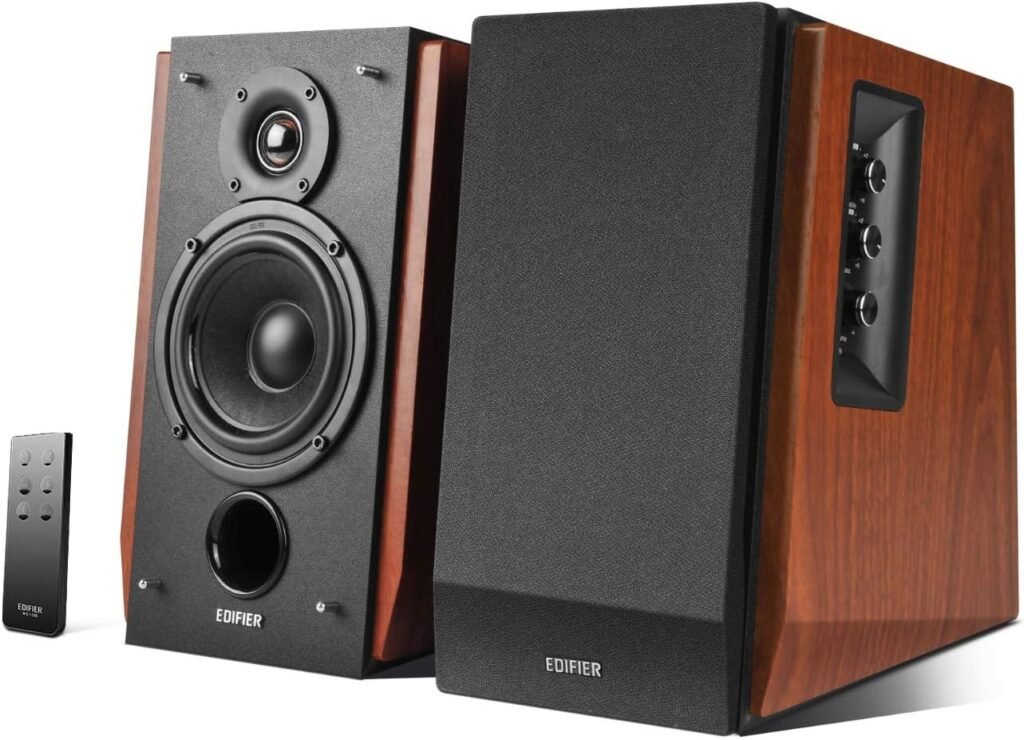
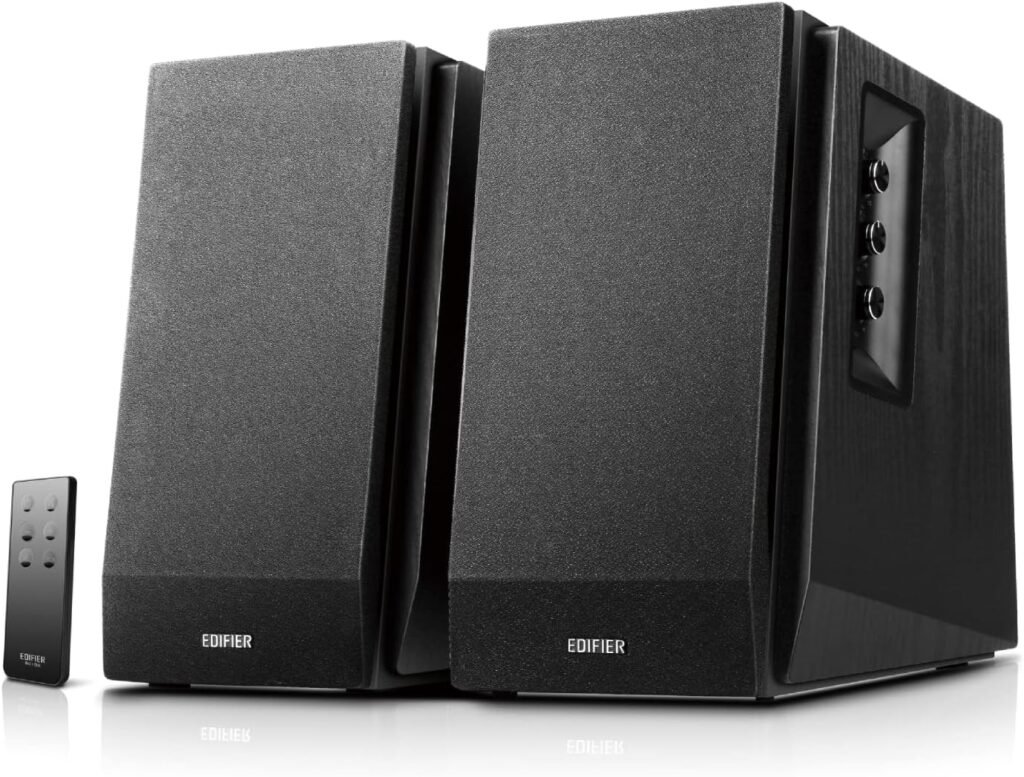
At first glance, the R1700BT looks more like a piece of furniture than a tech gadget. The MDF wood cabinets with walnut wood effect vinyl give these speakers a warm, classic appearance that blends nicely with bookshelves, desks, and media centers.
We get a slightly angled front baffle, which not only adds character but also serves a functional purpose. That angle directs sound a bit more toward our ears when the speakers sit on a desk or TV stand, improving clarity and presence.
Materials and Construction
The use of MDF (medium density fiberboard) for the cabinets is a big plus at this price point. MDF is common in speaker construction because it reduces unwanted vibration and resonance, which can blur sound. The finish feels solid and well-assembled, with tight seams and no obvious rough edges.
We also appreciate that the speakers do not scream “gamer” or “budget plastic.” Instead, they look like they belong in a living room, office, or home studio, which broadens where we can comfortably place them.

Size, Placement, and Everyday Use
Compact but Substantial
The R1700BT is a bookshelf speaker pair, so they are compact enough to sit on a desk or shelf but still big enough to house decent drivers and internal amplification. They strike a good balance: not tiny satellite speakers, but not huge floor‑standing towers either.
On a desk, we may want to angle our monitor slightly or raise it on a stand, just to give the speakers space. On a TV console, they fit easily on either side of the screen.
Ideal Listening Distance
These are described as near‑field studio monitors, which means they are optimized for listening from a relatively close distance—typically 2 to 6 feet away. For most of us, that is a typical computer desk or small to medium living room arrangement.
If we sit very far away in a big room, they may not fill the entire space the way a large home theater system would. But for apartments, bedrooms, offices, and modest living rooms, their output is more than enough.
Connectivity: Bluetooth and Wired Options
Bluetooth Connection for Wireless Listening
One of the main selling points of the Edifier R1700BT is the built‑in Bluetooth connectivity. Pairing is straightforward: we put the speakers into Bluetooth mode, find them in our device’s Bluetooth menu, and connect. Once paired, our phone, tablet, laptop, or other device can stream audio wirelessly.
This is ideal for:
- Streaming music from our phone while we relax
- Playing from Spotify, Apple Music, YouTube Music, or other apps
- Connecting a laptop without needing an extra cable
We should keep in mind that Bluetooth audio, while very convenient, can introduce slight compression and latency. For casual listening, movies, or most games, it works well. For ultra‑precise audio editing or rhythm-critical gaming, we may prefer a wired connection.
Dual AUX Inputs for Versatile Setups
Alongside Bluetooth, the R1700BT includes two AUX inputs on the back:
- Standard 3.5mm headphone jack compatibility
- Dual RCA inputs
This lets us connect two different devices at once without constantly swapping cables. For example:
- AUX 1: Desktop computer or laptop
- AUX 2: TV, game console, or record player (with a phono preamp if needed)
Then we can switch between these inputs and Bluetooth using the remote or the control on the speaker. That flexibility is a big convenience when we are juggling multiple sources.
Input Management and Everyday Switching
No Need to Constantly Replug
One of the frustrations with some speaker setups is having to unplug one device and plug in another anytime we want to change our source. With the R1700BT, we can have:
- Phone or tablet on Bluetooth
- PC on one AUX input
- TV or console on the other AUX input
Switching between them is as simple as pressing a button on the remote or taping the input button on the speaker. This makes the R1700BT a solid hub for all our audio sources without adding a receiver or extra switch box.
Input Indicator and Feedback
There is a small LED on the front of the active speaker that changes color based on the input mode (for example, one color for Bluetooth, another for AUX). This gives us a quick visual cue about which source is currently selected, so we are not left guessing whether our sound should be coming from the TV, PC, or phone.
Remote Control: Convenience at Our Fingertips
Core Functions on a Compact Remote
The included remote control is simple but effective. With it, we can:
- Change input sources (Bluetooth, AUX 1, AUX 2)
- Adjust volume up or down
- Mute or unmute audio
This may sound basic, but we often do not realize how much we reach for volume controls until they are not within arm’s reach. Being able to do this from the couch or our office chair, without leaning over to a speaker or fumbling behind a TV, is a big usability win.
Living Room and Desk Benefits
In a living room, the remote frees us from needing separate audio control on our TV or streaming box. On a desk, it means we can keep the speakers at a fixed volume and use the remote for quick tweaks, which can be especially handy during calls, meetings, or late‑night sessions.
We should just remember that the remote is IR‑based, so it needs line of sight to the active speaker. As long as the speaker front is visible, it works as expected.
Sound Quality: Overall Performance
General Sound Signature
The Edifier R1700BT aims for a pleasing, slightly warm sound signature rather than a strictly flat, analytical one. That means:
- Bass has a bit of weight and presence, especially for a bookshelf speaker.
- Mids are generally clear, letting vocals and dialogue stand out.
- Highs have enough detail to keep music lively without being overly sharp or fatiguing.
For most genres—pop, rock, jazz, electronic, and movie soundtracks—this tuning is very enjoyable. It offers a good balance between detail and fun.
Volume and Headroom
With 66 watts RMS of power, these speakers can get quite loud in small to medium rooms without distorting heavily. We can comfortably fill a bedroom, office, or modest living room with sound. At moderate volume levels, clarity and tonality remain consistent.
If we push volume to the absolute maximum, we may hear some strain depending on the content, but in normal daily use, they have more than enough power.
Bass, Mids, and Highs in Detail
Bass Response
For speakers of this size, the bass is surprisingly robust. We get enough low‑end punch to make movies and music feel full without needing an external subwoofer in most everyday setups.
That said, physics still applies. These are bookshelf speakers, not huge floor‑standers or a dedicated sub. Ultra‑deep bass (for example, sub‑30Hz rumbles in big action scenes) will not be as intense as in a full home theater with a subwoofer. Still, for music listening and TV shows, the bass feels satisfying and well‑controlled rather than boomy.
Midrange Clarity
The midrange is where vocals, guitars, pianos, and most dialogue live. The R1700BT does a solid job of keeping this region clear and present. For podcasts, YouTube videos, and movies, voices remain easy to understand, which is one of the most important qualities in everyday speakers.
We notice that this midrange clarity also helps when we use the speakers for work or study, such as online meetings or educational videos, where intelligibility matters more than sheer bass.
Treble Detail
The treble is crisp enough to bring out detail in cymbals, strings, and other high‑frequency elements. Edifier tends to tune its tweeters to be lively without becoming piercing, and we see that approach here as well.
For long listening sessions, this is a good compromise; we get detail, but our ears are less likely to feel fatigued.
Controls and On‑Speaker Adjustments
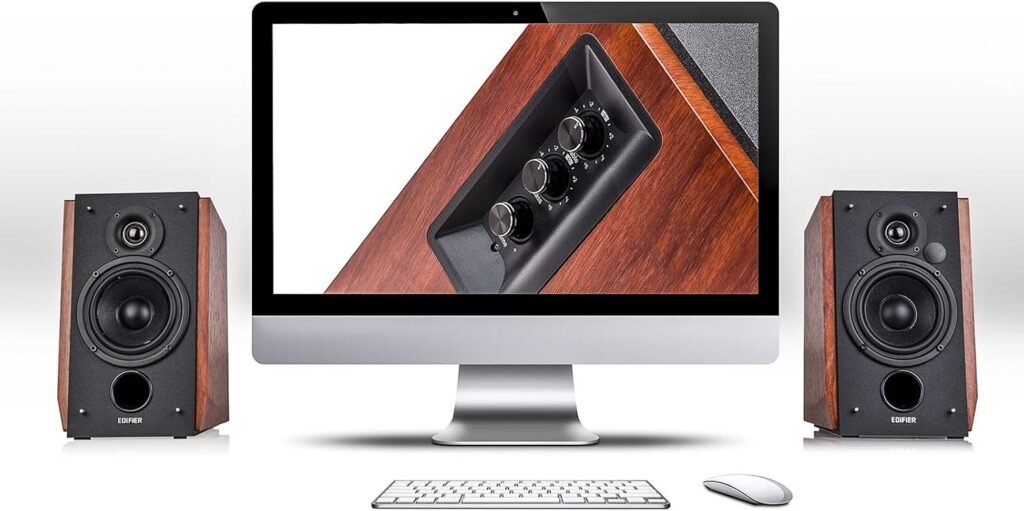
Side Panel Knobs
On the side of the active speaker, we find a set of control knobs. Typically, we have:
- Volume
- Bass
- Treble
These allow us to tailor the sound to our room and our preferences. If we are in a smaller room or have the speakers near a wall, we might want to dial the bass back slightly. If we like a brighter sound for certain music, we can nudge the treble up.
We should think of these as gentle tone‑shaping tools rather than radical equalizers. They are ideal for small adjustments that make the speakers better suited to our space.
Easy Fine‑Tuning
This physical control is something many of us appreciate over pure software apps. We can reach over, make a quick adjustment, and immediately hear the difference, instead of hunting through menus or phone apps.
For shared households, this is also handy because anyone can walk up and tweak the sound without needing access to an app or account.
Using the R1700BT With Different Devices
With a Computer or Laptop
On a desktop or laptop, we can connect the R1700BT in two primary ways:
- Bluetooth for casual wireless listening and a clean desk
- 3.5mm or RCA cable for lower latency and maximum reliability
For office work, streaming, and gaming, they make a noticeable upgrade from standard built‑in laptop speakers or cheap plastic desktop speakers. When editing photos or videos, this better sound makes media feel more immersive and engaging.
If we do basic audio or video editing, they are good enough as near‑field monitors to judge balance, levels, and general tonality, even if they are not ultra‑flat mastering speakers.
With a TV or Media Box
Connecting the speakers to a TV or media box via AUX lets us immediately improve TV audio. Built‑in TV speakers are often thin and boxy, while the Edifier pair provides:
- Fuller dialogue
- More impactful sound effects
- A wider stereo image
This is especially nice for streaming shows, movie nights, and sports. We can still use Bluetooth from our phone for music, and then switch back to TV input with the remote when we are ready for a show.
With Phones and Tablets
For phones and tablets, Bluetooth is the go‑to option. We can stream playlists, podcasts, audiobooks, or videos without touching cables. If friends visit, they can also pair their devices easily and queue up their own music.
Because the speakers support standard Bluetooth pairing, they work with iOS, Android, and most other Bluetooth‑enabled devices. We just need to remember to keep the speakers in Bluetooth mode to allow new devices to connect.
Home Office and Productivity Use
Better Sound for Calls and Meetings
In a home office or remote work setup, these speakers can take over audio for:
- Video meetings on Zoom, Teams, or Google Meet
- Online training courses
- Webinars and remote presentations
Voices sound clear and natural, which reduces fatigue in long calls. Pair them with a decent microphone or headset, and we have a strong work setup.
Focus and Ambient Music
If we like to listen to lo‑fi beats, ambient music, or instrumental soundtracks while working, these speakers excel as constant companions. The richer sound quality compared to laptop speakers makes even low‑volume background music more pleasant and less tinny.
We find that this can make long working sessions more comfortable and enjoyable.
Gaming and Entertainment
PC and Console Gaming
When paired with a PC or console on AUX and a monitor or TV for visuals, the R1700BT delivers a more cinematic sound than standard speakers. Environmental effects, music, and dialogue are more immersive.
For competitive gaming, we might still prefer a dedicated headset for positional audio and voice chat privacy. But for single‑player adventures, story‑driven games, and local multiplayer, speakers like these add a lot to the experience.
Movies and Streaming
For movies, the 66W RMS power and well‑tuned drivers help with:
- Clear dialogue in quiet scenes
- Strong music impact
- Satisfying effects in action sequences
No, this is not a full 5.1 surround system, but for a compact, simple setup, it offers a noticeable improvement over most stock TV audio. If our space or budget does not allow for a full AV stack, this is a very practical alternative.
Setup and Installation
Getting Started
Unboxing and setup are straightforward:
- Place both speakers on our chosen surface, ideally at ear level or angled slightly toward us.
- Connect the speaker cable between the active (powered) and passive speaker.
- Plug the active speaker into a power outlet.
- Connect our devices:
- AUX: run a 3.5mm or RCA cable from our PC, TV, or console.
- Bluetooth: pair our phone or tablet by putting the speakers into Bluetooth mode and selecting them from our device.
We are up and running within a few minutes, even if we are not technically inclined.
Placement Tips
For best sound:
- Keep speakers roughly at the same height and distance from our ears.
- Angle them slightly inward so they “face” our listening position.
- Leave a bit of space behind them if possible, instead of pushing them directly into a wall, to avoid overly boomy bass.
Small adjustments in placement can make a big difference in clarity and stereo imaging.
Pros and Cons of the Edifier R1700BT
What We Like
- Versatile connectivity: Bluetooth plus dual AUX means we can connect multiple devices at once.
- All‑in‑one design: Built‑in amplification means no receiver or separate amp needed.
- Solid sound quality: Warm, engaging sound with enough detail for everyday listening.
- Remote control: Easy volume, input, and mute control from our chair or couch.
- Attractive look: MDF wood cabinet with walnut effect finish suits many interiors.
- Good value: We get genuine upgrade‑level sound without spending a fortune.
Where It Might Fall Short
- No dedicated subwoofer output: If we later want to add a separate sub, we may need a different model or extra hardware.
- Not ideal for huge rooms: They can fill small to medium spaces well, but very large rooms might need something bigger.
- Bluetooth latency: For ultra‑tight rhythm gaming or pro audio work, wired inputs are preferable.
- No advanced app control: Tone controls are on-speaker only; some users may wish for app‑based EQ.
Comparison With Common Alternatives
Versus Cheap PC Speakers
Compared to small plastic PC speakers or built‑in monitor sound, the Edifier R1700BT is in another league:
- Deeper bass
- Clearer mids and highs
- Wider stereo imaging
- Higher maximum volume without distortion
If we are used to basic PC audio, this upgrade is immediately noticeable in music, games, and movies.
Versus Basic Soundbars
A simple soundbar under a TV can improve audio, but it usually lacks the same stereo width and flexibility as separate bookshelf speakers. With the R1700BT:
- Stereo separation is more pronounced because the speakers are farther apart.
- We also get flexible use with PCs and Bluetooth devices, not just the TV.
- The wooden enclosures often provide a more natural tonality than many plastic soundbars at similar price points.
If we value both TV and computer use, the Edifier pair is often a more versatile choice.
Versus High‑End Studio Monitors
Professional studio monitors tend to:
- Aim for flatter, more neutral response.
- Require a separate interface or more complex cabling.
- Cost significantly more, especially in larger sizes.
The R1700BT instead balances ease of use, attractive design, and enjoyable sound. For casual listening and everyday tasks, it is more friendly and less intimidating than pro‑grade gear.
Long‑Term Use and Reliability
Durability of the Wooden Enclosure
The MDF construction and vinyl finish should hold up well under normal home use. As with most speakers, keeping them away from moisture and extreme heat is important. The weight and rigidity help with stability, so they feel planted on our desk or shelf.
Dusting them occasionally and avoiding harsh cleaners on the vinyl finish will help them continue looking good for years.
Software and Tech Aging
Because the core features here are analog inputs and standard Bluetooth, they are less likely to become obsolete quickly. Even if Bluetooth standards evolve, the AUX inputs will continue to work with new TVs, computers, or audio devices for a very long time.
Unlike “smart” speakers that rely heavily on apps or cloud services that can change or shut down, these remain largely self‑contained.
Who Will Appreciate These Speakers Most?
Content Lovers and Casual Audiophiles
If we enjoy music, movies, and games and want a big step up from built‑in sound without the complexity of full hi‑fi systems, these speakers hit the mark. They are well-suited to:
- Students in dorms or apartments
- Remote workers with home offices
- Families who want better TV sound without a bulky theater setup
- Casual creators doing video or audio editing on a budget
People Who Want Simple but Good
Not everyone wants receivers, HDMI switching, calibration microphones, and racks of equipment. The R1700BT speaks directly to those of us who want:
- Plug‑and‑play setup
- Attractive, compact hardware
- Enough control to shape sound a bit
- Compatibility with many devices
We plug them in, connect our sources, and enjoy. There is something refreshing about that simplicity.
Buying Considerations and Tips
Room Size and Layout
We should think about where we plan to use these:
- Best fit: Small to medium rooms, offices, bedrooms, and modest living rooms.
- Less ideal: Very large, open floor plans where sound has to travel a long way.
If we expect to throw parties in a huge open loft or want chest‑thumping bass throughout a large space, a more powerful system with a subwoofer might suit better.
Type of Listening
They are a strong fit if we plan to:
- Watch TV and movies at moderate to moderately loud volumes.
- Listen to music while working or relaxing.
- Play games in a typical desk or couch setup.
- Do light to moderate creative work (editing, content creation).
If we aim for critical studio mixing or live performance monitoring, then dedicated studio monitors and audio interfaces might be a better match. For daily home use, the R1700BT is more than capable.
Practical Scenarios Where the R1700BT Shines
Single Desk Setup
We have a computer, perhaps a second monitor, and these speakers flanking our displays. We use them for:
- Work calls and presentations
- Music streaming during tasks
- Occasional gaming or movie watching
We keep one AUX wired to the PC, and another AUX or Bluetooth ready for our phone.
Compact Living Room Setup
Our TV sits in the middle, with the Edifier speakers on either side. We connect the TV via RCA or 3.5mm cable. For movie night, we use the remote to turn volume up, and later, we pair our phone for background music while we tidy up or read.
This replaces the need for a separate soundbar and offers better stereo imaging.
Bedroom or Studio Corner
The speakers sit on a dresser or shelf, connected by AUX to a small audio interface or directly to a laptop. We use them for songwriting, practicing instruments, or editing hobby content. They are close enough for near‑field listening while we sit at a small desk.
In all of these cases, their combination of size, sound, and flexibility really pays off.
Final Thoughts: Is the Edifier R1700BT Worth It?
When we look at everything this speaker pair offers—Bluetooth connectivity, dual AUX inputs, built‑in amplification, remote control, wooden cabinets, and a 66W RMS power rating—we get a strong, balanced package aimed squarely at real‑world home use.
We are not buying a fragile, hyper‑specialized studio tool or a bare‑bones plastic speaker set. We are getting a pair of active bookshelf speakers that:
- Integrate easily with TVs, PCs, phones, and consoles.
- Sound warm, clear, and engaging across most everyday content.
- Look refined enough to sit proudly in living rooms and offices.
- Remain simple to operate, even for people who are not into hi‑fi gear.
If we are after a practical, attractive upgrade from weak built‑in speakers or cheap PC audio, and we want something that just works for years with minimal fuss, the Edifier R1700BT Bluetooth Bookshelf Speaker set is a very compelling choice.
Disclosure: As an Amazon Associate, I earn from qualifying purchases.