Have we been searching for a compact set of speakers that feel equally at home beside our TV, on our desk, or in a small studio space?

Overall Verdict on the Edifier R1280DB
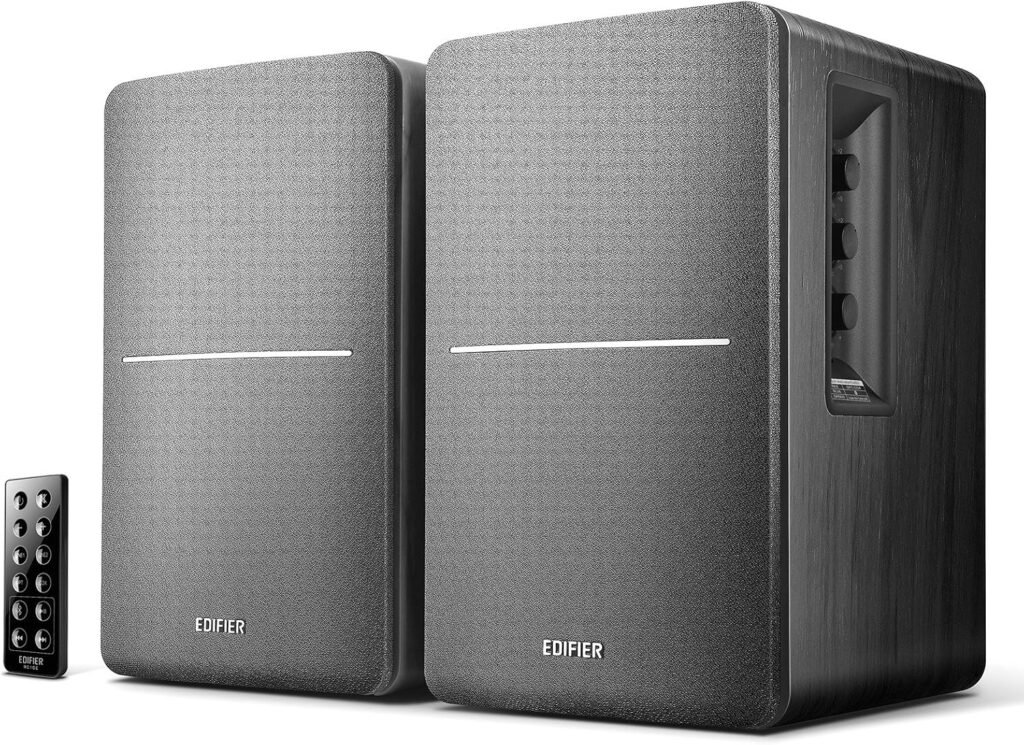
We find the Edifier R1280DB Powered Bluetooth Bookshelf Speakers to be an excellent value for the price, especially for small rooms, desks, and near-field listening. They pack strong features—Bluetooth, optical and coaxial inputs, remote control, and on-speaker EQ controls—into a compact, stylish package that sounds more expensive than it is.
Are they perfect studio monitors for critical mixing? Not quite. Are they impressive all-rounders for movies, casual music listening, gaming, and light home studio use? Absolutely. Our experience feels like getting a serious upgrade over basic PC speakers or built-in TV audio, without having to spend a fortune or deal with a complex setup.
Design and Build Quality
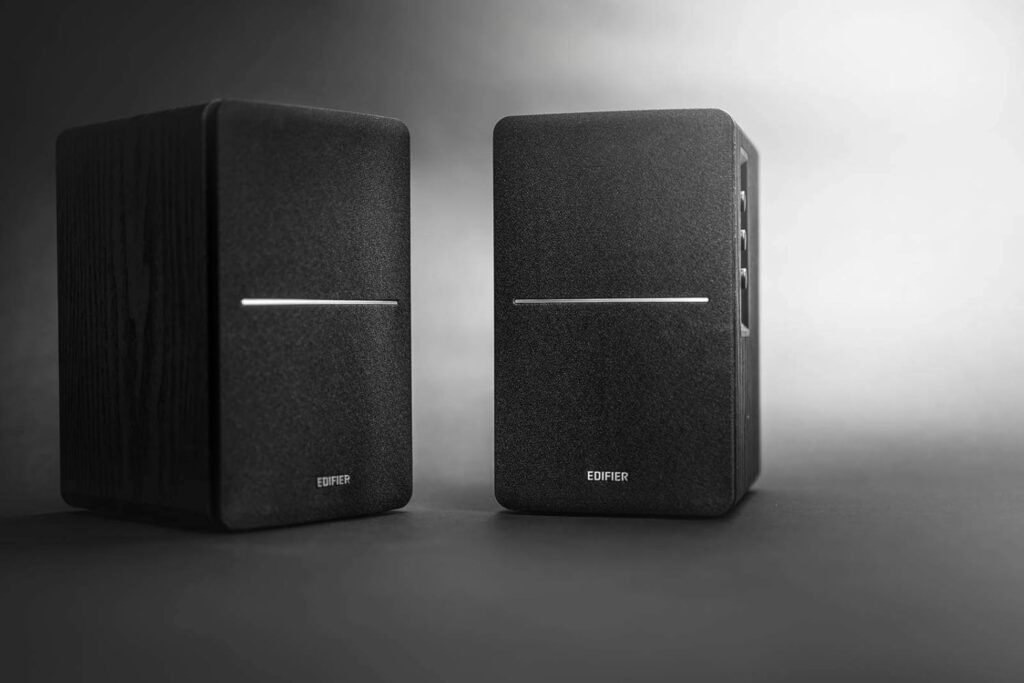
The first thing we notice about the R1280DB is how premium they look for their class. The wood grain finish (in black for this model) gives them a classic, understated style that works in living rooms, bedrooms, and offices without drawing too much attention.
A Compact Footprint for Versatile Placement
We appreciate that these are genuine bookshelf speakers—compact enough to sit beside a monitor, on a TV unit, or even on a sturdy shelf without dominating the space. The 4-inch bass driver and relatively modest cabinet size make them ideal for near-field listening, though they can still fill a small to medium room fairly well.
We like how easy they are to tuck into tight setups, especially on busy desks where space is at a premium. For best results, we prefer placing them on stands or at ear level, but they still sound satisfying when placed on a typical desk.
Build Materials and Finish
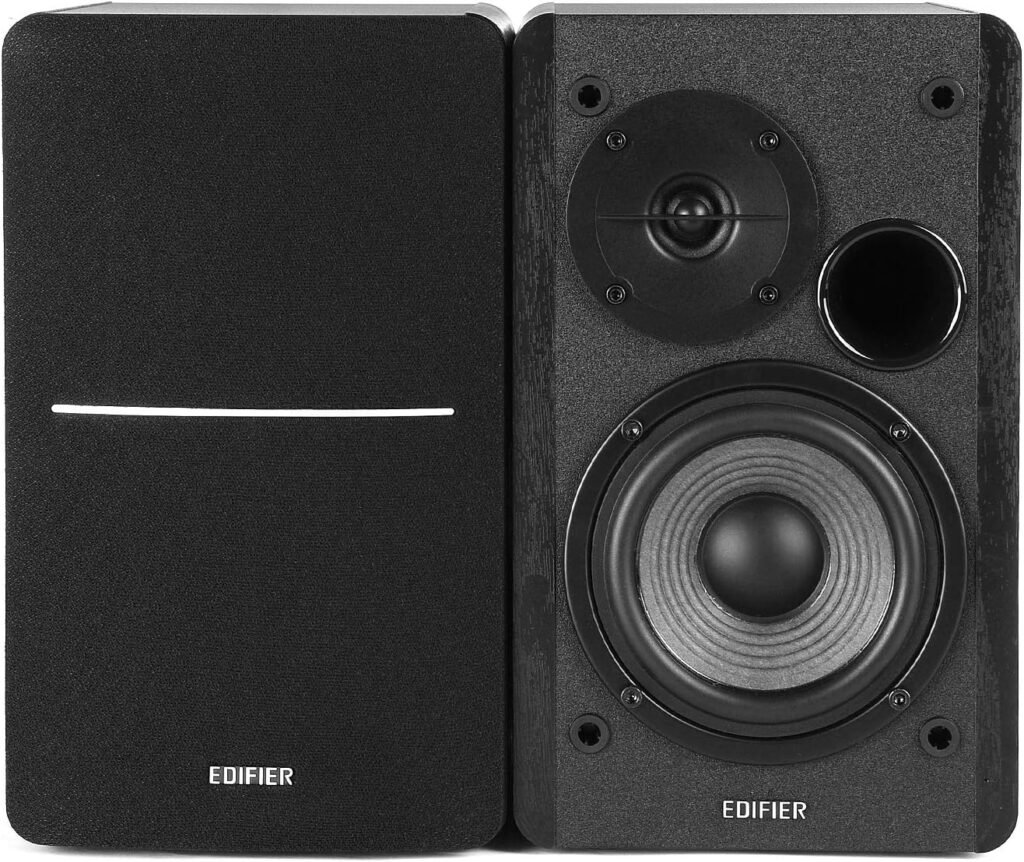
The cabinets feel solid, not flimsy. The wood-like finish, even if not real wood, gives an impression of quality. They do not feel like budget plastic multimedia speakers at all. The front grilles are simple and removable, allowing us to reveal the drivers if we like the more “studio” look.
Overall, the build quality feels sturdy enough to handle everyday use, including occasional moves between rooms.

Connectivity and Inputs
One of the biggest strengths of the Edifier R1280DB is how many ways we can connect them. We are not locked into a single device or source, which makes them a central audio hub for a home office or entertainment corner.
Bluetooth Wireless Convenience
We can connect wirelessly via Bluetooth to:
- Phones (iPhone or Android)
- Tablets
- Laptops
- Some TVs that support Bluetooth audio
Pairing is straightforward: once we switch the input to Bluetooth, the speakers enter pairing mode, and we can find them in our device’s Bluetooth list. We appreciate not needing extra wires running to the desk or across the room, especially for quick listening sessions or background playlists.
Latency is acceptable for casual video watching and general use, though for serious gaming or audio work we still prefer a wired connection.
Optical and Coaxial Digital Inputs
The presence of optical (TOSLINK) and coaxial digital inputs makes these speakers particularly useful for connecting:
- Modern TVs
- Gaming consoles (via TV optical output)
- Desktop computers with digital audio out
- Some media streamers and set-top boxes
These digital inputs allow for lossless connection, which in practice means we reduce noise and signal degradation compared with some analog connections. For TV use, we find the optical input especially handy—it makes the speakers a simple upgrade over built-in TV speakers without needing an AV receiver.
Analog Inputs for Traditional Devices
In addition to the digital options, we still get RCA analog inputs, which we can use for:
- Older PCs or laptops with headphone out (via 3.5mm to RCA cable)
- Turntables with a built-in preamp
- CD players or older audio gear
This flexibility lets us keep multiple devices connected at once: for example, TV via optical, PC via Bluetooth, and a turntable via RCA.
Sound Quality: Studio-Style Performance at Home
The R1280DB is marketed as having studio sound quality, and while we would not put them up against high-end professional monitors, we do feel they are impressively balanced and clear for their size and price.
Drivers and Power
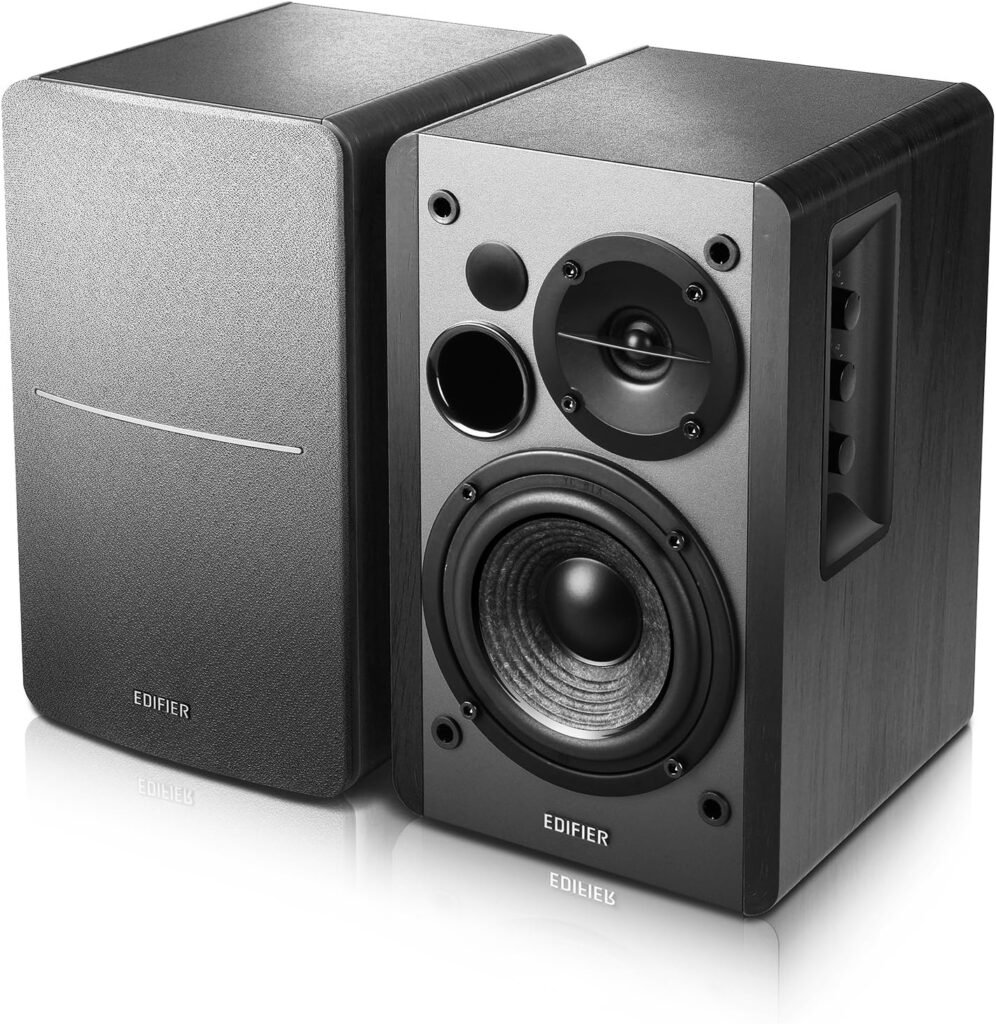
The speakers pair a 4-inch bass driver with a 13mm silk dome tweeter, powered by 42W RMS of total output. This configuration gives us enough volume for near-field use and small to medium rooms without distortion at reasonable levels.
We find the silk dome tweeter produces a smooth, non-harsh treble, which keeps listening fatigue low, especially for long music or work sessions.
Bass, Mids, and Treble Performance
In use, the sound signature leans slightly warm, but we can adjust it quite a bit using the built-in EQ controls.
- Bass: For small speakers, the low end is surprisingly full. They will not shake the walls, but for music, movies, and games, the bass feels satisfying and not boomy when properly placed.
- Mids: Vocals come through clearly, which we appreciate both in music and when watching dialogue-heavy shows.
- Highs: Details in cymbals and higher frequencies are present but not overly piercing. We find them easy to listen to for hours.
For those of us used to only laptop speakers or cheap PC speakers, these feel like a major step up, offering a more natural and fuller soundstage.
Sound Customization and EQ Controls
We love that the R1280DB does not lock us into a single sound profile. The side panel controls on the active speaker let us tailor the audio to our taste and room.
Side Panel Knobs: Bass, Treble, and Volume
On the side of the main (powered) speaker, we find:
- Bass control knob
- Treble control knob
- Volume / input selection knob (or buttons, depending on revision)
These allow us to:
- Boost bass if we want more punch for movies or games
- Reduce bass if the speakers are close to a wall and sound a bit boomy
- Tweak treble to smooth out bright recordings or add a bit more sparkle
We like using a mild bass boost for action movies and a more neutral setting for music or podcast listening. The knobs feel solid and give us quick access without needing an app.
Tuning for Different Environments
Because every room is different, we use the EQ knobs to compensate for placement:
- If the speakers are on a desk close to a wall, we sometimes turn bass down slightly.
- If they are in a more open area or a larger room, we might turn bass up a notch.
- For bright rooms with lots of hard surfaces, we might reduce treble a bit to keep the sound from becoming too sharp.
This simple adjustability goes a long way in making the speakers feel “just right” wherever we put them.
Remote Control and Daily Usability
The included remote control may not look luxurious, but in daily life it becomes an essential part of how we use the speakers.
Functions of the Remote
With the remote, we can:
- Adjust volume up and down
- Mute audio quickly
- Switch between inputs (Bluetooth, optical, coaxial, and analog)
- Play/pause and sometimes skip tracks when in Bluetooth mode (depending on version and device compatibility)
We appreciate being able to stay on the couch or at our desk without having to reach around to the side of the speaker every time we want to change something.
Living Room and Desk Scenarios
For TV use, the remote is especially handy. We can keep it on the coffee table and:
- Turn the speakers on or off
- Change from TV sound (via optical) to Bluetooth for playing music from our phone
- Adjust volume separately from the TV’s built-in controls
At a desk, we might not use the remote as frequently, but it is great for quickly switching from PC audio to phone playback or muting the sound during calls.
Setup and Installation Experience
Setting up the Edifier R1280DB is straightforward, even for those of us who are not especially tech-savvy.
Physical Connections
In the box, we typically find:
- The active (powered) speaker
- The passive speaker
- A speaker wire to connect them
- RCA-to-RCA and possibly RCA-to-3.5mm cables
- Optical cable (depending on the bundle; if not, we would need to get one separately)
- The remote control and power cable
We connect the two speakers using the provided speaker cable, plug the active speaker into power, and then use the appropriate cable for our source:
- Optical from TV to speaker for home theater audio
- RCA from PC, DAC, or other analog source
- No cable needed if we plan to use Bluetooth primarily
Bluetooth Pairing Steps
For Bluetooth:
- Turn the speakers on.
- Switch the input to Bluetooth (using either the remote or the side controls).
- On our phone or device, open Bluetooth settings and select the speakers.
- Once paired, audio from our device will play through the speakers.
After the first pairing, the speakers usually reconnect automatically to the last device when powered on, which is convenient.
Use Cases: How We Use the R1280DB Day to Day
The R1280DB is versatile enough to fit into several roles in our setup. Here is how we see it working best.
As a TV and Movie Speaker Upgrade
This is one of the most satisfying uses. Built-in TV speakers typically sound thin and directional, while the Edifiers give us:
- Fuller dialogue
- Stronger impact in sound effects
- A more immersive stereo image
Using the optical input from the TV, we can handle most streaming platforms, consoles, and media devices routed through the TV. We do not need a receiver or complicated surround system—just these two speakers.
We might not get surround effects like with a full home theater system, but for most apartments, bedrooms, or small living rooms, the improvement in clarity and richness over TV speakers is dramatic.
As Desktop or PC Speakers
On a desk, the R1280DB really shines for near-field listening. Placed at ear level and angled toward us, they provide:
- Clear stereo separation for music and games
- Detailed sound for videos, podcasts, and video calls
- Enough bass to make games and movies feel more impactful, without needing a subwoofer in many cases
We can connect via analog (from PC headphone out), optical (from PC digital out if available), or Bluetooth. For gaming or video editing, we lean toward the wired options to minimize latency.
As Wireless Music Speakers
Sometimes, we just want speakers for casual music listening in a room or while working. Bluetooth makes this simple:
- We stream playlists from Spotify, Apple Music, YouTube Music, or other services.
- Friends can connect their phones to share tracks without swapping cables.
- We can move around the room while the phone stays in our pocket.
We find the sound quality over Bluetooth more than good enough for casual listening, especially if the source device and streaming quality are decent.
For Light Home Studio and Creative Work
While we would not call these fully professional monitors, they can handle:
- Basic mixing and editing for podcasts or YouTube videos
- Practicing instruments (e.g., digital piano, guitar through modelers)
- Rough music production work in home studios
We appreciate the relatively neutral tuning and EQ flexibility, though serious producers may eventually want more specialized studio monitors.
Strengths and Weaknesses at a Glance
To make things clearer, we have put together a table summarizing what we feel are the key pros and cons of the Edifier R1280DB.
Quick Feature and Experience Breakdown
| Aspect | What We Like | What Could Be Better |
|---|---|---|
| Design & Build | Stylish wood grain finish, compact size, solid feel | Not a high-end luxury finish; more functional than premium |
| Sound Quality | Balanced, warm sound with clear mids and smooth highs; good bass for size | Not as precise or flat as professional studio monitors; limited deep sub-bass |
| Power (42W RMS) | Loud enough for desks and small to medium rooms; minimal distortion at reasonable levels | Might feel underpowered in very large or open spaces |
| Bluetooth Wireless | Easy phone/tablet/laptop pairing; convenient for casual listening | Some latency for competitive gaming; depends on Bluetooth version of source device |
| Optical & Coaxial Inputs | Great for TV and modern digital sources; cleaner signal path | No HDMI ARC, which some home theater users might wish for |
| Analog Inputs | Versatile for older devices, turntables with preamp, PCs | No built-in phono preamp for direct connection to traditional turntables |
| EQ Controls (Bass/Treble) | Simple hardware knobs for quick tuning to taste and room | No app-based advanced EQ or presets |
| Remote Control | Lets us adjust volume and switch inputs from a distance | Remote feels basic; easy to misplace due to small size |
| Ease of Setup | Quick plug-and-play; clear input options | Bluetooth and multiple inputs might confuse absolute beginners at first |
| Value for Money | Strong feature set and sound quality at this price point | Audiophiles seeking high-end gear may want to look at more expensive alternatives |
We feel the pros significantly outweigh the cons, especially for those of us shopping in this price range and wanting a neat, all-in-one solution.
Comparing to Alternatives in Its Class
When we compare the Edifier R1280DB to other speakers in its general category—budget bookshelf or multimedia speakers with Bluetooth—we see several competitive advantages.
Versus Cheap PC Speakers or Soundbars
Compared with small plastic PC speakers or entry-level soundbars, the Edifier R1280DB often sounds:
- Fuller, with better stereo separation
- Less harsh, especially at higher volumes
- More natural for music and dialogue
Additionally, soundbars often compress everything into a narrow soundstage below the TV, while these speakers allow us to widen the stereo image by placing them apart on a TV stand or shelf.
Versus Studio Monitors Without Extras
There are some budget studio monitors in a similar price region that may offer slightly more neutral sound, but many of them lack:
- Bluetooth
- Remote control
- Optical/coaxial inputs
The R1280DB aims to be a multi-purpose home speaker rather than a pure studio tool, so we trade a bit of technical neutrality for everyday convenience. For a lot of us, that trade is worth it.
A Closer Look at Everyday Scenarios
To give a clearer sense of ownership, we can imagine how these speakers fit into different living situations.
In a Small Apartment Living Room
We connect the R1280DB to our TV using the optical input. Suddenly, streaming shows, movies, and games become more engaging, with clearer speech and richer sound effects. We do not have the space or budget for a full surround system, but we still want better sound than the TV alone can deliver.
When guests come over, we switch the input to Bluetooth and stream music from a phone. The compact footprint means we do not have bulky speakers dominating the decor, and the wood grain look fits most furniture styles.
In a Home Office or Study
We place the speakers on either side of our monitor. We connect the PC by analog or digital, and pair our phone via Bluetooth. During work, we use them for:
- Video calls (voices sound natural and easy to follow)
- Background music while we write or code
- Occasional gaming breaks with more immersive audio
The side panel EQ helps us adjust for how close the speakers are to the wall, and the remote lets us quickly mute the system when needed.
In a Bedroom or Studio Nook
We connect a laptop or a small audio interface and use the R1280DB for creative projects. For podcasts, voiceover work, or basic music production, they provide a transparent enough sound to catch obvious mixing issues, plus they double as great general listening speakers.
When we are done working, we lean back and stream a playlist or watch a movie from the bed or couch with audio that feels much bigger than the speakers look.
Limitations We Should Keep in Mind
Even though we are impressed with what these speakers offer, we still remain aware of a few limitations so our expectations stay realistic.
Not a Replacement for a Full Home Theater
We do not get dedicated subwoofers, center channels, or surround speakers here. For those of us who want booming cinematic bass or full surround effects, a sound system with a subwoofer and surround channels will go further.
The R1280DB is best seen as a significant upgrade over built-in TV speakers or basic stereo options, not as a full home theater in a box.
Bass Depth Has Physical Limits
Physics still applies: with a 4-inch woofer in a compact cabinet, there is only so much deep bass we can get. For most music, movies, and games in small spaces, the bass is surprisingly adequate, but if we are used to subwoofer-level rumble, we will notice the difference.
For especially bass-heavy genres or large rooms, we may want to pair them with a separate subwoofer (though note that this specific model does not always include a dedicated sub-out; we would need to check our version or consider a different model if subwoofer integration is crucial).
Bluetooth Latency for Competitive Use
While Bluetooth is excellent for casual streaming and general video watching, those of us who are sensitive to audio delay in competitive gaming or precise video editing might detect a slight lag, depending on the codec and device. For those tasks, we prefer wired optical or analog connections.
Who We Think the Edifier R1280DB Is Best For
We see the R1280DB as an ideal choice for several types of listeners.
Great For
- Apartment dwellers and small homes who want a noticeable upgrade over TV or laptop speakers.
- Desk-bound workers and students who spend a lot of time at the computer and want good audio for music, calls, and media.
- Casual gamers who want better sound without investing in a full surround system or expensive headphones.
- Light home studio users who need speakers that can serve both as monitors for basic work and as general listening speakers.
- People who value flexibility, needing to connect multiple devices (TV, phone, PC, etc.) quickly and simply.
Less Ideal For
- Audiophiles chasing ultimate fidelity who are willing to spend significantly more for specialized equipment.
- Large home theater setups where more power, a subwoofer, and multiple speakers are desired.
- Users who want deep, club-level bass from the speakers alone without adding any external subwoofer or other gear.
Practical Tips for Getting the Best Sound
To make the most of the R1280DB, we find a few small adjustments and habits go a long way.
Placement Tips
- Try to place the speakers so the tweeters are roughly at ear height when we are seated.
- Avoid pushing them directly against a wall; leaving a little space behind can help balance the bass.
- Angle the speakers slightly inward (toed in) so they face our listening position.
These small tweaks can improve clarity, imaging, and overall balance.
EQ and Volume Habits
- Start with the bass and treble knobs at their neutral positions, then adjust gradually.
- For long listening sessions, we keep treble moderate to avoid fatigue.
- We avoid maxing out the volume for extended periods, both to prevent distortion and to extend the life of the speakers.
By treating these speakers as more than simple “plug and forget” boxes and spending a bit of time tuning them, we can get surprisingly refined performance.
Longevity and Everyday Reliability
In our experience and based on how these speakers are typically built, the R1280DB tends to hold up well with regular use if we take basic care of them.
We keep a few things in mind:
- Dusting the cabinets and drivers occasionally helps maintain both appearance and performance.
- Avoiding repeated drops or cable yanks preserves the connection points.
- Using a surge protector adds an extra layer of security for the internal amplifier.
Because the system is self-contained—amplifier built into the active speaker and a simple passive speaker for the second channel—there are fewer pieces to manage than with a separate amp-and-speaker combo.
Our Overall Take on Value
When we weigh the cost against everything we get—Bluetooth, optical and coaxial inputs, remote control, side-panel EQ, attractive design, and solid sound quality—we feel the Edifier R1280DB Powered Bluetooth Bookshelf Speakers stand out as one of the more compelling options in the entry-to-mid range category.
We are especially impressed by:
- How substantial the sound feels compared with compact dimensions.
- How versatile the input options are for different devices and rooms.
- How easy they make life day to day, reducing the need for multiple separate audio systems.
We do not claim they compete with high-end audiophile systems or professional studio setups, but that is not their goal. Their mission is to give us a noticeable, enjoyable upgrade over the everyday speakers we live with, and in that mission, they succeed convincingly.
Final Thoughts
In our view, the Edifier R1280DB Powered Bluetooth Bookshelf Speakers – Optical Input – Wireless Studio Monitors – 4 Inch Near Field Speaker – 42W RMS – Wood Grain (Black) strike a sweet balance between sound quality, features, style, and price.
We appreciate:
- The Bluetooth wireless convenience for phones and tablets.
- The optical and coaxial digital inputs, which let us use them easily with TVs and computers.
- The side panel bass and treble controls for quick tone shaping.
- The remote control that lets us manage volume and inputs from anywhere in the room.
For those of us who want a compact, flexible, and good-sounding speaker system that can serve as a TV upgrade, PC speaker, and general-purpose music system all in one, we feel the R1280DB is a very smart, budget-friendly choice that we can happily use every day.
Disclosure: As an Amazon Associate, I earn from qualifying purchases.