Have we ever wished our compact desktop speakers could sound bigger, look cooler, and still fit neatly beside our monitor?

What Is the Edifier QR30 and Who Is It For?
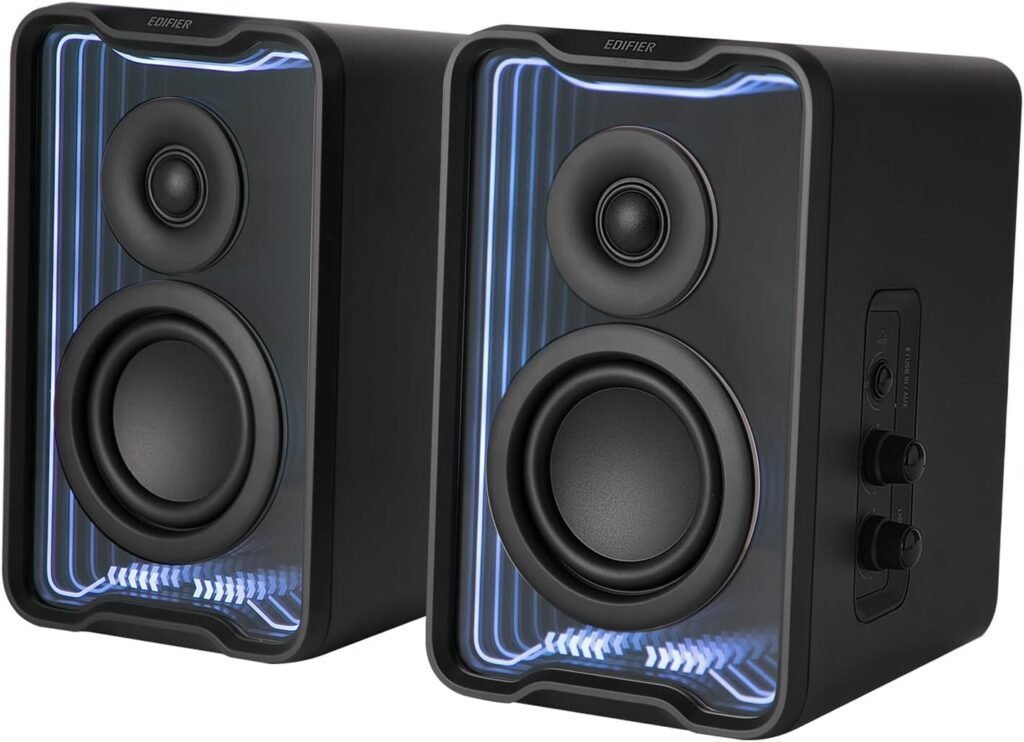
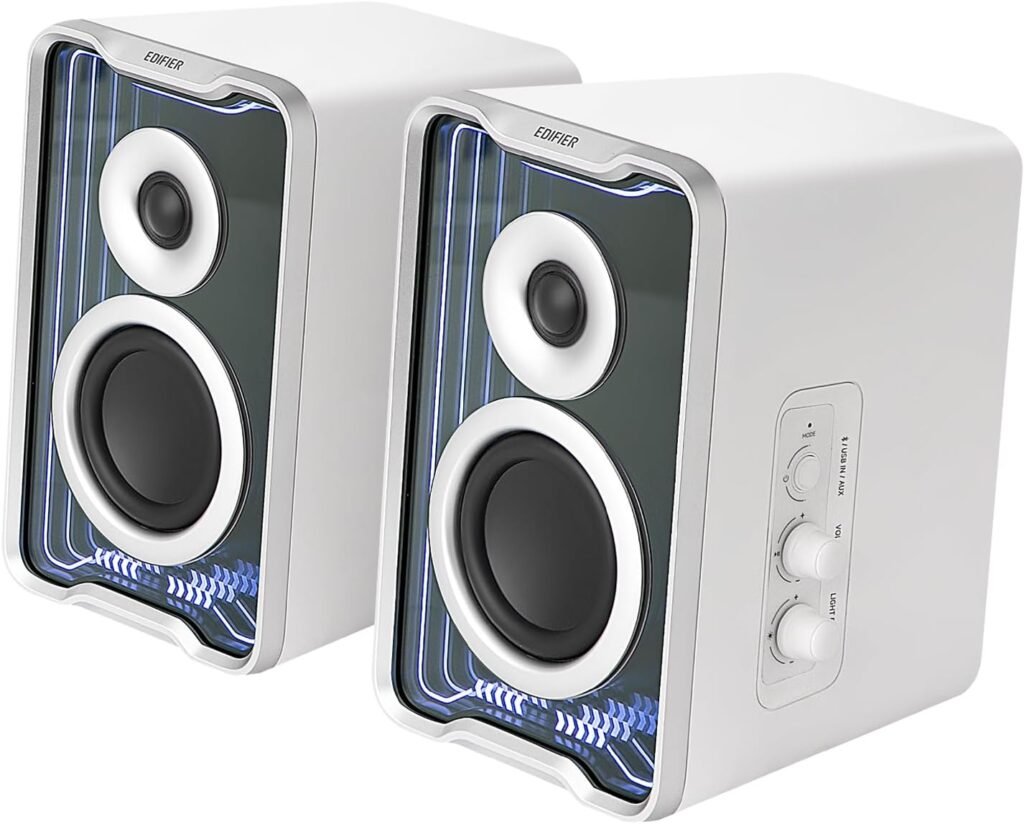
The Edifier QR30 2.0 Desktop Active Speaker is a compact, modern pair of desktop speakers with Bluetooth V5.4, wired inputs, dynamic RGB-style lighting, and app control. We get 30W RMS of power, 2.75″ mid‑bass drivers, 0.75″ silk dome tweeters, and a built‑in Class‑D amplifier, all wrapped in a minimalist black design.
These speakers are best suited for us if we spend a lot of time at our desk—working, gaming, watching movies, or listening to music—and we want something that looks sharp, sounds bigger than it looks, and is easy to control both physically and via apps.
Design and Build Quality
The overall design of the QR30 is sleek and understated, with just enough flair from the lighting to make our setup feel more modern and personalized. We get a compact form factor that does not overpower our desk, but still feels substantial and well-built.
Compact Footprint and Dimensions
The QR30 speakers measure 4.41″ (W) x 7.60″ (H) x 5.59″ (D). That means they are small enough to sit on either side of a laptop or monitor without stealing too much space, yet tall enough to project sound at a comfortable listening height.
On a busy desk with a keyboard, mouse, maybe a notebook and coffee mug, these speakers are sized just right to tuck in neatly without looking cramped. We can keep them close to the wall or even flank a dual‑monitor setup without worrying about them feeling bulky.
Materials and Build Impressions
The QR30 chassis uses a sturdy housing that feels solid when we handle it. The finish is matte black, which helps hide fingerprints and dust better than glossy plastics. The speaker grilles are neatly integrated, giving the front a clean look.
We get a modern, slightly angular aesthetic that pairs well with most office and gaming setups. The build feels more “premium desktop gear” than “cheap PC speaker,” and the knobs on the side panel have a reassuring resistance when we turn them, suggesting decent internal hardware.

Sound Performance Overview
Sound quality is where these compact speakers aim to punch above their weight. Edifier has a long track record with bookshelf and desktop speakers, and we can hear that experience here, especially given the size and price bracket.
Drivers and Amplifier
Each QR30 unit houses a 2.75″ mid‑bass long‑throw driver and a 0.75″ silk dome tweeter, powered by a Class‑D amplifier with a total output of 30W RMS.
The term “long‑throw” for the mid‑bass driver means it is designed to move more air than a typical small driver, which helps with bass and overall fullness. The silk dome tweeter contributes to a smooth, less fatiguing high end that usually works well for long listening sessions.
From a practical perspective, we get enough power here for a small to medium‑sized room, and more than enough for near‑field listening at a desk.
Tonal Balance: Bass, Mids, and Highs
In real-world use, the QR30 offers a sound that leans slightly warm, with a noticeable emphasis on low‑mid presence to create a fuller body than tiny speakers usually provide.
- Bass: For a compact 2.0 system without a subwoofer, the bass is respectable. We should not expect room‑shaking low end, but kick drums, bass guitar, and electronic beats have weight and rhythm. It feels tight rather than boomy, particularly if we avoid placing the speakers in tight corners.
- Mids: Vocals, dialogue, and instruments like guitars and pianos come through clearly. This midrange clarity is great for both music and video calls or podcasts. Voices sound natural rather than thin or overly bright.
- Highs: The silk dome tweeters give crisp, detailed highs without sounding piercing. Cymbals, string overtones, and small details (like key clicks or subtle reverb tails) are present but not harsh, which helps prevent ear fatigue during long workdays.
We can further shape this general balance using the app’s EQ options, but even out of the box, the default tuning is quite friendly and versatile.
Soundstage and Imaging
For near‑field listening at a desk, the QR30 provides a satisfying stereo image. When we angle the speakers slightly toward us and give them a bit of space, we can pick out the placement of instruments in a stereo mix more easily than with a basic soundbar or single Bluetooth speaker.
The soundstage feels wider than the actual physical distance between the two speakers, which adds immersion when we game or watch movies. While these will not rival high‑end stereo setups, they are a notable step up from built‑in laptop or monitor speakers.
Connectivity and Inputs
One of the strengths of the QR30 is how easy it is to connect almost any common device we use at our desk. We have both modern wireless and simple wired options.
Bluetooth V5.4 Wireless Connection
The QR30 uses Bluetooth V5.4, which gives us a stable, low‑latency, energy‑efficient wireless connection. In practice, pairing is straightforward:
- We put the speakers into Bluetooth mode using the controls.
- We open the Bluetooth settings on our phone, tablet, or computer.
- We select “Edifier QR30” from the list.
Once paired, reconnection is typically quick whenever we power the speakers back on or bring our device in range. Bluetooth V5.4 also tends to offer better reliability and slightly improved resistance to interference compared to older Bluetooth standards.
Multipoint Connectivity
The multipoint feature allows the QR30 to connect to two Bluetooth devices at the same time. That means we can, for example, have them paired with our laptop and our phone simultaneously.
We might be listening to music from our laptop and then get a call on our phone. With multipoint, we can switch audio quickly without re‑pairing or doing much manual switching. This is especially convenient if we frequently hop between work and personal devices through the day.
Wired Inputs: USB-A and 3.5 mm AUX
In addition to Bluetooth, the QR30 includes USB‑A and 3.5 mm AUX wired inputs:
- USB‑A input: Ideal for connecting to a desktop or laptop as a simple digital audio device. We plug in, select the QR30 as an output in our system sound settings, and we are ready to listen. This gives us a clean, digital signal path and bypasses potentially noisy audio jacks on older computers.
- 3.5 mm AUX input: Perfect for connecting to devices like turntables with line‑out (or via a phono preamp), older MP3 players, game consoles with analog output, or even a TV’s headphone jack.
Having both these options means we do not have to rely on Bluetooth if we prefer lower latency or a fully wired setup.
Controls and Ease of Use
Daily usability can make or break a speaker system. The QR30 keeps controls accessible, intuitive, and quick to learn, so we are not fumbling for buttons or menus every time we want to change a setting.
Side-Mounted Knobs
On the side of one of the speakers, we find a set of physical knobs that control:
- Playback mode / input selection
- Volume
- Lighting effect
We can feel which knob is which after a bit of use, so making changes by touch becomes second nature. Physical controls are especially handy when we do not want to open an app every time we want to tweak something.
Turning the volume knob gives us precise control, and the mode/input control makes switching between Bluetooth, USB, and AUX quick and uncomplicated. The lighting knob lets us adjust brightness or cycle through effects without leaving our current activity.
Quick Switching Between Sources
Because the QR30 supports multiple inputs and Bluetooth multipoint, we might have a scenario like this:
- Laptop connected via USB‑A
- Gaming console or turntable connected via AUX
- Phone connected via Bluetooth
With the side‑mounted controls, we can hop between these sources in seconds. We do not have to re‑pair devices or constantly plug and unplug cables, which makes the QR30 feel truly central to our desk audio setup.
Lighting Effects and Visual Appeal
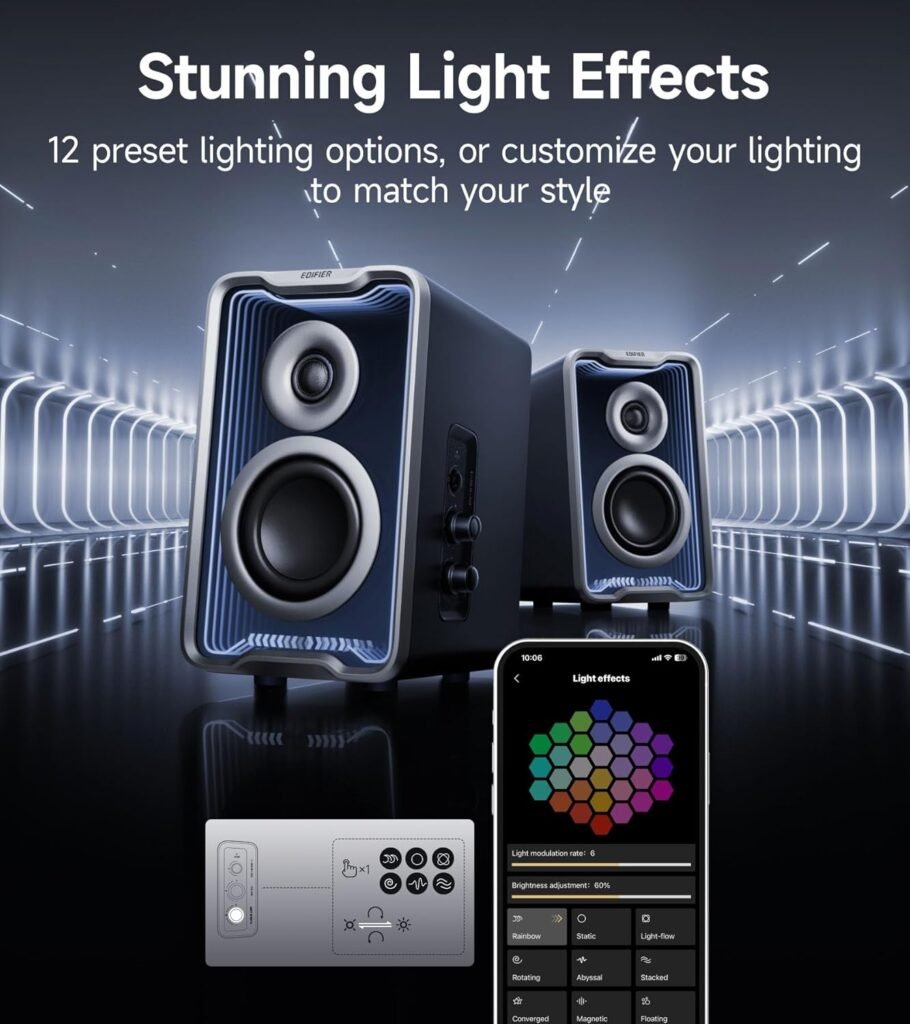
One of the standout features of the Edifier QR30 is its integrated lighting system. Far from being just a static LED strip, it is a customizable, dynamic system designed to complement our listening and gaming sessions.
TempoAbyss Lighting Technology
Edifier uses a proprietary lighting system called TempoAbyss in the QR30. This technology syncs the lighting with certain patterns and behaviors that can match our ambiance or mood.
We get 12 preset effects, each offering a different visual style—some more calm and ambient, others more energetic and reactive. While the exact names of each preset may vary in the app, we can generally expect options like:
- Subtle breathing effects
- Pulsing patterns
- Gradient color transitions
- More dynamic, rhythm‑like visuals
Customization with the Lighting Knob and Apps
We can control the lighting in two main ways:
-
Physical “Lighting Effect” knob on the speaker
- Change between lighting modes
- Adjust brightness level
- Turn lighting down if we need a darker environment
-
Edifier ConneX mobile app and TempoHub PC app
- Fine‑tune specific lighting effects
- Choose color themes (depending on available presets)
- Adjust how reactive or subtle the lighting should be
If we work during the day, we might choose a brighter, more active lighting style to keep our desk looking lively. At night, we can choose a soft, slow‑changing effect or simply lower the brightness to reduce eye strain.
App Support: Edifier ConneX and TempoHub
One of the advantages of modern desktop speakers like the QR30 is app integration. Instead of being stuck with factory defaults, we gain a level of customization that lets us tailor both sound and behavior to our taste.
Edifier ConneX Mobile App
The Edifier ConneX app is available for mobile devices and gives us control over:
- Playback controls (play/pause, track changes when compatible)
- Input/source selection
- EQ presets and custom equalization
- Lighting settings and presets
- Manuals and documentation access
- Speaker settings and firmware updates (where supported)
With this app, we can set different profiles for different use cases. For instance, we might have:
- A “Work” profile with a neutral EQ, lower brightness lights, and USB input
- A “Gaming” profile with enhanced bass and highs, and more dynamic lighting
- A “Night” profile with a softer EQ and minimal lighting
Once set up, switching between profiles is quick, making the speakers adapt to our routine rather than the other way around.
Edifier TempoHub PC App
For those of us who spend most of our time on a computer, the Edifier TempoHub PC app gives similar functionality on desktop:
- Fine EQ tuning
- Switching sound modes
- Lighting customization
- System integration and additional settings
Using the PC app is especially convenient if we are working on audio, gaming, or streaming on a computer and want to make sound changes in real time without reaching for our phone.
Everyday Usage Scenarios
To understand the QR30 better, it helps to picture how we might use it throughout a typical day at our desk. These are some scenarios where the speaker set really shines.
Work and Productivity
During work hours, we might be:
- Listening to background music or lo‑fi beats
- Attending video meetings
- Watching training videos or presentations
The QR30’s clear mids and smooth highs ensure that voices remain intelligible and natural, which is critical for meetings and webinars. Music at low to medium volumes remains rich and engaging without overpowering our concentration.
We can also appreciate the compact size; the speakers do not clutter the workspace or distract visually when the lighting is set to a subtle mode.
Gaming and Entertainment
After work, we might switch to a game, stream a movie, or watch content on YouTube. Here, the QR30’s 30W RMS output and stereo imaging help us step into the scenes more fully.
- Explosions and sound effects feel more dynamic than on tiny built‑in speakers.
- Environmental sounds in games become easier to place, helping with immersion.
- Dialogue in movies stays clear, even with background and soundtrack effects.
If we prefer a more cinematic sound signature, we can use EQ presets that emphasize bass and treble, giving us that “V‑shaped” sound commonly associated with entertainment speakers.
Music Listening Sessions
When we want to sit back and really listen to music, the QR30 is able to bring a surprising amount of nuance out of our favorite tracks given its size. Acoustic music sounds natural, while pop and electronic genres benefit from the slightly warm tuning and controlled bass.
We might connect our phone via Bluetooth, put on a curated playlist, and let the lights pulse softly in the background. For more serious listening, we can use the USB input from a PC, tweak an EQ curve to match our taste, and create a satisfying near‑field listening setup without occupying a lot of shelf space.
Technical Specifications at a Glance
To make the core details easier to skim, we can summarize key specs and features of the Edifier QR30 in the table below.
| Feature | Specification / Details |
|---|---|
| Product Type | 2.0 Desktop Active Speaker (pair) |
| Drivers | 2.75″ mid‑bass long‑throw driver + 0.75″ silk dome tweeter (per speaker) |
| Amplifier | Built‑in Class‑D amplifier |
| Total Output Power | 30W RMS |
| Wireless Connectivity | Bluetooth V5.4 |
| Multipoint Support | Yes, connects to two Bluetooth devices simultaneously |
| Wired Inputs | USB‑A (digital), 3.5 mm AUX (analog) |
| Lighting System | Integrated RGB‑style lighting with TempoAbyss technology |
| Lighting Presets | 12 preset light effects, adjustable brightness, app customization |
| Physical Controls | Side‑mounted knobs for mode/input, volume, and lighting |
| Mobile App | Edifier ConneX (playback, EQ, lighting, profiles, settings) |
| PC App | Edifier TempoHub (sound modes, EQ, lighting, settings) |
| Dimensions (per speaker) | 4.41″ (W) x 7.60″ (H) x 5.59″ (D) |
| Design Style | Compact, minimalist, modern black finish |
| Ideal Usage | Desktops, laptops, minimalist setups, small rooms, work‑from‑home, gaming, music |
Strengths of the Edifier QR30
The QR30 has a lot going for it, especially if we prioritize versatility and design alongside sound quality. Let us break down the key advantages we gain with this speaker set.
Compact Size with Surprisingly Big Sound
One of the biggest strengths is how much audio presence these small cabinets produce. They look like typical desktop speakers at first glance, but once we turn them on, we notice:
- Fuller bass than expected
- Clear and natural vocals
- Enough volume to fill a personal space or small room
For those of us working in apartments, dorm rooms, or shared offices, that balance between power and compactness is very appealing.
Versatile Connectivity and Multipoint
Bluetooth V5.4, multipoint capability, USB‑A, and AUX together form a versatile connection package. We do not have to choose between wired and wireless; we can actively use both, often at the same time.
This flexibility makes the QR30 an excellent “hub” for:
- Laptops and desktops (USB or Bluetooth)
- Phones and tablets (Bluetooth)
- Consoles or analog devices (AUX)
The more devices we cycle through during the day, the more we appreciate how simple it is to integrate them all.
Lighting That Adds Character Without Being Overbearing
The TempoAbyss lighting system is not just a gimmick. With 12 presets and adjustable brightness, we can tune it to match our taste, from minimal accent lighting to eye‑catching animations.
We can treat the QR30 like part of our desk’s visual identity. The lighting helps tie together other RGB elements (keyboard, mouse, PC tower) or add personality to an otherwise plain office desk. If we ever want a clean, distraction‑free look, dimming or turning down the lights is quick and easy.
User-Friendly Apps and Control Options
The combination of:
- Side‑mounted knobs
- Edifier ConneX mobile app
- Edifier TempoHub PC app
gives us layered control. If we like physical controls, they are there. If we prefer digital configuration, especially for EQ tweaking and profiles, the apps provide that.
This makes the QR30 feel modern and adaptable. We are not locked into one usage mode or one configuration; instead, we can adjust the experience to match our usage patterns.
Limitations and Considerations
No speaker system is perfect for everyone. The QR30’s strengths come with a few considerations we should keep in mind before deciding if it fits our needs.
Bass Depth vs. a Dedicated Subwoofer System
For a 2.0 compact desktop speaker, the QR30 offers good bass performance. However, it cannot physically match the deep, room‑shaking impact of a 2.1 system with a separate subwoofer.
If we listen to a lot of bass‑heavy genres and want chest‑thumping low frequencies, we might find the QR30 adequate but not overwhelming. For most users and most desks, the bass balance is more than enough, but expecting subwoofer‑level performance would be unrealistic given the size.
No Dedicated Physical Remote Mentioned
The control scheme relies on:
- Side knobs on the speakers
- Mobile and PC apps
While this is usually sufficient, some users may miss having a separate infrared remote for quick volume and input changes from across the room. If we plan to use the QR30 mostly at our desk within arm’s reach, this is not an issue. If we plan to set them farther away as living room speakers, it is something to consider.
Primarily Desk-Focused
The QR30 is designed to shine in a near‑field environment: we sit a few feet away, at a desk, and get an immersive stereo image. If we want speakers for a large living room and plan to sit far away, larger bookshelf speakers might still be more appropriate in terms of scale and output.
For its intended role at a desk or small room, though, the QR30 fits very well.
How the QR30 Fits Into Different Setups
It helps to think about where these speakers sit in the broader landscape of audio solutions we might choose for our desk or small room.
Compared to Built-In Laptop or Monitor Speakers
Switching from built‑in speakers to the QR30 is a substantial upgrade. We gain:
- Much richer bass
- Clearer speech and vocals
- Wider stereo image
- Higher maximum volume without distortion
- Customizable sound via EQ
If we have only ever used built‑in audio, the QR30 will make music, games, and films feel noticeably more alive.
Compared to a Single Portable Bluetooth Speaker
Portable Bluetooth speakers are great for on‑the‑go use, but they are not optimized for fixed, near‑field listening at a desk. The QR30, by contrast, offers:
- True stereo separation
- More stable desk placement
- Multiple wired inputs
- App integration tailored to a desktop setting
- Better ergonomics for daily work and entertainment use
We might still keep a portable speaker for travel, but for our primary workspace, the QR30 provides a more refined, connected experience.
Compared to Larger Bookshelf Speakers
Traditional passive bookshelf speakers paired with an external amplifier can deliver more power and bass extension, but they also:
- Require more space
- Need extra components and cables
- Often cost more as a complete system
The QR30 simplifies everything into an all‑in‑one active system with fewer cables, less clutter, and more integrated features like lighting and app control. If we prioritize simplicity and desk‑friendliness, the QR30 is more convenient than a full bookshelf rig.
Tips for Getting the Best Experience
To make sure we get the highest performance from the QR30, we can follow a few practical setup and usage tips.
Positioning and Placement
- Speaker distance: Place the speakers about as far apart as our seated distance from them (forming an approximate equilateral triangle).
- Angle: Slightly angle the fronts toward our ears for best stereo imaging.
- Height: Keep the tweeters roughly at ear level if possible, or tilt the speakers so they face up toward us if they are lower.
- Surroundings: Avoid pressing them directly against a wall; leaving a little air space can help the bass sound more natural.
Using the Right Input for the Situation
- For our main computer, USB‑A provides a reliable digital connection with minimal fuss.
- For gaming consoles or analog sources, AUX is straightforward and flexible.
- For phones and tablets, Bluetooth V5.4 offers convenience and quick switching.
We might even set a “default” input for work (like USB) and reserve Bluetooth for casual listening from our phone.
Leveraging the EQ and Sound Modes
Through the ConneX and TempoHub apps, we can:
- Slightly boost lows and highs for a more energetic sound
- Tone down high frequencies if we are sensitive to brightness
- Reduce bass a bit if we place the speakers near a wall and notice muddiness
Fine‑tuning the EQ based on our room and taste can substantially improve our enjoyment.
Overall Value and Who Should Choose the QR30
When we step back and consider all the elements—the build, sound quality, connectivity, lighting, and app integration—the Edifier QR30 positions itself as a strong value for desktop audio enthusiasts who care about both sound and aesthetics.
We should seriously consider the QR30 if:
- We want a compact, modern 2.0 speaker set for our desk.
- We love the idea of dynamic lighting that can match our mood or gaming setup.
- We use multiple devices (PC, phone, console, etc.) and want easy switching.
- We value clear, balanced sound with enough bass for most everyday listening without needing a separate subwoofer.
- We appreciate app control for EQ, presets, lighting, and configuration.
On the other hand, we might look at other solutions if:
- We want earth‑shaking, deep sub‑bass for large rooms.
- We prefer a more traditional, no‑lights bookshelf aesthetic with no app involvement.
- We need a system primarily for far‑field living room listening rather than near‑field desktop use.
Final Thoughts
The Edifier QR30 2.0 Desktop Active Speaker combines a lot of thoughtful details into a compact package. We get well‑tuned drivers powered by a Class‑D amplifier, flexible Bluetooth V5.4 with multipoint, useful wired inputs, customizable lighting with TempoAbyss, and robust app support through Edifier ConneX and TempoHub.
On a practical level, the QR30 makes our desk a more enjoyable place to spend time. Our music sounds fuller, our games feel more immersive, our meetings are easier to hear, and the dynamic lighting adds personality to our workspace without overwhelming it.
If we are looking for an all‑in‑one desktop speaker solution that balances sound quality, features, design, and size, the Edifier QR30 is a compelling option that fits smoothly into modern work‑and‑play setups.
Disclosure: As an Amazon Associate, I earn from qualifying purchases.