Have we ever wished our smart speaker sounded like a serious hi‑fi system but didn’t listen to everything we say?
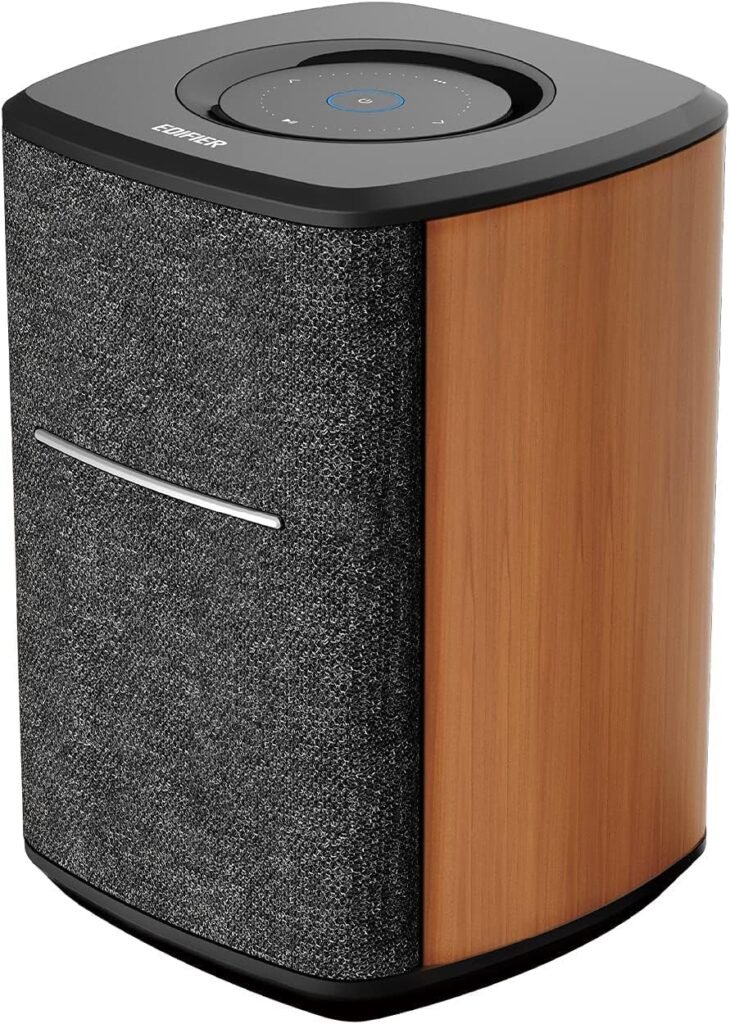

Edifier WiFi Smart Speaker MS50A: What Makes It Different?
When we look at the Edifier WiFi Smart Speaker Without Microphone (MS50A), we are not just looking at another wireless speaker. We are looking at a speaker that intentionally skips a built‑in microphone while still working with Alexa, AirPlay 2, Spotify Connect, and TIDAL Connect. That combo instantly sets a different tone: big sound, strong streaming features, but with privacy at the center.
This speaker targets those of us who want a high‑quality wireless sound system with modern app support, yet feel uneasy about always‑listening microphones in our living rooms, bedrooms, or home offices.
Key Features at a Glance
We often find it helpful to see the core specs and features laid out side by side. Below is a quick summary of what the Edifier MS50A offers.
| Feature | Details |
|---|---|
| Product Name | Edifier WiFi Smart Speaker Without Microphone, MS50A |
| Power Output | 40W RMS total output |
| Drivers | 4-inch woofer + 1-inch tweeter |
| Connectivity | Wi-Fi and Bluetooth 5.0 |
| Voice Assistant Support | Works with Alexa (via other Alexa devices), no built-in mic |
| Streaming Protocols | Apple AirPlay 2, Spotify Connect, TIDAL Connect |
| Multi-Room Audio | Yes, via AirPlay 2 or Alexa groups |
| Stereo Pairing | Yes, over Wi-Fi using two MS50A speakers |
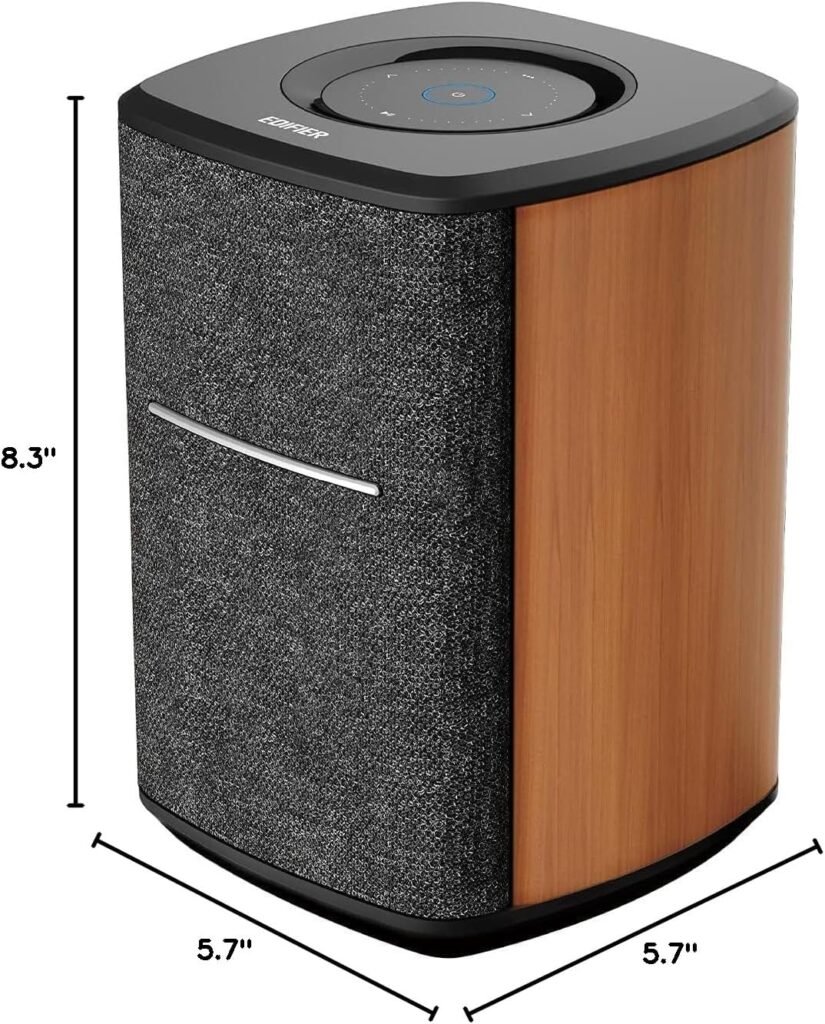
| Dimensions | Approx. 6 x 6 x 8 inches |
| Microphone | No mic (privacy-focused design) |
| Use Cases | Music listening, podcasts, background audio, TV companion, multi-room audio |
Seeing the essentials in one place helps us understand how well this speaker fits into our home and daily routines. The combination of a 4-inch woofer, 1-inch tweeter, and 40W RMS output immediately suggests that this is aimed at bigger sound than typical small smart speakers.

Design and Build Quality
A Clean, Minimalist Look That Fits Most Rooms
Edifier tends to lean towards modern, understated design, and the MS50A continues that tradition. It is a one-piece speaker with a compact footprint (around 6 x 6 inches at the base and 8 inches tall), which makes it easy to place on shelves, desks, side tables, or mantels.
We appreciate that the design stays neutral enough to blend into a variety of interior styles. It does not scream “gadget”; instead, it feels more like a neat piece of audio furniture that quietly integrates into our spaces.
Materials and Construction Feel Solid
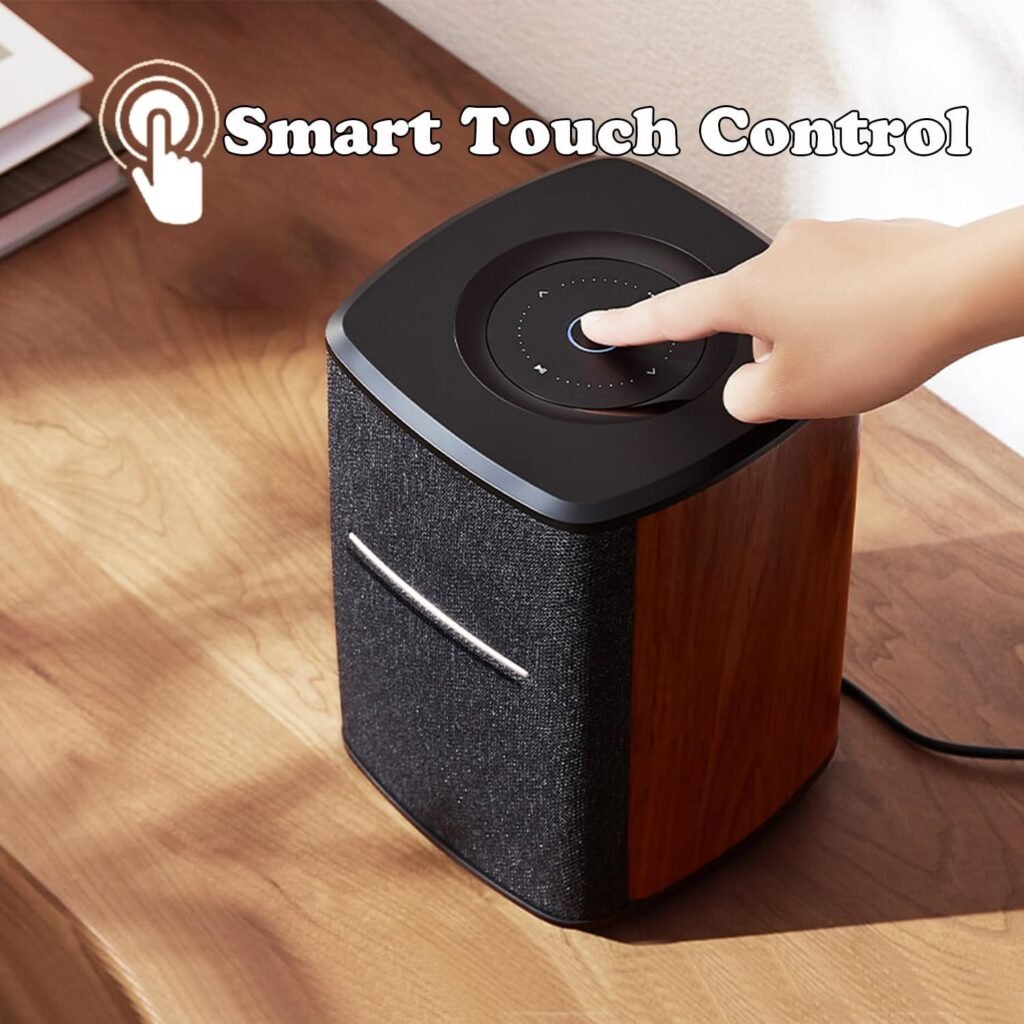
The build quality feels robust for its price range. The cabinet has a sturdy, dense feel that helps minimize unwanted vibrations, which is important for clean bass performance. The front and sides are covered by a smooth grille finish, while the top surface typically houses touch controls.
We get the sense that Edifier built the MS50A to handle years of daily use—from quick Bluetooth sessions to long, all‑day background playlists—without feeling fragile or cheap.
Sound Quality: Big, Room‑Filling Audio
40W RMS: Why That Matters
The 40W RMS rating tells us this is not just a small “kitchen radio” type speaker. Many compact smart speakers range from about 5–15W RMS; 40W is firmly in the “proper room-filling sound” tier. That matters if we like to listen at moderate to high volume or want a speaker that can handle more dynamic music genres.
We notice that with 40W RMS, the MS50A has more headroom than many cheaper models. Headroom is the extra power available that allows the speaker to handle peaks in music—like drum hits, crescendos, or bass drops—without sounding strained or compressed.
4-Inch Woofer and 1-Inch Tweeter: A True Two‑Way System
The MS50A uses a classic two‑way driver setup: a 4-inch woofer for low and mid frequencies, and a 1‑inch tweeter for the highs. This is important because:
- The 4-inch woofer can handle bass and midrange with more authority than tiny full‑range drivers.
- The dedicated tweeter improves clarity and detail in vocals, cymbals, and higher‑pitched instruments.
In practice, we get more separation and clarity than single‑driver portable speakers. Vocals sound more natural and full, with instruments occupying their own space rather than blending into a mush.
DSP Technology Helps Control Distortion
Edifier mentions updated DSP (Digital Signal Processing) technology, which is essentially an internal “brain” shaping how the speaker handles different frequencies and volumes. Good DSP helps keep bass from getting boomy, mids from getting muddy, and highs from becoming too sharp.
At low to moderate volumes, we can expect clean, controlled sound with a nice balance. At higher volumes, the DSP steps in to prevent ugly distortion, letting us push the speaker a bit without things falling apart. For everyday listening, that makes the speaker feel more confident and refined.
Tonal Balance: How Does It Actually Sound?
While personal taste matters, the MS50A tends toward a balanced tuning with a slight emphasis on warmth and fullness. The 4-inch woofer brings satisfying low end, but not the kind of exaggerated, booming bass that overwhelms everything. The vocals are forward enough for podcasts and singers to stand out clearly.
Highs from the 1‑inch tweeter tend to be crisp without becoming piercing. That makes long listening sessions comfortable, whether we are streaming jazz, pop, or talk shows. We would not classify it as a “clinical studio monitor” sound—this is more of a friendly, enjoyable home listening tone.
Wi-Fi and Bluetooth: Connectivity and Ease of Use
Dual Connectivity Gives Us Flexibility
We really appreciate that the MS50A supports both Wi-Fi and Bluetooth 5.0. Wi-Fi streaming generally provides:
- Better audio quality, especially with services that support higher bitrates.
- Multi-room and stereo pairing features.
- Control from multiple devices without re‑pairing.
Bluetooth 5.0 is handy for quick, direct connections from any compatible smartphone, tablet, or laptop. If a guest wants to play something from their device, Bluetooth makes it dead simple.
Wi-Fi Streaming: Stable and Convenient
Over Wi-Fi, we get access to Alexa integration, AirPlay 2, Spotify Connect, and TIDAL Connect. Once we connect the speaker to our home network, the apps and assistants treat it like a proper member of the smart home.
Because Wi-Fi does not rely on maintaining a constant direct link between phone and speaker, we can:
- Start a playlist, then walk away with our phone without interrupting playback.
- Use different devices in the household to control playback.
- Avoid call and notification sounds interrupting the music when using supported app-based streaming (like Spotify Connect).
Bluetooth remains useful in fringe areas of our home where Wi-Fi coverage might be weaker, or for playing local files that do not easily integrate with apps like Spotify or TIDAL.
Works with Alexa (But No Built-In Mic)
How Alexa Works Without a Microphone
The MS50A has no built-in microphone, which immediately reassures us that it is not constantly listening. Yet it still “Works with Alexa,” which means:
- We use another Alexa-enabled device (like an Echo Dot, Echo Show, or Alexa app on our phone) to send voice commands.
- Alexa then streams audio to the MS50A as a target speaker or group member.
So in daily use, we might say “Alexa, play jazz in the living room” to an Echo Dot, and the music plays through the Edifier MS50A in that room. The Edifier essentially behaves as the audio output for Alexa, not the listening device.
Why a Mic-Free Smart Speaker Makes Sense
Many of us love the convenience of smart assistants but feel uneasy about putting multiple microphones around the house. The MS50A splits the difference nicely:
- We keep voice control through a separate device.
- We gain a high‑quality audio system that never listens or records.
- We selectively decide where to place always‑listening devices (for example, kitchen only).
This design is especially appealing in bedrooms, home offices, nurseries, or anywhere we feel more sensitive about privacy.
Apple AirPlay 2: Seamless for Apple Users
Straightforward Streaming from iPhone, iPad, or Mac
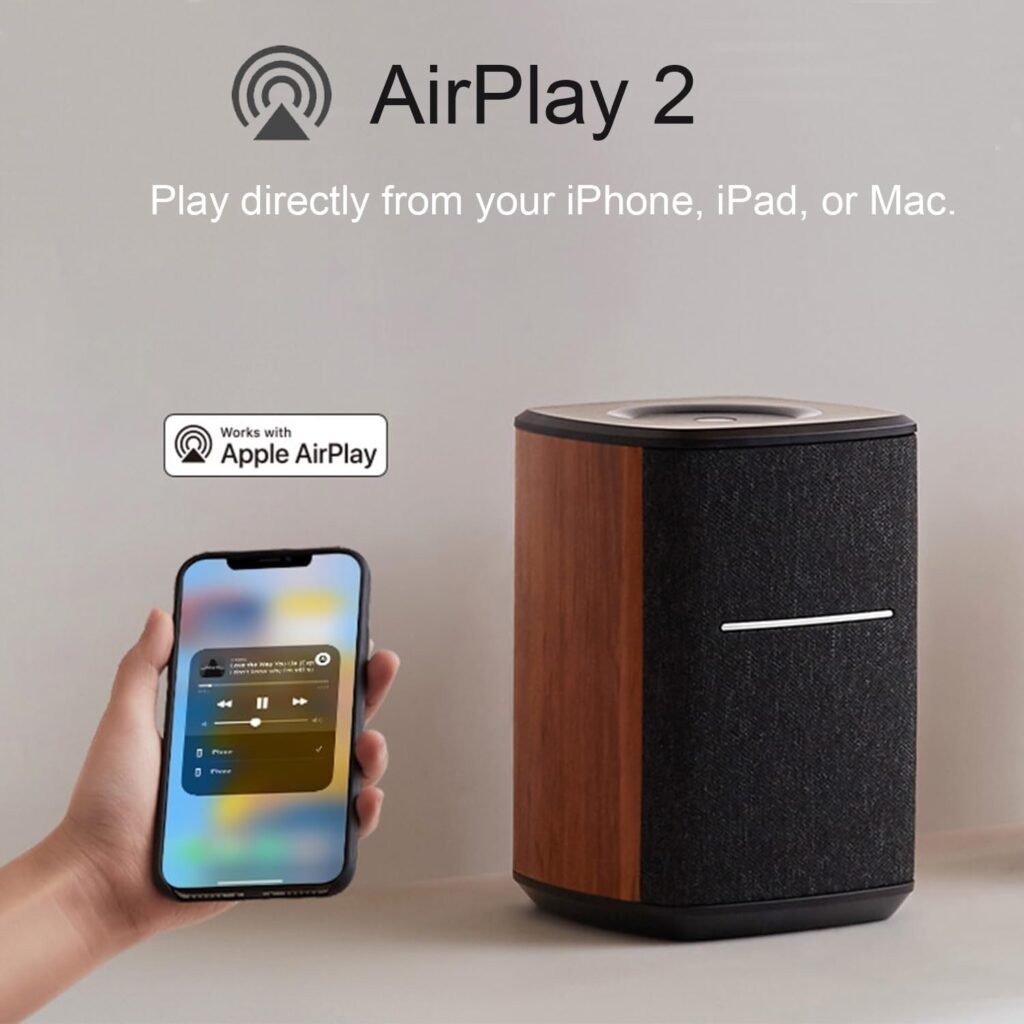
If we use Apple devices, AirPlay 2 is one of the smoothest ways to play audio. With the MS50A on the same Wi-Fi network, we can:
- Swipe down to Control Center on iPhone or iPad.
- Tap the AirPlay icon.
- Select the Edifier MS50A as our output.
We can send audio from Apple Music, YouTube, podcasts, Safari, and more. Because AirPlay 2 is system-level, almost any sound from our Apple device can go through the speaker.
Multi-Room with AirPlay 2
AirPlay 2 supports grouping multiple speakers, including those from different brands that support AirPlay 2. That means we can create multi-room setups like:
- MS50A in the living room.
- Another AirPlay 2 compatible speaker in the kitchen.
- A soundbar with AirPlay 2 in the bedroom.
We can then play the same music across all rooms or only in selected spaces, controlled from our Apple device. This gives us a flexible whole-home audio system without being locked into a single ecosystem of speakers.
Spotify Connect and TIDAL Connect: App-Native Streaming
Spotify Connect: Control Music from Any Device
With Spotify Connect, we open the Spotify app, tap on the “Devices Available” icon, and choose the Edifier MS50A as the playback destination. After that:
- The speaker streams directly from Spotify over Wi-Fi.
- Our phone or computer just acts as a remote.
- We can switch control between devices easily (for example, from phone to laptop).
This is more stable than raw Bluetooth streaming because notifications or incoming calls on our phone do not stop the music. It also preserves better audio quality compared with Bluetooth in many cases.
TIDAL Connect: Great for High-Fidelity Fans
For those of us using TIDAL, TIDAL Connect offers similar advantages. We choose the MS50A as the target device within the TIDAL app, and the speaker handles the streaming.
This is particularly valuable when we care about higher-quality streams. We can enjoy richer, more detailed sound without tying playback quality to Bluetooth’s limitations. It also keeps the music running even if we close the app on our phone or move out of Bluetooth range.
Stereo Pairing: Creating a Real Left–Right Soundstage
Why Stereo Pairing Changes the Experience
Using a single speaker for both left and right channels is convenient, but it cannot reproduce the spatial width of true stereo. With two MS50A units paired over Wi-Fi:
- One becomes the left channel, the other the right.
- We get a wider soundstage, with instruments and voices spreading across the space.
- Music feels more immersive and realistic, especially in medium to large rooms.
If we enjoy sitting on the couch or at a desk and really listening to albums, podcasts, or movies, stereo pairing can be a big upgrade. It transforms two compact boxes into something resembling a compact hi‑fi setup.
Setting Up Stereo Mode
While specifics depend on the app and ecosystem we use, the general process involves:
- Connecting both MS50A speakers to our Wi-Fi.
- Using the appropriate app (Alexa/AirPlay 2 environment) to link them as a stereo pair.
- Assigning left and right channels accordingly.
Once configured, they behave as a single stereo system. Control from Spotify, TIDAL, Alexa, or AirPlay 2 treats them as one “speaker” that is actually a stereo pair.
Multi-Room and Whole-Home Audio
Grouping Speakers for Synchronized Playback
The MS50A supports multi-room and whole-home music using:
- AirPlay 2 for Apple devices, or
- Alexa speaker groups when configured in the Alexa ecosystem.
We can group multiple MS50A speakers together or mix them with other compatible devices. This is perfect for parties, cleaning days, or simply moving around the house without losing the music.
We might set up:
- “Downstairs” group: living room MS50A + kitchen speaker.
- “Everywhere” group: all smart speakers in the home.
Once set, we can tell Alexa (via another device) to play music on a group, or use the AirPlay 2 interface on Apple devices to send audio to multiple rooms.
Use Cases for Whole-Home Audio
Multi-room audio really shines in everyday real‑world scenarios:
- Morning routines: playing news or a calm playlist across bedroom, bathroom, and kitchen.
- Social gatherings: background music covering living room and dining areas.
- Study or work: same low-level instrumental music following us from room to room.
Because the MS50A can function as both a strong standalone speaker and part of a larger system, we can start with one and gradually expand, building a flexible whole‑home audio setup.
Size and Placement: Making the Most of 6 x 6 x 8 Inches
Larger Than Many Smart Speakers, Still Compact Enough
At approximately 6 x 6 x 8 inches, the MS50A is on the larger side of Wi-Fi smart speakers but still far from bulky. The size gives room for a 4-inch woofer and a proper internal volume for bass performance, yet it remains easy to place.
Ideal spots include:
- Bookshelves or open shelving units.
- Side tables next to sofas or armchairs.
- TV stands as a TV sound enhancer (though it is not a dedicated soundbar).
- Desks, if we want a more powerful computer audio solution.
We just want to leave a bit of breathing room around the speaker so sound can radiate freely; pushing it too far into a tight corner may exaggerate bass.
Room Size and Listening Distance
In small to medium rooms—bedrooms, home offices, most living rooms—the MS50A has enough power to fill the space comfortably. For very large, open-plan living areas, we may prefer:
- Two MS50A speakers in stereo mode, or
- Using it as part of a multi-room setup to distribute sound more evenly.
The sweet spot for serious listening might be anywhere from 4 to 10 feet away, depending on room shape and furniture. Closer than that, we get a near-field, “desk monitor” style experience; farther back, it becomes more of a room-filling presence.
Privacy Considerations: No Built-In Microphone
Why No Mic Matters in Daily Life
Many smart speakers market voice assistants as their central selling point. That is great for convenience but raises privacy questions—even with mute switches and promised safeguards.
The MS50A avoids that entire issue by not including a microphone at all. That means:
- No chance of accidental wakes or recordings.
- No sound from our environment is ever captured by the speaker itself.
- The device is purely an audio output unit.
If we are designing a home with privacy in mind, especially in sensitive areas like bedrooms, children’s rooms, or offices where we discuss work, this is very reassuring.
Maintaining Smart Features Without Sacrifice
Despite the lack of a mic, we still retain all the streaming strengths:
- Alexa integration via other devices.
- AirPlay 2 for Apple ecosystems.
- Spotify and TIDAL Connect for app-centered usage.
- Bluetooth for quick connections.
We effectively have the best of both worlds: rich smart streaming and strong sound quality, minus the “always-listening” concerns.
Day-to-Day Usability and Controls
Top Controls for Quick Adjustments
Even though much control happens via apps and assistants, physical controls matter. Typically, Edifier includes basic touch or button controls on top of the MS50A for:
- Volume up/down.
- Play/pause.
- Possibly switching input modes.
We can quickly mute audio or adjust levels without unlocking a phone or shouting across the room. This is especially handy late at night or early in the morning when we want subtle adjustments quietly.
App and Ecosystem Control
We mainly control the MS50A through:
- Spotify/TIDAL apps (for Connect features).
- Apple’s AirPlay interface.
- Alexa app or Alexa-enabled devices (for voice grouping and commands).
- Bluetooth controls on our phone, tablet, or laptop.
Once we get familiar with our preferred ecosystem, controlling the speaker becomes second nature. We might forget the speaker itself is a separate device and just think of it as “where the sound goes.”
Use Cases: How We Might Actually Live with It
As a Primary Living Room Music System
For many of us, the MS50A can act as the main music hub in a living room:
- Streaming everything from Spotify or TIDAL.
- Handling radio, podcasts, and ambient playlists.
- Acting as a casual sound upgrade for TV via Bluetooth (if our TV supports it), though it is not a full surround system.
If we later want more depth and width, we can add a second unit for stereo pairing.
In the Bedroom or Home Office
The lack of a microphone makes the MS50A especially comfortable in spaces where we rest or work:
- In a bedroom, we can keep music, white noise, or podcasts without the feeling of being listened to.
- In a home office, background music or focus soundtracks feel more immersive and less fatiguing thanks to the driver setup and DSP.
The physical size also fits nicely on most desks or shelves without dominating the room visually.
As Part of a Multi-Room Setup
If we already have Echo devices, AirPlay 2 speakers, or are planning a full-house system, the MS50A becomes a strong “anchor” speaker in a key room:
- Pair it in stereo in the main listening area.
- Use smaller speakers elsewhere for lighter background audio.
- Control everything under one unified app ecosystem (Alexa or AirPlay 2).
This modular approach lets us start with what we need today and grow into something more elaborate over time.
Pros and Cons
What We Might Love About the MS50A
-
Strong sound quality for its size and price
The 4-inch woofer, 1‑inch tweeter, and 40W RMS output deliver fuller, more confident sound than many small smart speakers. -
No built-in microphone (privacy-focused)
We get modern streaming without feeling observed, ideal for bedrooms and private spaces. -
Works with Alexa, supports AirPlay 2, Spotify Connect, and TIDAL Connect
The speaker integrates smoothly into major ecosystems and streaming platforms. -
Wi-Fi and Bluetooth 5.0 flexibility
We can choose stable, high-quality Wi-Fi streaming or quick Bluetooth connections as needed. -
Stereo pairing and multi-room support
Two units can create genuine stereo; multiple units can form part of a whole‑home system. -
Larger cabinet than typical smart speakers
The slightly bigger footprint supports more powerful, room‑filling sound.
Where We Might Have Reservations
-
No built‑in mic might reduce convenience for some users
If we want to talk directly to the speaker for voice commands, this model is not for us; we need a separate Alexa device. -
Not a portable, battery-powered unit
The MS50A is more of a stationary home speaker, not something we grab and take outside without power. -
Dependent on ecosystems for best features
To fully use multi-room, stereo pairing, and Connect features, we need to operate within Alexa, Apple, Spotify, or TIDAL environments. -
No dedicated subwoofer output
Bass is strong for the size, but we cannot simply plug in a separate subwoofer if we crave very deep low frequencies.
Who Is the Edifier MS50A Best For?
Ideal Buyers
The MS50A fits us best if:
- We want a smart, Wi-Fi-connected speaker with serious attention to sound quality.
- We care a lot about privacy and do not want additional microphones in the room.
- We mainly use Alexa, AirPlay 2, Spotify, or TIDAL and prefer the integration those platforms offer.
- We like the idea of starting with a single strong speaker, with the option to add a second for stereo or expand to multi-room later.
- We listen to a lot of music, podcasts, or streaming radio and want something more substantial than a tiny portable speaker.
Not the Perfect Fit If…
It might not be our best choice if:
- We absolutely want built-in voice assistant functionality in the speaker itself (no extra devices).
- We are looking for a portable, outdoor-friendly speaker with a battery.
- We want a full home theater surround system with HDMI ARC, center channels, and subwoofer outputs.
- Our home does not have strong Wi-Fi, and we prefer everything to run via analog or wired connections (which the MS50A is not built around).
Practical Tips for Getting the Best Experience
Placement Tips
To maximize performance, we can:
- Keep the speaker at or near ear height when seated, if possible.
- Avoid enclosing it completely inside cabinets; leave some space around it.
- Keep it a few inches away from the wall to avoid excessive bass resonance.
If we run a stereo pair, we should:
- Place them roughly at equal distance from our main listening spot.
- Angle them slightly inward for a focused soundstage.
Connectivity and Network Suggestions
- Ensure our Wi-Fi signal is strong where we place the speaker; consider a mesh system if needed.
- Use Wi-Fi streaming for serious, extended listening, and Bluetooth for quick or casual sessions.
- If we use multiple MS50A units or other multi-room speakers, it helps to name them clearly (e.g., “Living Room MS50A,” “Bedroom Speaker”) in our Alexa or AirPlay setup.
Final Thoughts: Is the Edifier MS50A Worth It?
The Edifier WiFi Smart Speaker Without Microphone (MS50A) stands out as a thoughtful alternative in a market crowded with always-listening devices. We get:
- A robust 40W RMS sound system with a 4-inch woofer and 1-inch tweeter.
- Full support for Wi-Fi streaming, Bluetooth 5.0, and key services like Alexa, AirPlay 2, Spotify Connect, and TIDAL Connect.
- Stereo pairing, multi-room capabilities, and a bigger, more confident sound than many typical smart speakers.
- A design that deliberately omits a microphone, giving us privacy by design rather than by software switch.
If we are building or upgrading a home audio setup and want both modern connectivity and peace of mind about privacy, the MS50A is a compelling option. It fits well as a primary living room speaker, a powerful bedroom or office system, or a cornerstone of a growing whole‑home audio setup.
In short, we would choose the Edifier MS50A when we want our speaker to do one thing exceptionally well—deliver rich, connected sound—without listening to our conversations along the way.
Disclosure: As an Amazon Associate, I earn from qualifying purchases.