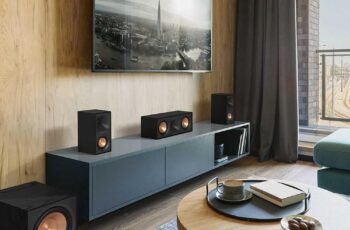
Looking for a pair of compact studio monitors that claim studio-grade detail, Hi-Res support, and modern wireless features?

First impressions and unboxing
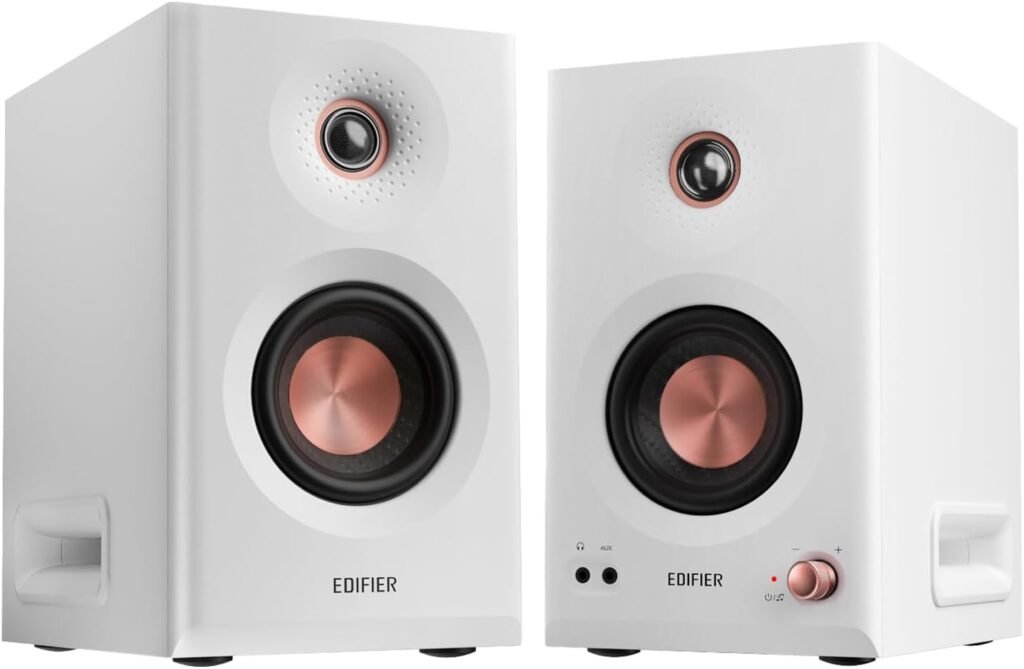
When you first open the box of the Edifier MR5 2.0 Studio Monitor Bookshelf Speakers, the white finish and compact footprint catch your eye. The packaging is tidy and protects the drivers well, and the included documents make setup feel straightforward so you can get them on your desk or stands quickly.
What’s in the box?
You’ll find the pair of monitors, power cables, a short user manual, and usually a warranty card; some retailers include accessory cables. It’s a simple bundle designed to get you listening fast without a lot of extras to sort through.
Design and build quality
The MR5s are built with MDF cabinets that help reduce resonance and keep coloration to a minimum. You’ll notice the dimpled tweeter waveguide and a clean front baffle that aim to provide consistent performance across a wider listening area.
Cabinets and finishes
The cabinet feels solid and weighty for its size, which contributes to a more controlled low end and less panel vibration. If you care about aesthetics, the white finish looks modern and integrates well into a home studio or living room setup.
Driver design and waveguide
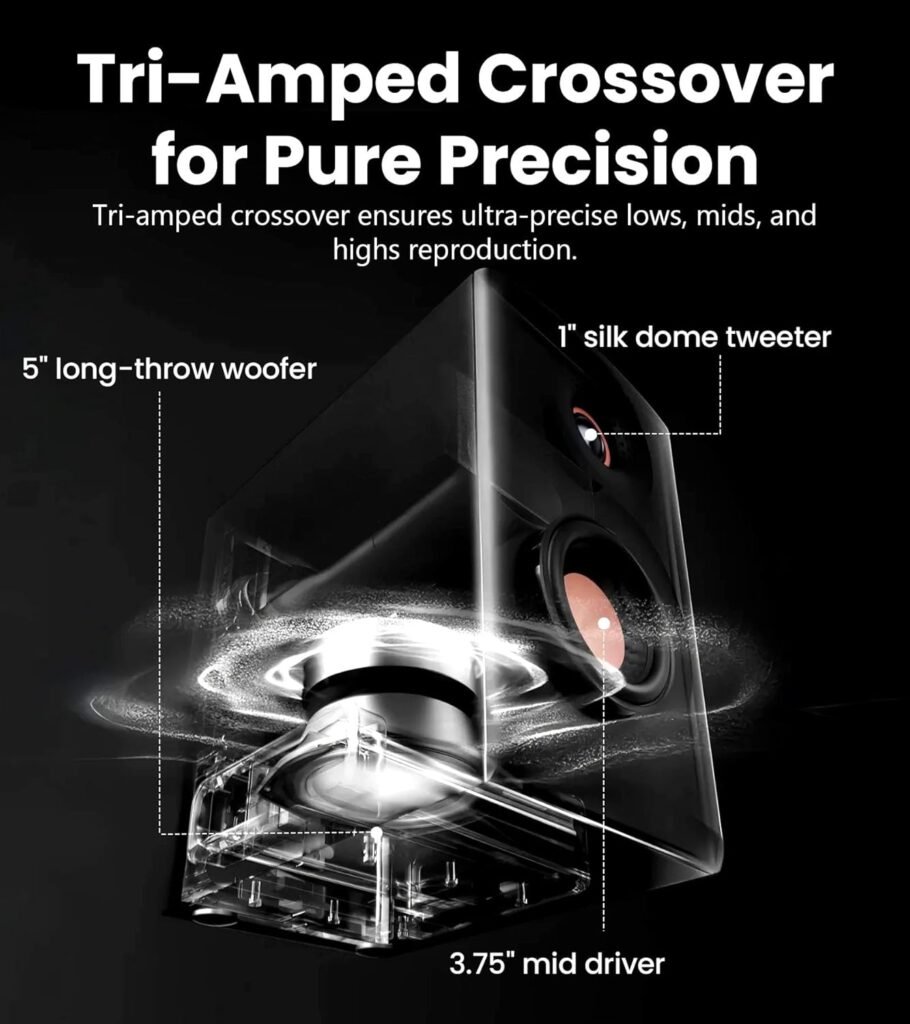
You get a 3-way design with a 5″ long-throw woofer, a 3.75″ mid driver, and a 1″ silk dome tweeter, which is uncommon in compact bookshelf monitors. That dedicated mid driver helps keep vocals and instruments focused, and the waveguide helps disperse high frequencies more evenly so you don’t have to sit dead-center to get a good image.
Controls and connectivity layout
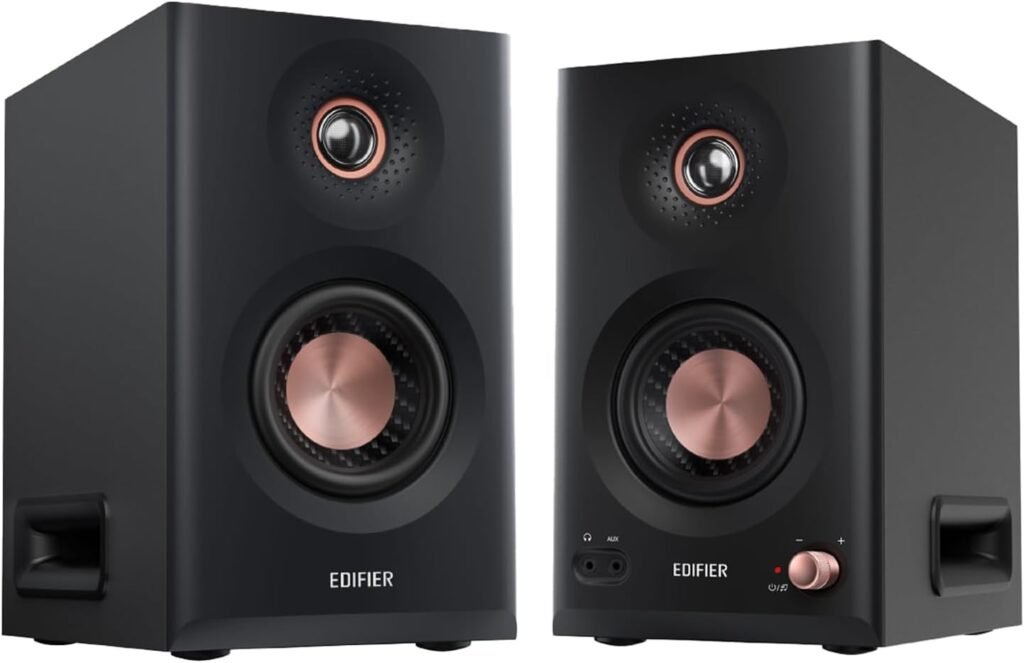
Controls are intuitive: a front-panel volume knob and a headphone jack for quick monitoring, plus physical rear knobs for bass and treble adjustments. On the back you’ll find balanced XLR and TRS, plus RCA inputs and Bluetooth 6.0 pairing—so you can toggle between pro gear and casual streaming easily.

Technical specifications
Here’s a quick summary of the key specs so you know what you’re dealing with.
| Specification | Details |
|---|---|
| System | 3-way active crossover |
| Drivers | 5″ long-throw woofer, 3.75″ mid driver, 1″ silk dome tweeter |
| Frequency Response | 46 Hz – 40 kHz |
| Amplification | 110W RMS Class D |
| Peak SPL | 101 dB |
| Hi-Res Support | 24-bit / 96 kHz wired & wireless (LDAC) |
| Bluetooth | 6.0 with LDAC |
| Inputs | XLR, TRS, RCA, AUX |
| Outputs | Front-panel 3.5mm headphone |
| Room Compensation | Rear physical knobs + EDIFIER ConneX App |
| Cabinet | MDF |
| Color | White (compact size for home studio & music) |
Sound signature and performance
Once you start critical listening, the MR5s come across as balanced and detailed without sounding aggressively bright. You’ll appreciate how the three-way design separates frequencies and offers a sense of clarity that’s useful for mixing and enjoyable for music listening.
Low end and bass response
The 5″ long-throw woofer gives you a surprisingly tight and extended low end down to the mid-40s Hz. You’ll get enough bass for near-field mixing and full listening enjoyment, though if you need sub-20 Hz impact for electronic genres, a subwoofer is still recommended.
Midrange clarity and presence
The dedicated mid driver really pays off: vocals and guitars sit forward in the mix with a natural timbre that helps you make mixing decisions more confidently. If you work on vocal-heavy material, you’ll find the mids informative and forgiving.
High frequencies and detail
Tweeter performance is smooth and refined thanks to the silk dome and waveguide design. You’ll hear detail and shimmer when the source has it, but the highs never feel overly harsh or fatiguing in long sessions.
Imaging, soundstage, and stereo field
These monitors produce a focused near-field image with a believable stereo spread that helps you place instruments across the soundstage. You’ll get good center imaging and a stable phantom center when positioned properly.
Dynamics and loudness
With 110W RMS and a 101 dB peak SPL capability, the MR5s deliver solid dynamics for their size—you can push them to levels that’ll fill a mid-sized room without obvious strain. You’ll notice clean transient response and punch when a track calls for it.
Room compensation and EQ
Edifier gives you both hardware and software options to tune the monitors to your room, which is useful if you don’t have acoustic treatment yet. You’ll be able to make practical adjustments that improve clarity and bass control.
Rear physical knobs
Simple high and low frequency knobs on the back let you notch out or boost problem areas quickly. You’ll like how easy it is to make immediate changes when you hear a cancellation or boom without needing software.
EDIFIER ConneX App features
The EDIFIER ConneX App provides more advanced room compensation options like Low Cut-Off, Desktop Control, and Acoustic Space presets. You’ll be able to fine-tune the response to your listening position and environment if you prefer software-based EQ over physical knobs.
Practical tips for tuning
Start with the rear knobs set flat, then add small adjustments while listening to familiar tracks. You’ll save time if you sit in your normal listening position and make changes a few dB at a time—large boosts can introduce more problems than they solve.
Connectivity and features
The MR5 is unusually versatile for bookshelf monitors, giving you modern wireless convenience without sacrificing professional wired options. You’ll be able to jump between studio gear and consumer devices with minimal fuss.
Bluetooth 6.0 and LDAC
Bluetooth 6.0 provides stable wireless connections and LDAC support lets you stream higher-resolution audio wirelessly. You’ll appreciate this if you like to play lossless files from a phone or laptop without running cables constantly.
Wired inputs: XLR/TRS/RCA
Balanced XLR and TRS inputs mean you can integrate these speakers with audio interfaces, mixers, or professional gear. If you prefer a simpler consumer setup, RCA inputs are available too so you don’t have to hunt for adapters.
Headphone output and front controls
A front-panel 3.5mm headphone jack gives you quick private monitoring, and the volume knob is handy for fast adjustments. You’ll find this useful for late-night sessions or when you need to audition something privately without swapping cables.
Multi-point and multi-device use
Multi-point Bluetooth allows you to pair more than one device for quick switching between sources. You’ll enjoy this if you share the speakers for music and video playback among different devices in your space.
Setup and placement guidance
Getting placement right is crucial for any near-field monitor, and the MR5s respond well to thoughtful positioning. You’ll see significant improvements by spending a little time on alignment and off-axis control.
Near-field studio setup
Place the monitors in an equilateral triangle with your listening position, tweeters at ear height, and the speakers angled slightly toward you. You’ll get the most accurate imaging and tonal balance when the drivers form a direct path to your ears.
Desktop setup and low-cut filter
On a desktop, you’ll want to account for boundary bass buildup—use the low-frequency compensation or a desk-friendly “Desktop Control” preset in the app. You’ll notice a big improvement in bass clarity if you correct for the reflections caused by the desk surface.
Pairing with a subwoofer
If your work demands sub-30 Hz information, add a compact subwoofer and set the MR5 low-cut or crossover appropriately. You’ll get deeper bass without muddying the midrange if you blend the sub and monitors carefully.
Use cases and target users
The MR5s are versatile enough to serve several roles, so you can choose how they fit into your workflow. Whether you’re making music, mixing, or just enjoying high-resolution audio, they have features that cater to multiple needs.
Home studio recording and mixing
You’ll benefit from the accurate mids and controlled lows when you’re mixing or tracking at home. The balanced inputs let you connect interfaces and outboard gear, so you can treat the MR5s as your primary monitoring reference.
Casual listening and desktop audio
If you want powerful near-field sound from a desk or shelf, these speakers handle everyday listening with grace. You’ll appreciate the wireless Hi-Res support and the musical presentation when you’re not working—movies, podcasts, and albums all sound excellent.
Gaming and multimedia
For gaming and media, the imaging and dynamics help with positional cues and impactful sound effects. You’ll get a more immersive experience than typical computer speakers, and Bluetooth lets you stream game audio from consoles and phones when needed.
Comparisons and alternatives
It helps to see how the MR5 stacks up against other popular monitors so you can match features to your priorities. You’ll get a sense of where the MR5 excels and where other speakers might be more appropriate.
Compared to typical active 2-way monitors
Unlike many 2-way designs, the MR5’s 3-way approach gives you a dedicated mid driver, which improves mid-range clarity. You’ll notice cleaner separation and a more natural vocal presence compared with some 2-way monitors that rely on a single mid/bass driver.
Versus bookshelf speakers with passive crossovers
Powered active monitors like the MR5 simplify setup and provide amplification matched to the drivers, which is an advantage over passive bookshelf speakers that require an external amp. You’ll get tighter control and often better dynamics in a compact package.
Budget and premium alternatives
If your budget is constrained, there are cost-effective two-way monitors that still perform well, but you’ll lose the dedicated mid driver and some refinement. On the higher end, studio monitors from established pro brands may offer flatter responses for ultra-critical mixing; you’ll pay a premium for that last bit of analytical accuracy.
Quick spec comparison
This small table gives a high-level look at how the MR5 compares to other common choices in the same size class.
| Model | Design | Notable strength |
|---|---|---|
| Edifier MR5 | 3-way active | Detailed mids, Hi-Res wireless, versatile inputs |
| Typical 2-way Compact Monitor | 2-way active | Often flatter low-cost option, simpler crossover |
| Larger Pro Monitors | 2- or 3-way active | More power, room-filling SPL, pro calibration |
Pros and cons
You’ll want a quick list of strengths and limitations to help decide if the MR5 suits your needs.
Pros:
- Detailed 3-way design with standout midrange clarity you’ll notice on vocals.
- Hi-Res 24-bit/96kHz support wired and LDAC wireless for flexible listening.
- Room compensation via physical knobs and EDIFIER ConneX App for quick and advanced tuning.
- Multiple pro and consumer inputs (XLR/TRS/RCA) plus Bluetooth 6.0.
- Solid build with MDF cabinets and thoughtful waveguide design.
Cons:
- For very low sub-bass or club/room-shaking levels, you’ll still need a subwoofer.
- If you require an ultra-flat reference for high-end professional mastering, some higher-end nearfield monitors may be more neutral.
- App-based tuning is useful but not a substitute for proper acoustic treatment.
Practical tips, tweaks, and accessories
Small changes to the environment and accessories will significantly improve your results. You’ll get better accuracy with a few targeted purchases and careful setup.
Isolation pads and stands
Use isolation pads or stands to decouple the speakers from your desk and reduce resonance. You’ll notice a cleaner bass and improved imaging when the speakers aren’t directly on reflective surfaces.
Cables and connectivity choices
Balanced XLR or TRS cables reduce noise and are preferred for studio setups. You’ll avoid hum and interference if you use balanced cables from your interface to the MR5s rather than relying solely on RCA.
Acoustic treatment basics
Treat early reflection points and add bass traps if you have low-frequency build-up. You’ll get a more consistent listening environment and more reliable mixes if you invest in basic acoustic panels.
Troubleshooting common issues
You won’t always get perfect behavior right out of the box, but most issues have straightforward fixes. Here are a few things you may encounter and how to address them.
Bluetooth pairing problems
If the speakers won’t pair, make sure no other paired device is connecting automatically and that the MR5 is in pairing mode. You’ll also want to confirm your source device supports LDAC if you expect Hi-Res wireless performance.
Hum, ground loop, noise
A persistent hum often indicates a ground loop—try different power outlets or use a ground loop isolator for RCA connections. You’ll usually find balanced connections (XLR/TRS) are the most resistant to this issue.
No sound from one speaker
Check input routing and cable connections first; swap cables to isolate whether it’s the cable or the speaker. You’ll also want to confirm the balance/pan settings on your interface or playback device aren’t accidentally muting a channel.
Maintenance and care
Treat the speakers gently and keep them dust-free, and they’ll last a long time. You’ll preserve the finish and driver longevity by avoiding excessive moisture and using a soft cloth for cleaning.
Driver and cabinet care
Avoid poking the drivers and remove dust with a dry microfiber cloth. You’ll maintain sound quality by not using liquids or abrasive cleaners on the cabinet or drivers.
Firmware and app updates
Check the EDIFIER ConneX App and Edifier support pages for firmware updates for Bluetooth or app features. You’ll benefit from occasional improvements and bug fixes, especially with wireless functionality.
Frequently asked questions (FAQ)
These short Q&As address questions you’re likely to have before or after buying the MR5s.
Q: Are the MR5s suitable for mixing and mastering? A: The MR5s are excellent for mixing and near-field monitoring with an emphasis on musical accuracy and midrange clarity. You’ll likely find them very helpful for mixing, but for mastering at a professional level you may prefer monitors specifically engineered for ultra-flat, clinical reference response.
Q: Do I need a separate amplifier? A: No. The MR5s are active monitors with a built-in 110W RMS Class D amplifier, so you can connect them directly to your audio interface or other sources without an external amp.
Q: Can I stream high-res audio wirelessly? A: Yes. The MR5s support 24-bit/96kHz Hi-Res audio over wired connections and LDAC for higher-quality wireless streaming, so you can enjoy Hi-Res material from compatible devices.
Q: Will these work in a small room? A: Absolutely. The MR5s are designed for near-field use and can handle small to mid-sized rooms well. You’ll still benefit from basic acoustic treatment and proper placement to minimize room-induced problems.
Q: Do they have a subwoofer output? A: The speakers don’t have a dedicated subwoofer output listed in the main feature set, so you’ll typically manage sub integration through your interface or speaker-level routing. You’ll want to confirm connection options for your specific setup.
Final verdict and recommendation
If you want a compact pair of monitors that combine musicality, modern wireless capabilities, and pro-level connectivity, the Edifier MR5 2.0 monitors are a very compelling option. You’ll get a unique three-way driver complement that gives you excellent midrange clarity, usable low end, and smooth highs—plus flexible room compensation and app control that make them friendly for both studio work and casual listening.
You should choose the MR5 if you value detailed mids for mixing vocals and acoustic instruments, if you want Hi-Res wireless streaming, and if you need balanced professional inputs alongside consumer-friendly options. If you need extreme low-frequency extension or an ultra-clinical mastering reference, consider adding a subwoofer or comparing higher-end studio monitors.
Quick buying checklist
This short checklist helps you confirm the essentials before purchasing.
- Do you need balanced XLR/TRS inputs for an audio interface? If yes, the MR5s are a good fit.
- Will you want Hi-Res wireless streaming? The LDAC support makes the MR5s convenient.
- Do you require sub-30 Hz extension? Plan on adding a compact subwoofer for deep electronic bass.
- Are you setting up on a desk? Consider isolation pads and the EDIFIER ConneX Desktop preset.
If most answers are yes, these monitors match your needs nicely and give you a versatile mixture of studio capabilities and everyday convenience.
Disclosure: As an Amazon Associate, I earn from qualifying purchases.