Have we ever wished our desk speakers could sound like proper studio gear without turning our workspace into a full-blown studio?

Edifier MR3 Powered Studio Monitor Speakers Review
When we first look at the Edifier MR3 Powered Studio Monitor Speakers, Hi-Res Audio Certified Bluetooth V5.4 Active Bookshelf Loudspeakers, 2.0 Computer Speaker with Headphone Output RCA AUX Balanced TRS Input (White), it feels like these speakers are trying to sit in two worlds at once. They promise the accuracy of studio monitors and the convenience of everyday desktop speakers. In this review, we walk through how well they actually pull that off in real-world use.
Design and Build Quality
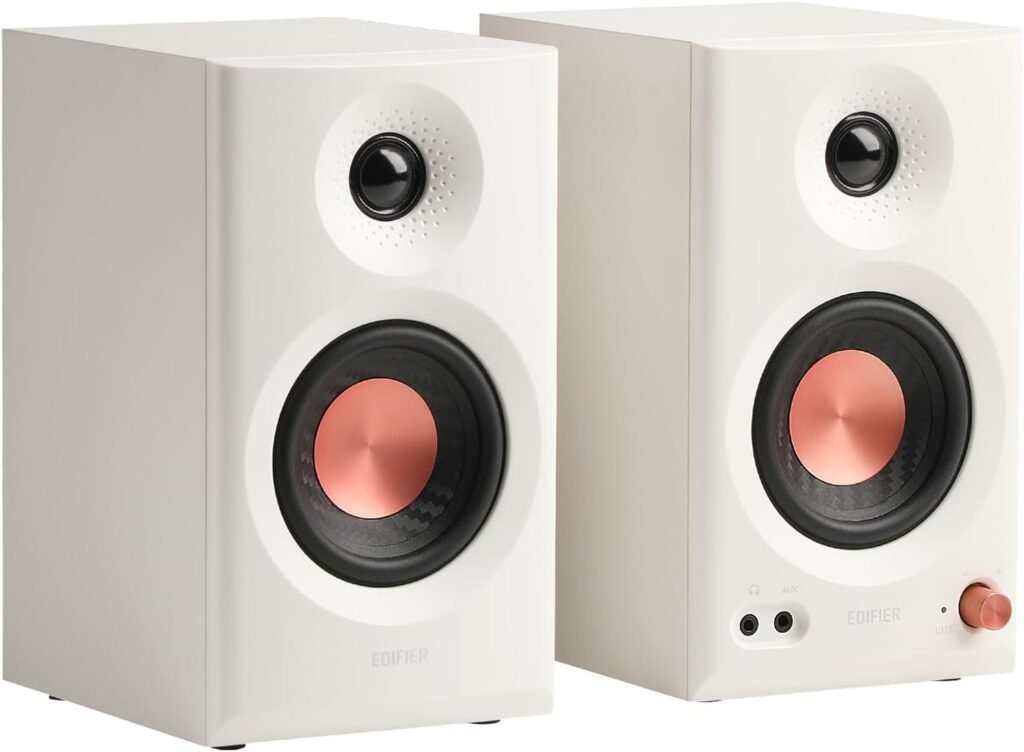
The Edifier MR3 speakers give us a clean, modern look that fits easily into most setups. The white finish feels contemporary and pairs nicely with minimalist desks, music workstations, or a simple living room media corner.
The MDF (medium-density fiberboard) cabinet is not just a buzzword for audiophiles. It matters because MDF is far better at resisting unwanted vibrations than flimsy plastic shells. That rigidity helps us get cleaner mids and tighter bass with less distortion, even when we push the volume.
The build feels solid in the hand, with no rattles or cheap-feeling joints. These look and feel like a serious pair of speakers rather than just another plasticky computer speaker set pretending to be “studio.”
Size and Desk Presence
The MR3 units are compact enough to sit comfortably on a desk alongside a monitor and keyboard, but large enough to house real 3.5″ mid-low drivers and 1″ tweeters. The footprint makes them viable for:
- Home studios in tight rooms
- Bedroom or dorm setups
- Secondary editing stations or work-from-home desks
We get that “proper monitor” vibe in a relatively small package, which matters when every inch of desk space is precious.

Key Features at a Glance
To make it easier to see what we actually get with the Edifier MR3, here is a quick breakdown of the core specs and features.
| Feature | Details |
|---|---|
| Audio Certification | Hi-Res Audio Certified |
| Frequency Response | 52Hz – 40kHz (flat response emphasis) |
| Output Power | 18W x 2 RMS (36W total) |
| Peak SPL | Up to 92.5dB |
| Drivers | 3.5″ mid-low drivers, 1″ tweeters |
| Cabinet Material | MDF cabinet |
| Inputs | Balanced TRS, RCA, AUX |
| Wireless | Bluetooth V5.4 with multi-point connection |
| Headphone Output | Yes |
| Sound Modes | Music, Monitor, Custom |
| App Support | EDIFIER ConneX app with detailed EQ and tuning |
| Ideal Use Cases | Audio production, video editing, guitar practice, everyday listening, desktop setups |
This combination of power output, Hi-Res certification, and multiple input options pushes the MR3 into a space where we can use them both as work tools and as leisure speakers.
Audio Performance and Sound Signature
Sound quality is where these speakers need to justify their studio monitor label. With Hi-Res Audio certification and a stated flat response across 52Hz to 40kHz, Edifier is clearly aiming at users who care about detail and neutrality.
Clarity and Detail
We notice right away that the MR3 emphasizes clarity over boominess. Vocals and instruments sit clearly in the mix, and we can pick apart layers in music more easily than with typical bass-heavy consumer speakers.
The 1″ tweeters help deliver crisp highs without feeling piercing. Cymbals, acoustic guitar strings, and vocal breath sounds come through with a sense of texture that makes critical work like EQ decisions or mixing edits more confident.
Frequency Response: From Bass to Treble
The specified 52Hz to 40kHz range tells us a lot about what to expect:
- Below 60Hz, we will not get subwoofer-level rumble, but for most music and production work, the low-end presence is surprisingly solid for 3.5″ drivers.
- The midrange remains clear, which matters for vocals, guitars, keys, and dialogue.
- The extended high frequency range adds air and openness, especially in high-quality recordings.
We get a more honest low end than we would from small, bass-boosted speakers. That means our mixes and sound design choices translate better to other systems.
Loudness and Headroom
With 18W x 2 RMS and a peak SPL of 92.5dB, these speakers get more than loud enough for nearfield listening. From a desktop distance, we comfortably reach working levels without noticeable strain or distortion.
We can:
- Mix audio without constantly cranking the volume
- Listen to music with enough punch for an immersive experience
- Push them a bit when we want energy, without the sound collapsing into harshness
We get good headroom for a compact 2.0 system.
Hi-Res Audio Certification: Why It Matters
Hi-Res Audio certification means the MR3 meets certain standards in terms of bandwidth and fidelity. This is not just a logo for show. For us as listeners and creators, it translates into:
- Better reproduction of high-quality audio files (lossless and high-bitrate formats)
- More accurate imaging and detail retrieval
- Confidence that the speakers are not the bottleneck in our signal chain
When we pair the MR3 with a decent interface or DAC and high-quality files, we can genuinely appreciate the difference over entry-level speakers.
Connectivity and Input Options
One of the strongest parts of the Edifier MR3 package is connectivity. Edifier clearly expects us to move between production work, casual listening, and multiple devices.
Rich Wired Connections
We get the following input choices:
- Balanced TRS
- RCA
- AUX (3.5mm)
Balanced TRS input is a big deal because:
- It lets us connect to audio interfaces and mixers properly.
- It helps reduce interference and noise over longer cable runs.
- It aligns more closely with studio-style gear rather than consumer-only equipment.
RCA and AUX give us straightforward ways to hook up:
- Desktop computers and laptops
- TVs and media boxes
- Turntables with a preamp or built-in phono stage
- Game consoles and portable devices
Simultaneous RCA and AUX Connections
The MR3 allows RCA and AUX inputs to be connected at the same time, which is extremely practical. We can keep:
- A computer or interface on one input
- A phone, tablet, or secondary device on the other
This lets us switch between devices simply by pausing and playing on whichever source we want, without replugging cables constantly.
Bluetooth V5.4 with Multi-Point Connection
Bluetooth support elevates these from purely work-focused monitors to genuine “do-everything” speakers. With Bluetooth V5.4, we get a modern, stable connection with better efficiency and latency performance than older Bluetooth versions.
Multi-Point Connection Convenience
Multi-point means we can pair more than one Bluetooth device at the same time. In practical terms, that means we can:
- Keep our phone and laptop paired simultaneously
- Take a call from the phone, then switch back to music on the laptop
- Stream podcasts or music from a tablet when the computer is off
We spend less time fumbling through pairing menus and more time actually listening.
Everyday Wireless Listening
For critical mixing and editing, we would still stick to wired connections, but for casual listening, background music, or watching videos, Bluetooth on the MR3 is extremely convenient.
We can:
- Sit back with a tablet and watch videos
- Stream playlists from a phone while away from the desk
- Use the speakers in a small living room setup without dragging cables across the floor
We gain flexibility without sacrificing the option of serious wired monitoring when we need it.
Headphone Output and Monitoring Flexibility
A built-in headphone output on a speaker set might sound minor, but it can simplify our workflow. Instead of always reaching down to the back of a PC tower or our audio interface, we can:
- Plug headphones directly into the speakers
- Mute the speaker output when needed (depending on system behavior)
- Quickly switch between nearfield speakers and headphones while working
This is particularly helpful for:
- Late-night editing sessions
- Switching between monitoring environments when mixing
- Shared spaces where we need to listen privately at times
We get a more streamlined setup without extra headphone amps or constant cable changes.
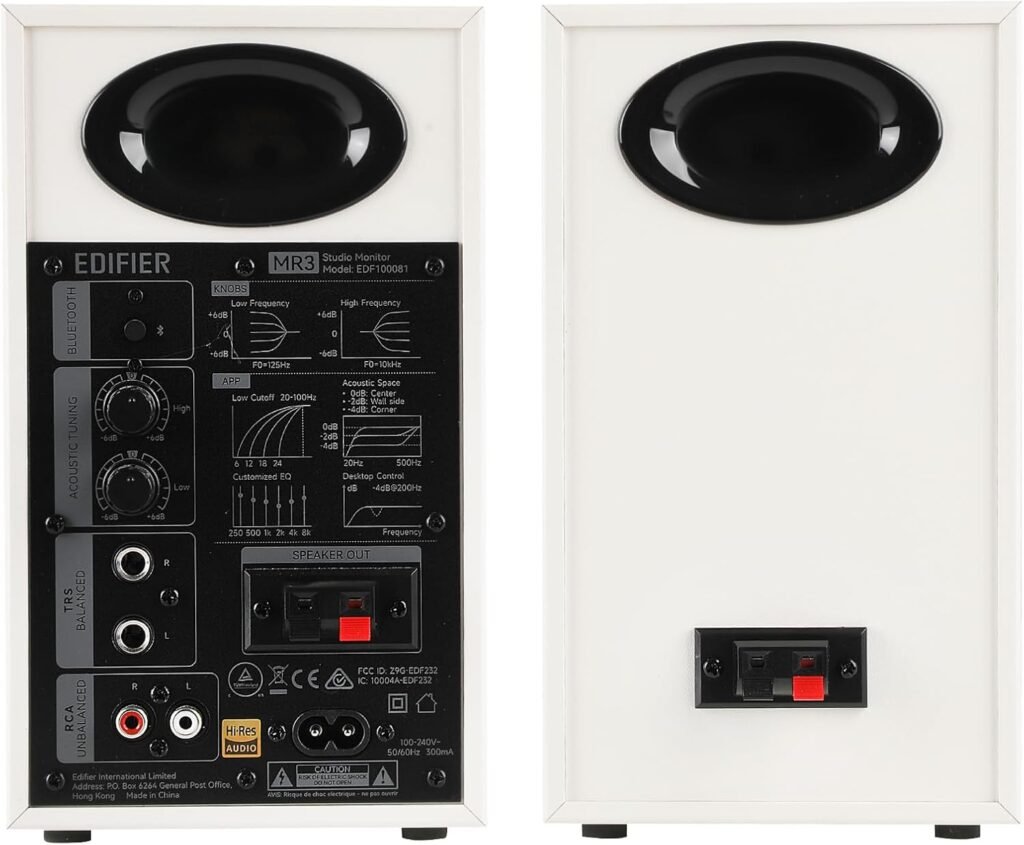
Sound Modes: Music, Monitor, and Custom
The Edifier MR3 is not locked into just one sound profile. We can switch between Music, Monitor, and Custom modes, and that flexibility is one of the more interesting aspects of these speakers.
Music Mode
Music mode is tailored for general listening enjoyment. In this mode, we tend to get:
- A slightly more engaging, possibly warmer sound
- A tuning that flatters a wide variety of genres
- A more “fun” presentation than strictly neutral monitors
We might use this mode for playlists, movies, casual gaming, or when friends come over and we just want everything to sound rich and satisfying.
Monitor Mode
Monitor mode is designed for precision and accuracy. This is the mode we use when:
- Mixing tracks
- Editing dialogue or sound for video
- Evaluating recordings or virtual instruments
In monitor mode, the speaker tuning shifts toward a more neutral, honest presentation. That can mean:
- Less exaggerated bass
- Tighter, more revealing mids
- Clearer picture of flaws in a mix
We may not find it as immediately flattering for casual listening, but it serves the purpose of helping our work translate better to other systems.
Custom Mode
Custom mode is where the EDIFIER ConneX app comes into play. This mode allows us to:
- Set our own EQ profile
- Adjust specific frequency bands
- Fine-tune the sound to our room, desk, or taste
If we find that our room eats up certain frequencies or our preference leans toward more low-end or more air in the treble, we can dial that in. This turns the MR3 into a flexible tool that matches both our ears and our environment.
EDIFIER ConneX App and EQ Control
The EDIFIER ConneX app elevates the MR3 from “set-and-forget” to “tune-and-tailor.” When we want deeper control, the app lets us:
- Switch between sound modes
- Make in-depth adjustments
- Apply personalized EQ control
We can treat this like a miniature “room correction and taste tuning” system. It gives us more control than many speakers in this price range, where we are often stuck with a single profile or just a simple bass/treble knob.
We might find ourselves using the app to:
- Pull back a slight high-frequency harshness if our room is very reflective
- Add a touch of warmth if we listen mostly at low volumes
- Optimize for spoken word clarity if we use the speakers heavily for voice editing or podcast work
We get the sense that these speakers are not locked into one identity; we can shape them into what we need them to be.
MDF Cabinet and Distortion Control
The choice of an MDF cabinet is not just an aesthetic consideration. MDF is widely used in serious loudspeaker construction because of its density and consistent structure.
For us, that translates into:
- Less cabinet resonance coloring the sound
- More controlled bass response
- Clearer midrange reproduction
This matters especially when we use the MR3 for audio production, video editing, and guitar playing, where we really want to hear what we are doing, not just what the box itself is adding.
When we play a guitar amp sim through the MR3 or monitor a vocal recording, the solidity of the cabinet helps preserve the integrity of the tone. We can trust that what we are hearing is closer to the truth of the signal.
Real-World Use Cases
The Edifier MR3 is clearly designed as a multi-role speaker. Instead of being locked into either “studio monitor” or “living room speaker,” it manages to work well in several contexts.
For Audio Production and Home Studio Work
In a small home studio, the MR3 can serve as:
- Primary monitors for beginners or intermediate creators
- Secondary reference speakers alongside a larger main pair
- Mobile or secondary station speakers for editing on the go
With monitor mode and balanced TRS inputs, we can connect these directly to our audio interface and get a reasonably flat, honest representation of our projects.
We benefit from:
- Detailed midrange for vocal and instrument work
- Controlled low-end that helps reveal masking issues
- The ability to switch to Custom mode when we want a slightly more pleasing tone for client playbacks
For Video Editing and Content Creation
If we are editing video, the MR3s give us:
- Clear dialogue reproduction
- Good separation of sound effects, music, and voices
- Enough volume to feel impact without resorting to headphones all day
We can cut YouTube videos, social media clips, or more serious film projects with enough accuracy to trust our level and EQ decisions.
For Guitar and Instrument Practice
Using the Edifier MR3 as playback monitors for:
- Software amp sims
- Digital pianos and keyboards
- Modelers and multi-effects units
is a genuine pleasure. The relatively flat response in monitor mode helps reveal the real tone of our instruments and patches, instead of hyping the bass or over-brightening the top end.
We can:
- Hear subtle differences between amp models and IRs
- Practice at realistic levels without destroying room acoustics
- Play along with backing tracks streamed over Bluetooth or fed through AUX
For Everyday Listening and Computer Use
On a day-to-day basis, the MR3s work well as high-quality computer speakers or bookshelf loudspeakers. We can:
- Stream music while working
- Watch movies and shows with clear dialogue and engaging sound
- Game with spacious stereo imaging and impactful effects
Music mode and Bluetooth support make them feel like premium consumer speakers when we want relaxation more than analysis.
Strengths and Weaknesses
No product is perfect, so it helps to look honestly at where the Edifier MR3 excels and where we might feel some trade-offs.
What We Love
- Hi-Res Audio Certified sound: Capable of serious detail and clarity.
- Multiple sound modes: Music, Monitor, and Custom give us flexibility for work and play.
- EDIFIER ConneX app: Personalized EQ offers more control than usual in this range.
- Rich connectivity: Balanced TRS, RCA, AUX, Bluetooth V5.4, and headphone out.
- Compact studio-friendly design: MDF cabinet, clean look, and manageable size for desks.
- Multi-point Bluetooth: Quickly switch between devices without unpairing.
These strengths make the MR3 a robust all-rounder for anyone who mixes productivity and entertainment on the same desk.
Potential Limitations
We should also be aware of a few natural limitations of this form factor and category:
- No subwoofer-level bass: The 3.5″ drivers handle low-end well for their size, but they cannot match a separate subwoofer.
- Nearfield focus: They are designed primarily for close-to-mid-distance listening, not to fill a huge open room.
- Accuracy vs. excitement: In monitor mode, the sound is more honest than hyped, which some listeners might find less “fun” if they prefer exaggerated bass.
For many of us, these are not deal-breakers, but it is good to set expectations clearly.
Comparing to Typical Computer Speakers and Studio Monitors
To understand where the MR3 really sits, we can mentally compare them to two familiar categories: regular computer speakers and full-blown studio monitors.
Versus Typical Computer Speakers
Compared to basic computer speakers, the MR3 gives us:
- Far better clarity and balance
- Wider frequency range and cleaner highs
- More connection options (balanced TRS, better Bluetooth, RCA, AUX)
- Real potential for production work and content creation
Where simple PC speakers are mostly about convenience and some bass impact, the MR3 is clearly designed as a proper listening and monitoring system with serious audio ambitions.
Versus Larger Studio Monitors
Compared to large 5″ or 7″ studio monitors, the MR3:
- Takes up less desk space
- Offers built-in Bluetooth and headphone output (often missing from pro monitors)
- Is easier to integrate into mixed-use setups (work, play, media)
However, larger studio monitors will still likely outperform the MR3 in:
- Deep bass extension
- Maximum SPL for larger rooms
- Soundstage size and headroom
We should think of the MR3 as an extremely capable small monitor that leans into versatility, rather than as a replacement for big studio mains.
Aesthetic and Room Integration
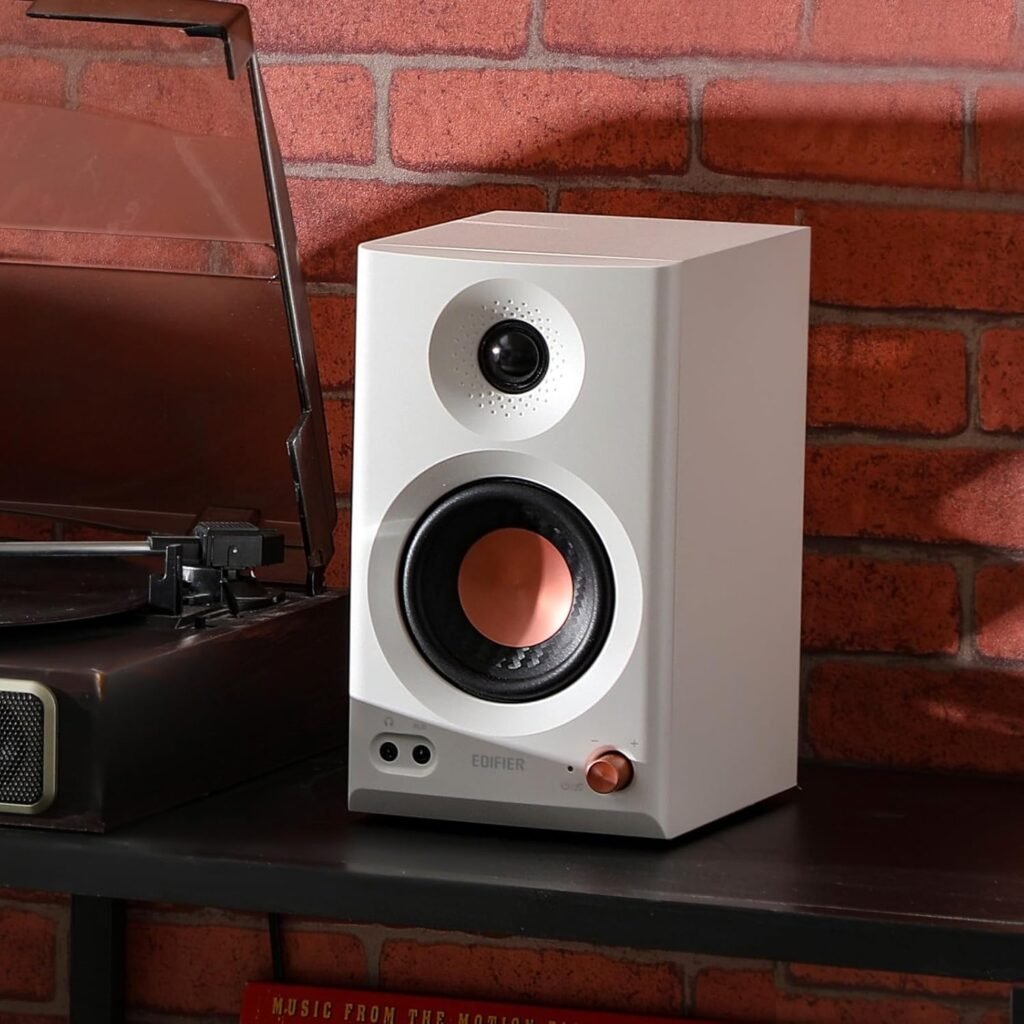
The white finish on the Edifier MR3 makes it visually stand out from the typical black box monitors. For many of us, aesthetics matter because our desk or studio is also our living space.
These speakers can match:
- White or light-wood desks
- Modern Mac-based setups
- Clean home office environments
Because they are not overly industrial-looking, we can place them in a living room or bedroom without them stealing all the attention. They blend in nicely while still giving us that “serious gear” satisfaction.
Daily Usability and Ergonomics
Beyond sound, we also care about how easy the speakers are to live with.
In daily use, we appreciate:
- Simple switching between inputs and modes
- Reliable Bluetooth pairing that does not constantly drop
- Physical stability on the desk thanks to the MDF build and weight
We can leave them powered on as our “always ready” audio hub for:
- Work calls
- Music streaming
- Media playback
With the headphone output and multiple connections, they quickly become a central piece of our desktop ecosystem rather than just an add-on.
Who the Edifier MR3 Is Best For
Putting everything together, we can narrow down the ideal users for the Edifier MR3 Powered Studio Monitor Speakers, Hi-Res Audio Certified Bluetooth V5.4 Active Bookshelf Loudspeakers, 2.0 Computer Speaker with Headphone Output RCA AUX Balanced TRS Input (White).
We think these will be especially good for:
- Home studio owners and aspiring producers who need accurate, compact nearfield monitors that double as daily listening speakers.
- Content creators, YouTubers, and video editors who want clear dialogue and honest sound without filling their desk with huge monitors.
- Guitarists and instrumentalists using digital rigs or amp sims, who want to hear their tones faithfully in a small room.
- Students and remote workers wanting a single high-quality pair of speakers for meetings, music, and light creation.
- Listeners who care about sound quality but also want Bluetooth and modern convenience in a neat, minimal package.
If we fall into any of these categories and our space is more desk than full studio, the MR3 lines up nicely with our needs.
Final Thoughts
The Edifier MR3 strikes us as a smart, well-balanced pair of powered speakers that respect both sides of our audio life: the serious, detail-driven work side and the relaxed, music-loving personal side.
We get:
- Hi-Res Audio Certified performance capable of genuine clarity and neutrality
- A solid MDF cabinet that controls distortion and keeps sound tight
- Multiple wired connections plus modern Bluetooth V5.4 with multi-point support
- Useful sound modes and a powerful app-based EQ for shaping the sound to our taste and room
Are they going to replace huge studio monitors in a treated control room? Probably not. But that is not what they are designed for. Instead, they serve as versatile, compact, powered studio monitor speakers that fit our desk, fit our workflow, and fit our everyday listening habits.
If we are looking for a pair of speakers that can confidently handle music creation, precise monitoring, gaming, video editing, and relaxed listening in one neat, attractive package, the Edifier MR3 makes a very compelling case for a spot on our desk.
Disclosure: As an Amazon Associate, I earn from qualifying purchases.