Have we ever wished our desktop speakers could sound like a full-size sound system without taking over our entire workspace?

Why We Were Curious About the Edifier M60
When we first came across the Edifier M60 Multimedia Speaker Bluetooth 5.3, 66W RMS, Hi-Res Audio & Hi-Res Wireless Audio, LDAC, 3″ Mid Bass & 1″ Tweeter, USB-C & Aux Inputs, Compact Desktop Speaker – Black, we were intrigued. On paper, it promised a lot: compact size, serious power, Hi-Res certification (both wired and wireless), LDAC support, thoughtful design, and user-friendly controls.
We wanted to know if this small desktop speaker set could realistically replace bulkier speakers for music, movies, and general computer use.
Design and Build Quality
We always pay attention to how speakers fit into our workspace, not just how they sound. The M60 is clearly designed to sit comfortably on a modern desk without looking out of place or overwhelming the setup.
Compact Size That Actually Fits on a Real Desk
We appreciate that the M60 is genuinely compact, not just “small for a speaker.”
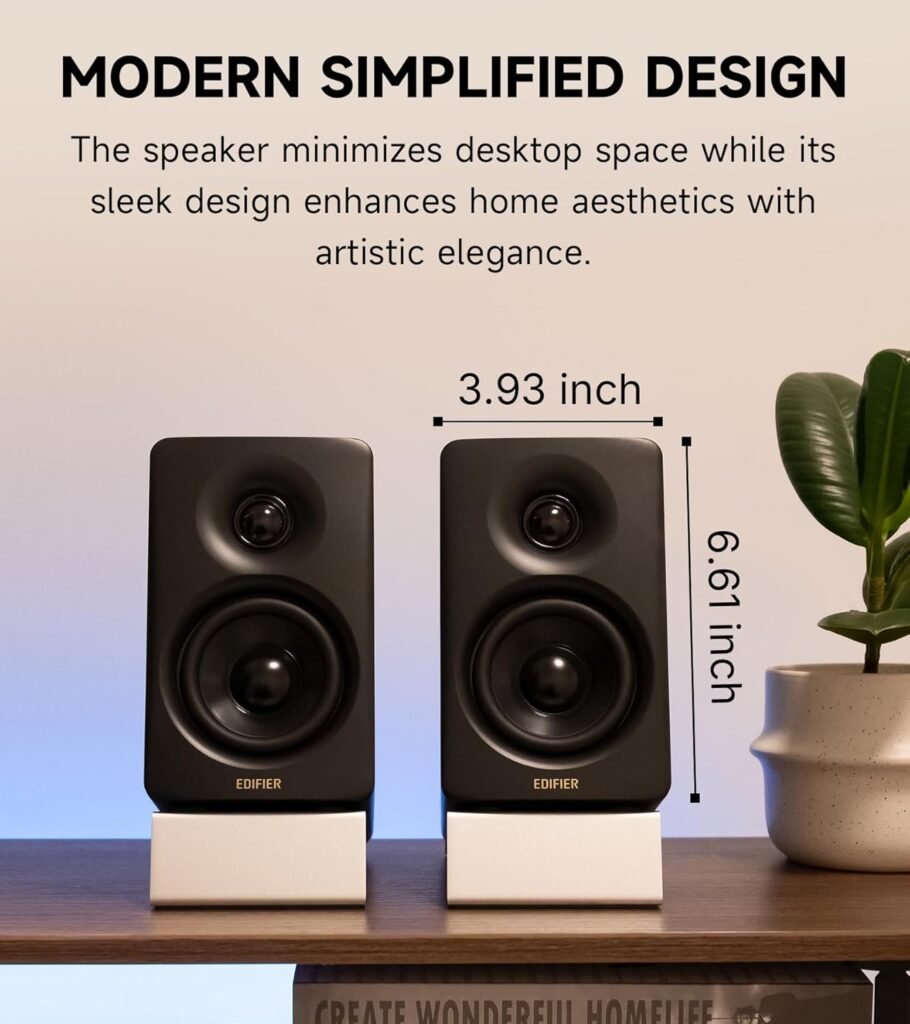
- Dimensions (per speaker): 100 mm (W) x 168 mm (H) x 147 mm (D)
That means each speaker is roughly similar in width and height to a common smartphone, just with a bit more depth. On a crowded desk with a keyboard, mouse, monitor, maybe a laptop and some notebooks, these speakers still fit comfortably without feeling like clutter.
We also like that this compact footprint doesn’t scream “tiny budget speakers.” Instead, it feels deliberate and refined.
Aesthetic and Finish
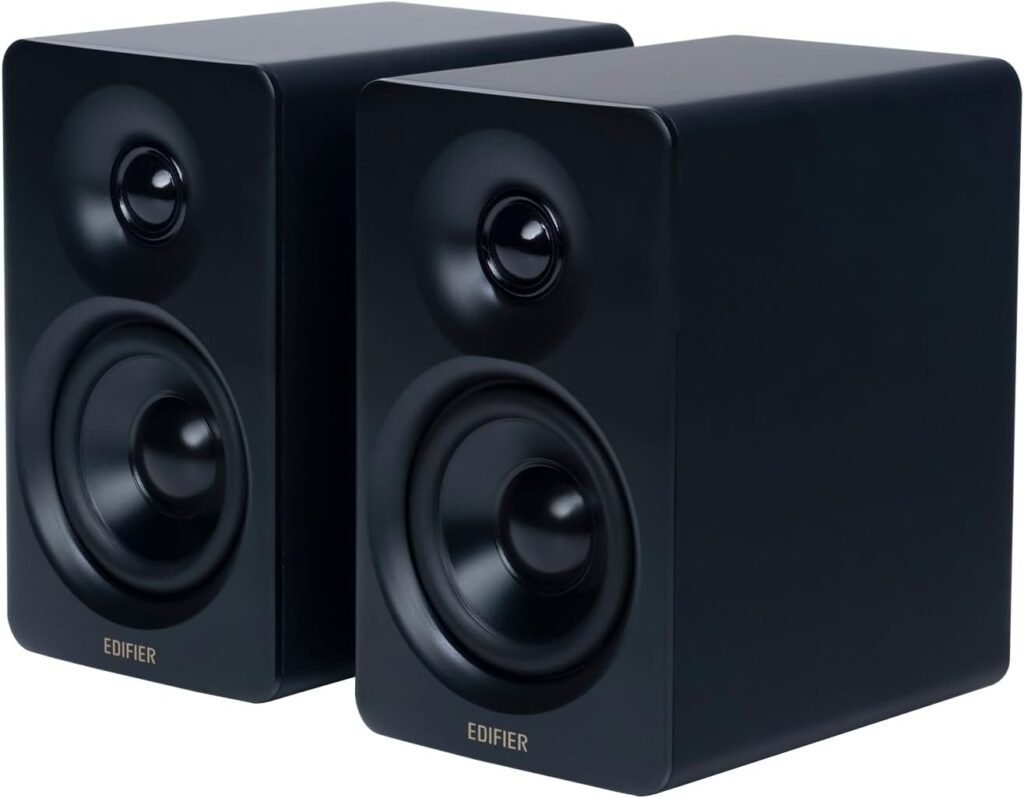
The black finish gives the M60 a clean, understated look. It blends well with gaming setups, minimalist offices, and studio-style desks alike. The design avoids flashy gimmicks and focuses on a modern, slightly premium vibe.
We notice the front baffle looks purposeful: you can clearly see the 1″ silk dome tweeter and the 3″ long-throw mid-bass driver, hinting that this isn’t just a cosmetic object but a serious audio device.
Aluminum Speaker Stands Included
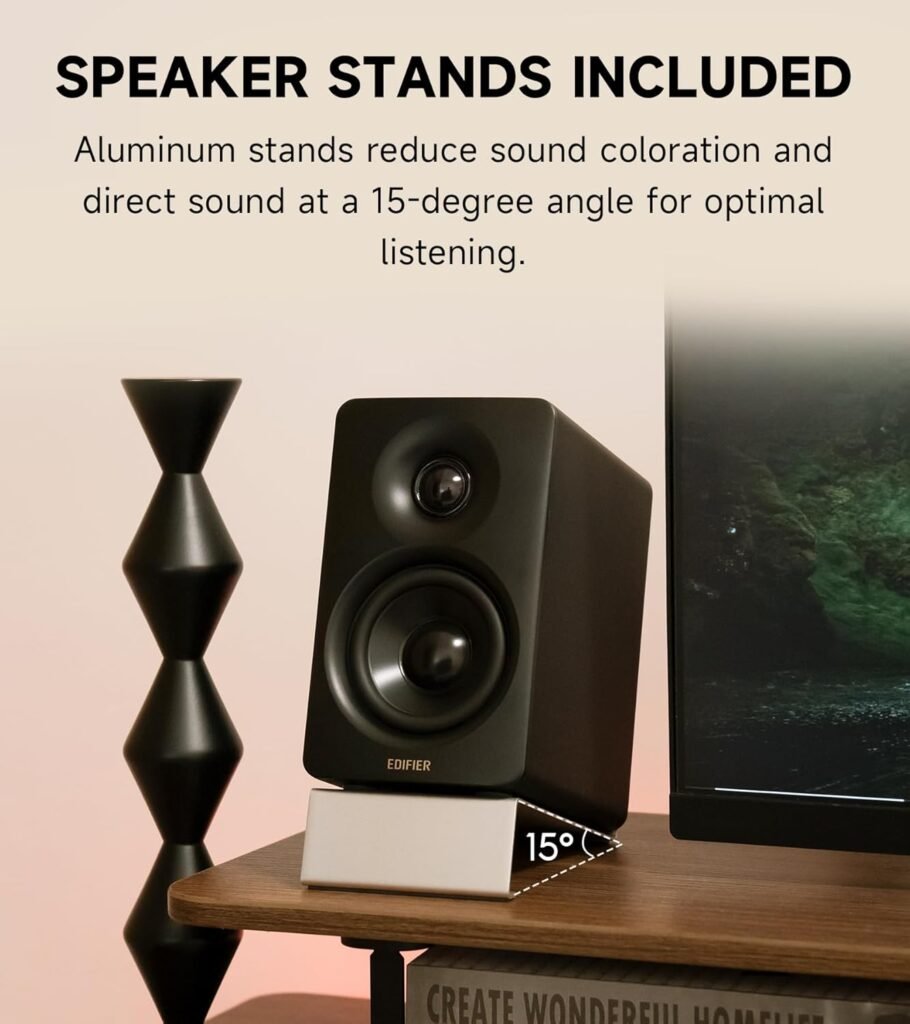
The inclusion of aluminum speaker stands at a 15-degree angle is a thoughtful touch we genuinely value. These are not just random accessories; they serve a real acoustic function.
- By angling the speakers upward, the stands direct the sound more accurately toward our ears when the speakers are placed on a desk.
- This helps reduce reflections off the desk surface and improves clarity, especially for mids and highs.
We find that many desktop speakers force us to buy separate stands or risers. With the M60, Edifier bundles what we actually need right in the box, which makes the overall setup more polished and ergonomic.

Sound Performance: Power, Clarity, and Balance
We were particularly interested in how much sound these compact enclosures could generate and whether they would maintain clarity at higher volumes.
66W RMS Output: Surprisingly Big Sound
The total output power of 66W RMS is substantial for a desktop speaker pair:
- Mid-low (per channel): 18W + 18W
- Treble (per channel): 15W + 15W
When we look at those numbers, we are essentially talking about a system that can comfortably fill a medium-sized room with sound, not just a small computer corner. We find this especially useful if we like to:
- Listen to music while working
- Watch movies or series from our PC
- Use the setup for casual console or PC gaming
Even at higher volumes, the system keeps its composure, largely thanks to the Class-D amplifier and DSP control managing the drivers intelligently.
Driver Configuration: 3″ Mid Bass & 1″ Silk Dome Tweeter
We find that the driver choice makes a big difference:
- 1″ silk dome tweeters tend to deliver smooth, natural highs without sounding harsh or piercing.
- 3″ long-throw aluminum diaphragm mid-low drivers manage to produce surprisingly punchy bass and a solid midrange considering their size.
This two-way design, combined with active crossover and DSP, helps separate frequencies so that vocals, instruments, and effects stay distinct instead of blending into a muddy mess.
We notice:
- Vocals sound clear and present
- Cymbals and high-frequency details are crisp but not fatiguing
- Bass is tight and controlled rather than boomy or bloated
High-Efficiency Class-D Amplification
Edifier uses a high-efficiency closed-loop Class-D amplifier in the M60. We like Class-D amps for:
- Lower heat output
- Better energy efficiency
- Higher power output from small enclosures
The closed-loop design and digital processing help maintain consistent sound quality at different volumes, which means less distortion when we push the speakers a bit.
Hi-Res Audio and DSP: What That Means for Us
We sometimes see “Hi-Res Audio” as a buzzword, so we always ask what it translates to in actual listening.
Hi-Res Audio Certification (Wired and Wireless)
The M60 is Hi-Res Audio certified not only for wired connections but also for wireless playback, which is relatively rare at this price and size.
- Wired Hi-Res: When connected via USB-C, we can send high-resolution audio to the speakers and let the internal digital processing and amplification handle the rest.
- Wireless Hi-Res: With LDAC over Bluetooth, we can stream at up to 24-bit/96kHz, which is significantly better than standard Bluetooth SBC or even many other codecs.
We notice that when we feed the M60 high-quality audio, it rewards us with:
- More detail in the mids and highs
- Sharper imaging of instruments
- A greater sense of depth and space in our music
Full Digital Processing and Built-In DSP
The M60 uses full digital audio processing with a built-in DSP (Digital Signal Processor). We see several advantages here:
- Two-way active crossover: The DSP precisely splits frequencies between the tweeter and mid-bass driver, improving clarity.
- Dynamic range control: The system can prevent sudden peaks from distorting or damaging the drivers.
- Consistent tuning: We get a carefully tuned sound profile that maintains balance regardless of content.
In practice, we experience:
- Tighter bass control, especially at higher volumes
- Less risk of distortion on dynamic tracks or movie soundtracks
- A more “finished” sound, as if the system has already been tuned by an engineer for real-world listening
Connectivity Options: Flexible for Different Setups
We love when a compact speaker set offers multiple ways to connect. The Edifier M60 does a strong job here.
Bluetooth 5.3 with LDAC Support
The Bluetooth 5.3 receiver inside the M60 supports the LDAC codec, which is key for high-resolution wireless audio.
- Maximum bitrate: up to 990 kbps
- Supported audio quality: up to 24-bit/96kHz
- Requirement: Android devices running version 8.0 or later for full LDAC functionality
With Bluetooth 5.3, we get:
- Lower latency
- Improved stability
- Better power efficiency on the source device
We appreciate that we can stream from smartphones, tablets, and laptops without needing a cable and still maintain high fidelity, especially if our device supports LDAC.
USB-C Input
Including a USB-C input adds a lot of convenience:
- We can connect directly to a computer or laptop.
- The audio signal stays digital until it reaches the speakers, where Edifier’s processing and amplification take over.
This creates a clean signal path and eliminates the need for a separate external DAC for many users. For a simple and effective desktop setup, USB-C is a great option.
AUX (3.5 mm) Input
We still like having a 3.5 mm AUX input, especially for:
- Older laptops or desktops
- Game consoles or handhelds
- Audio players without USB output
The AUX input won’t provide Hi-Res digital advantages like USB-C or LDAC, but it adds flexibility and compatibility, which we appreciate when juggling multiple devices.
Controls and User Experience
We find that the way we interact with speakers day-to-day matters almost as much as how they sound.
Cap-Sensitive Touch Panel
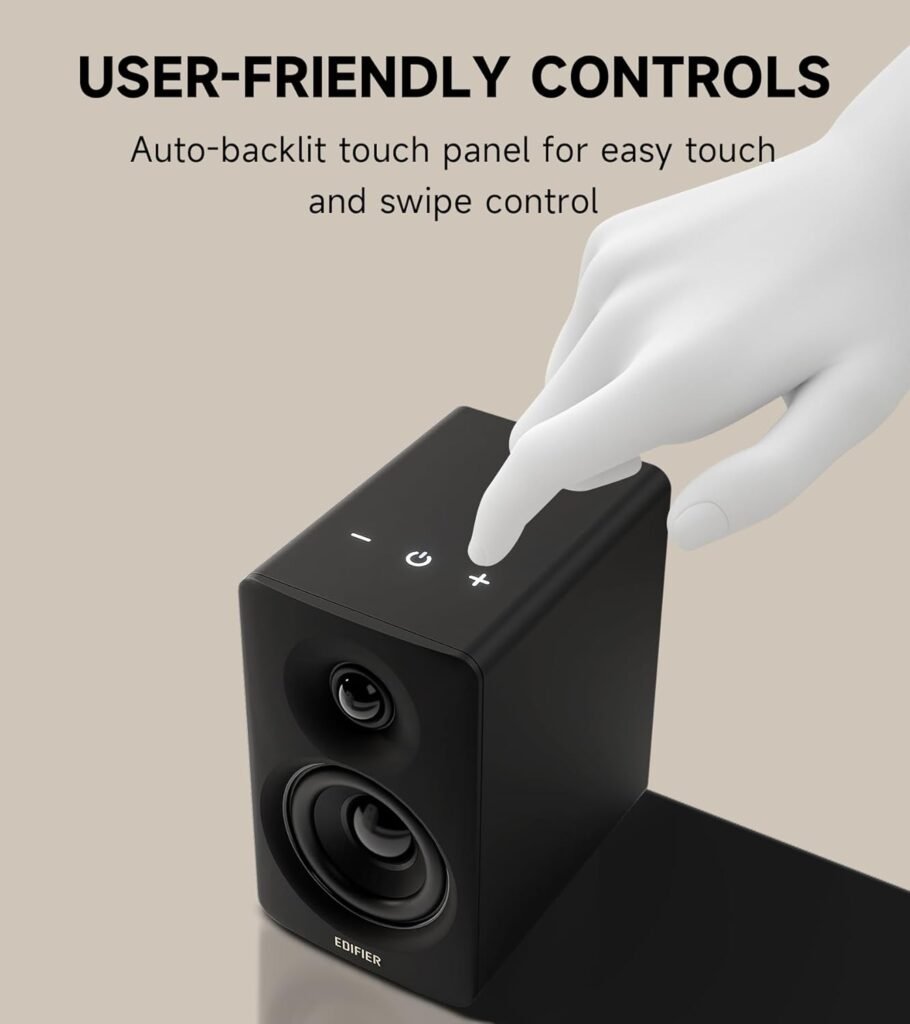
The M60 includes a cap-sensitive touch panel that feels modern and intuitive. What stands out for us is the automatic backlight:
- As our hand approaches, the backlight turns on.
- When we move away, it turns off on its own.
This small detail makes the speakers feel more premium and user-friendly. We can adjust volume or controls without fumbling in the dark or relying on clunky buttons.
We also like that this creates a clean, smooth surface, enhancing the overall design of the speakers instead of cluttering them with knobs.
EDIFIER ConneX Mobile App
Edifier supports the M60 with the EDIFIER ConneX app, which adds extra functionality:
- We can adjust various settings from our phone.
- We may access sound modes, EQ presets, and firmware updates (depending on app and region features).
We appreciate app control because:
- It lets us fine-tune the sound profile to our preferences.
- It makes controlling the speaker easier from across the room.
When we want a bit more bass for gaming or a more neutral profile for work, having app control gives us that flexibility.
Desktop Usage and Everyday Scenarios
We always like to imagine how a speaker system fits into our real daily life. The M60 feels well tailored to several common scenarios.
For Music Listening
When using streaming services or local high-resolution files, we notice:
- Clear separation of instruments
- Smooth treble from the silk dome tweeters
- Solid midrange presence for vocals and acoustic instruments
- Tight, punchy bass that doesn’t overwhelm
The 66W RMS allows us to listen at comfortable levels with plenty of headroom. We can also turn up the volume for more energetic listening without immediate distortion or harshness.
For Movies and TV Shows
Audio from movies and TV can be demanding, with big dynamic swings and layered sound effects. The M60 handles this well:
- Dialog remains intelligible and centered.
- Effects and background music feel immersive for a desktop environment.
- Bass impact is satisfying for the size, though we should not expect subwoofer-level rumble.
For users watching a lot of content on a PC or using the speakers with a small display, this system adds a lot of cinematic character compared to basic built-in monitor speakers.
For Gaming
We find that gamers benefit from this kind of setup too:
- Accurate imaging helps with positional audio cues.
- Explosions, soundtracks, and ambient effects gain weight and atmosphere.
- Wireless connectivity from certain devices is convenient, but wired inputs typically provide the lowest latency for serious gaming.
When combined with the angled aluminum stands, the M60 naturally points sound toward our ears, making in-game audio more precise.
For Work and Study
We also think of these as great companions for productivity:
- Background music feels rich and balanced without fatigue.
- Video calls and online meetings gain clearer voices and better presence.
- The compact size avoids taking too much desk space, and the tidy design enhances a professional workspace.
We can switch seamlessly between Bluetooth from our phone and USB-C from our laptop, depending on how we like to work.
Technical Specifications Summary
We find it helpful to break core details into a quick-reference format for clarity.
| Feature | Specification / Detail |
|---|---|
| Product Name | Edifier M60 Multimedia Speaker – Black |
| Total Output Power | 66W RMS (18W + 18W mid-low, 15W + 15W treble) |
| Amplifier Type | High-efficiency closed-loop Class-D audio amplifier |
| Drivers | 3″ long-throw aluminum diaphragm mid-low drivers; 1″ silk dome tweeters |
| Dimensions (per speaker) | 100 mm (W) x 168 mm (H) x 147 mm (D) |
| Audio Processing | Full digital processing with built-in DSP, two-way active crossover, dynamic control |
| Hi-Res Audio | Yes – certified for both wired and wireless |
| Wireless Connectivity | Bluetooth 5.3 |
| Wireless Codec | LDAC (up to 990 kbps, up to 24-bit/96 kHz, Android 8.0 or later required) |
| Wired Inputs | USB-C, AUX (3.5 mm) |
| Controls | Cap-sensitive touch panel with automatic backlight |
| App Support | EDIFIER ConneX mobile app for extended functions |
| Included Accessories | Pair of aluminum speaker stands (15° angle) |
| Recommended Use | Desktop audio, music listening, movies, gaming, work and study |
We like to see that Edifier packed this many modern features into a compact footprint while still providing enough power and driver quality to justify the Hi-Res claims.
Setup and Installation Experience
We find the setup process straightforward and beginner-friendly.
Physical Placement
We recommend:
- Placing the speakers on the included 15-degree angled stands.
- Positioning them at roughly ear height when seated.
- Keeping them at an equal distance from where we sit for balanced stereo imaging.
Because the footprint is small, we can fit them on narrow desks or in tight office setups with relative ease.
Connecting Devices
We typically follow this order of setup:
-
USB-C Connection
- Plug the speakers into our computer using the USB-C cable.
- Select the M60 as the audio output device on our operating system.
- Enjoy full digital audio with minimal fuss.
-
Bluetooth Pairing
- Activate Bluetooth pairing on the M60 (following the quickstart steps from the manual).
- Find and select the M60 from our phone, tablet, or laptop’s Bluetooth list.
- Confirm that LDAC is enabled on Android devices for best wireless quality.
-
AUX Input
- Connect any analog device via a 3.5 mm cable.
- Switch the speakers to the corresponding input mode.
We appreciate that once we complete the initial setup, switching between inputs is quick and we do not have to constantly reconfigure devices.
Strengths and Benefits We Notice
We think the Edifier M60 stands out in several key areas that matter for everyday use.
Compact, Stylish, and Desk-Friendly
The M60 strikes a smart balance:
- It is small enough to fit on almost any desk.
- It still looks and feels more premium than typical budget speakers.
- The aluminum stands add both style and acoustic improvements.
For those of us who value aesthetics and organization in our workspace, this is a noticeable advantage.
Strong Performance for the Size
We are impressed that a 66W RMS system fits into such compact cabinets. Combined with the silk dome tweeters and aluminum mid-bass drivers, the M60 feels like a carefully engineered mini system instead of a random “desktop gadget.”
We find the sound:
- Clear
- Controlled
- Powerful enough for near-field listening and even small-room playback
Modern Connectivity and Hi-Res Support
Offering Bluetooth 5.3 with LDAC, USB-C, and AUX in one unit gives us a lot of flexibility. Support for Hi-Res Audio, both wired and wireless, shows that Edifier targets users who care about audio quality, not just convenience.
This combination is ideal if we stream high-quality music, use lossless services, or maintain a local library of high-resolution tracks.
User-Friendly Touch Controls and App
We enjoy using the cap-sensitive touch panel every day. It is easy to adjust volume or controls quickly without fumbling with mechanical knobs. The automatic backlight is both helpful and satisfying to use.
The EDIFIER ConneX app expands control, enabling us to adjust settings directly from our phone, which is particularly convenient when we are away from the desk or sitting back watching media.
Considerations and Limitations
No product is perfect for everyone, and we think it helps to consider where the M60 might not be ideal.
Bass Depth vs. Subwoofer Systems
Even though the M60 produces impressive bass for its size, it still uses 3″ mid-bass drivers. This means:
- Bass is punchy and controlled.
- Deep sub-bass (the kind you feel more than hear) is naturally limited.
If we want chest-thumping, room-shaking low frequencies for movies or heavy bass music, we may still prefer a separate 2.1 system with a dedicated subwoofer. For balanced, accurate near-field listening, however, the M60 does a very respectable job.
Audiophile-Level Customization
The M60 focuses on delivering a well-tuned sound out of the box with some additional control via the ConneX app. However:
- It is not a fully modular audiophile system with external DACs, separate amps, and passive speakers.
- If we are the type who likes to mix and match components at a granular level, the all-in-one approach might feel limiting.
For most users who want a smart, compact, and powerful desktop setup, the integration is an advantage rather than a drawback.
Dependent on Device Support for LDAC
To get full benefit from Hi-Res Wireless via LDAC:
- We need an Android device running version 8.0 or later with LDAC support enabled.
- Apple devices, for example, do not use LDAC, so they will rely on other Bluetooth codecs.
We can still enjoy good wireless sound from non-LDAC devices, but the full specification is best realized with compatible Android hardware.
Who We Think the Edifier M60 Is Perfect For
We see the Edifier M60 as a strong choice for several types of users.
Desktop and Home Office Users
If we spend a lot of time at our desk for work or study, these speakers are a major upgrade over built-in laptop or monitor audio. We gain:
- Richer music playback during work sessions
- Clearer calls and video conferencing
- A more pleasant and immersive environment overall
Casual Audiophiles and Music Lovers
If we appreciate good audio and like to use streaming services with high-resolution options or local FLAC files, the M60 aligns well with those interests:
- Hi-Res support (wired and wireless with LDAC)
- Digital processing with DSP and active crossover
- Clean, detailed soundstage for near-field listening
We can enjoy real improvements in clarity and nuance without needing a large stereo setup.
Gamers and Movie Fans on PC or Small Displays
For gaming and movies on a desk-based setup:
- The 66W RMS output offers a cinematic feel in a relatively confined space.
- Sound effects and positional audio become more engaging.
- Voices stay intelligible, and music gains presence.
We might not replace a full living-room surround system, but for a desktop rig, this is a substantial improvement.
Our Overall Verdict on the Edifier M60
After considering the design, features, and performance, we see the Edifier M60 Multimedia Speaker Bluetooth 5.3, 66W RMS, Hi-Res Audio & Hi-Res Wireless Audio, LDAC, 3″ Mid Bass & 1″ Tweeter, USB-C & Aux Inputs, Compact Desktop Speaker – Black as a very compelling package for desktop audio.
We appreciate:
- The compact size that still houses serious power with 66W RMS.
- The balanced two-way design with 3″ mid-bass drivers and 1″ silk dome tweeters.
- The Hi-Res wired and wireless capabilities, especially LDAC support over Bluetooth 5.3.
- The USB-C and AUX inputs that make connectivity flexible and straightforward.
- The cap-sensitive touch panel and EDIFIER ConneX app, which make everyday use smooth and intuitive.
- The bundled aluminum speaker stands that improve both ergonomics and sound.
We think the M60 is ideal for anyone who wants their desktop speakers to sound like a real audio system, not just a basic add-on. While those of us seeking earth-shaking sub-bass might still prefer a 2.1 setup, the M60 targets clarity, balance, and high-resolution detail—and delivers all of that in a small, desk-friendly form.
For a clean, powerful, and modern desktop audio solution that respects both our ears and our workspace, the Edifier M60 stands out as a strong and well-rounded choice.
Disclosure: As an Amazon Associate, I earn from qualifying purchases.